The Home Office Setup That Doesn't Look Like Everyone Else's — 11 Picks Under $150
You've seen the same eleven products on the same white desk fifty times. Here's the version with taste — eleven upgrades under $150, battle-tested from the desk I run three businesses out of.
Heads up: some links below are affiliate links. If you buy through them, we earn a small commission at no extra cost to you. We only list gear we’d actually put on our own desk — and most of this is on it right now.
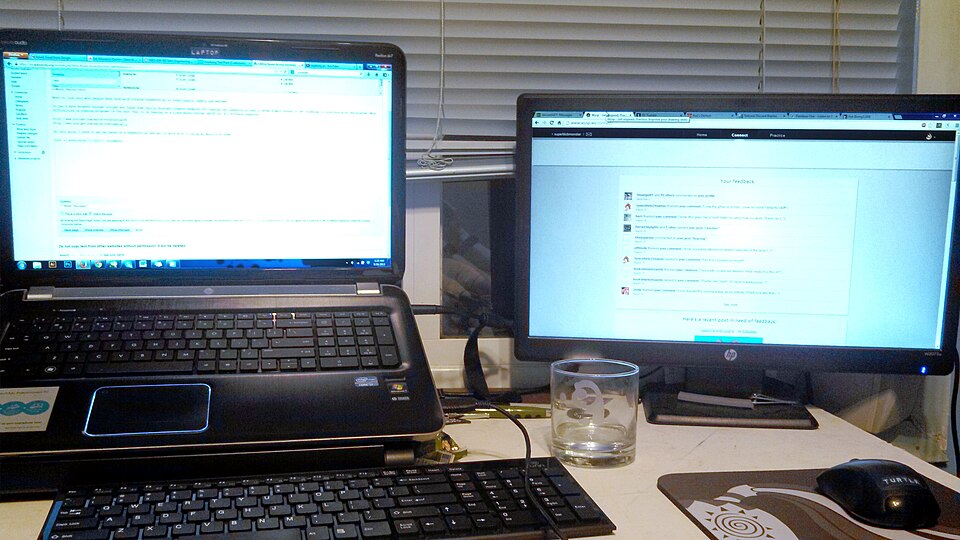
Desk setup: SuperBlobMonster / Wikimedia Commons, CC BY-SA 3.0.

Open any “best desk accessories” post and you already know what’s coming. The same eleven products. The same blinding white desk. The same product shots lifted from the same Amazon listings, arranged by someone who has clearly never run anything more demanding than a Pinterest board off that desk.
I’m not going to do that to you.
This is the desk I actually run three businesses from — Ctrl Alt Orion, plus Hilley Rocks (crystal resale) and my dad’s record collection turned vinyl side-hustle. Photo studio, shipping station, dev machine, and customer-service hub, all on one surface. So when I tell you something earns its spot, it’s because it survived that, not because it ranked first in a search.
Every pick is under $150. The whole point is a desk that reads as intentional — not gamer-RGB, not beige-corporate, just deliberate. Here’s the rule that ties it together:
Hide the wires. Light your face. Float the screen. Everything else is comfort.
Let me group these the way you’d actually buy them.
The three that change the room
If you only touch three things, touch these. They do more for how a desk reads than anything else on the list.
1. BenQ ScreenBar — monitor light bar (~$109)
The single biggest “oh, that looks professional” upgrade for the money. It clamps to the top of your monitor, takes up zero desk space, lights your face and your keyboard instead of your screen, and auto-dims to the room. On a video call, the difference between you and the person lit by their ceiling fixture is embarrassing — in your favor.
This is the one nobody has and everybody who gets it won’t shut up about. → Check price on Amazon
2. Ergotron LX monitor arm (~$75)
Get your monitor off the wobbly plastic stand it shipped with and float it. Suddenly there’s clean desk under the screen, the height is actually right for your neck, and the whole setup stops looking like a temporary arrangement. Holds up to 34” / 25 lbs (BTOD).
It’s the cheapest way to make a desk look like a workspace instead of a homework station. → Check price on Amazon
3. A full-desk mat (~$20–35)
The cheapest “looks designed” trick that exists. A large mat that spans the whole desk visually unifies the chaos — keyboard, mouse, notebook, coffee — into one intentional surface instead of a scatter of objects on bare laminate. Twenty bucks, instant cohesion (BTOD). → Check price on Amazon
The clutter killers
This is where the “doesn’t look like everyone else’s” promise actually gets delivered. Anyone can buy nice gear. Hiding the wires is what separates a real setup from a tech graveyard.
4. Anker 10-in-1 USB-C hub / monitor-stand combo (~$60–80)
One cable to the laptop, everything else plugged into a hub that doubles as a riser. Your desk stops looking like the back of a server rack. This is the unglamorous pick that does the most invisible work. → Check price on Amazon
5. Under-desk cable management tray (~$10–50)
The single most under-appreciated upgrade on this list. Route the power strip and the wire-nest under the desk, out of sight, and the whole thing transforms. Nobody photographs the cable tray. Everybody notices its absence. → Check price on Amazon
6. Anker 3-in-1 MagSafe charging cube (~$90–100)
Phone, watch, and earbuds charging off one tidy cube. Three cables become zero, and the corner of the desk that used to be a charging-cable spaghetti junction becomes a single deliberate object. → Check price on Amazon
The feel upgrades
None of these change how the desk looks much. They change how it feels to sit there for eight hours, which — if this is where you actually work — matters more than you’d think.
7. Keychron K2 wireless mechanical keyboard (~$50–80)
The anti-mush pick. After years on a flat membrane keyboard, typing on this feels like the difference between a rental car and your own. Compact, wireless, switches between Mac and Windows. Sounds and feels deliberate. → Check price on Amazon
8. BenQ ScreenBar Plus — light bar with desktop dial (~$120)
Same magic as the ScreenBar, but with a physical brightness/temperature dial that sits on the desk. If you adjust your lighting a lot — say, because you also shoot product photos of crystals and vinyl on the same desk — the dial earns the upgrade. → Check price on Amazon
9. White noise machine (~$25–45)
The sleeper pick, and a genuinely first-hand one. When part of your operation runs out of a garage with thin walls and you’re taking customer calls between shipping batches, a small white-noise machine is the difference between “home office” and “audibly home.” Nobody puts this on a desk-gear list. They should (BTOD). → Check price on Amazon
10. Under-desk footrest (~$30–50)
Nobody buys this. Everybody who has one swears by it. If your chair’s a little too tall or your back’s a little too tired by 3pm, a footrest fixes a problem you didn’t know was costing you. Quiet hero. → Check price on Amazon
11. Coffee mug warmer (~$25–35)
The tiny-luxury closer. Under $35, and it signals — to you, mostly — that this is a real workspace you take seriously. Hot coffee from 9 to noon without the four trips to the microwave. It punches absurdly above its price (Bob Vila). → Check price on Amazon
What to skip
Since I’m being honest about what’s on the desk, here’s what I deliberately left off — the stuff the genre keeps pushing that doesn’t earn its keep:
- Another RGB light strip. If you want your desk to look intentional, more colored light is the opposite of that. The ScreenBar lights your face; the rainbow strip lights your wall for nobody.
- A giant ultrawide you can’t really afford. A floated, well-lit standard monitor beats a budget ultrawide on a stock stand every time. Spend the difference on the arm and the light.
- A second “productivity gadget” that does what your phone already does. The desk doesn’t need a smart display reminding you of the calendar you already check forty times a day.
- Matching everything to one aesthetic. A desk that’s too coordinated reads as a showroom, not a workspace. A little real use is part of the look.
The payoff
A desk that looks intentional makes you work like the work matters. That’s not woo — it’s just that clutter is friction, and friction is the thing standing between you and actually starting.
You don’t need all eleven. Start with the three that change the room — light bar, monitor arm, desk mat — for well under $150 combined. Hide the wires next. Add the feel upgrades when a paycheck allows.
And if dialing in the desk gets you thinking about dialing in the actual operation you run from it — the inventory, the multi-channel selling, the website that’s supposed to be doing the selling — that’s the part we’re genuinely good at over at Ctrl Alt Orion.
A good desk won’t run the business for you. But it’ll stop quietly making it harder.
Sources
- BenQ ScreenBar — Amazon listing — confirms ASIN B076VNFZJG, ~$109.
- BenQ ScreenBar Plus — Amazon listing — confirms ASIN B07DP7RYXV, ~$120.
- camelcamelcamel — BenQ ScreenBar price history — defensible typical price; spot fake “deals.”
- Anker USB-C Hub 10-in-1 Monitor Stand — Amazon listing — confirms ASIN B0CW9HQDBR.
- BTOD — Desk Accessories That Will Upgrade Your Setup — independent ergonomics retailer; backs the Ergotron LX and light-bar picks.
- BTOD — Best Desk Gadgets Under $50 — supports the sub-$50 picks (mat, cable mgmt, mug warmer, white noise).
- TechRadar — Home office finds under $50 — corroborates the budget category picks.
- Bob Vila — Best Home Office Gifts — corroborates the “unique, not generic” framing.
Pricing flagged approximate throughout — re-verify at publish; Amazon prices move daily. Per-product imagery is All-Rights-Reserved (Amazon/manufacturer) — use SiteStripe compliant embeds at publish, not stored copies. Hero: SuperBlobMonster / Wikimedia Commons, CC BY-SA 3.0 (placeholder pending an original desk photo).