
Yes, you can automate invoices end-to-end today, and for most U.S. small businesses, the fastest next step is one of three paths: drop an Excel or Google Sheets template with a Zapier connector into your existing workflow for recurring runs (live in a day or two), spin up a SaaS invoicing pilot in a week or two, or commission a custom automation build if your billing logic is complex enough that off-the-shelf tools keep breaking. Each path has a real cost-to-benefit profile, and choosing the wrong one wastes months.
The core insight: Invoice automation is not a software purchase. It is an operational system that connects your CRM, billing rules, accounting ledger, and payment gateway. Buy or build accordingly.
Manual invoicing costs U.S. businesses far more than the time to type a PDF. Automated invoice processing eliminates the capture, keying, and approval bottlenecks that inflate days sales outstanding (DSO) and drain finance team hours. The quick-win path takes one to two days. A SaaS pilot runs two to four weeks. A custom build for complex rules typically lands in six to twelve weeks, depending on integration depth.
Table of Contents
- How does automated invoice processing work, step by step?
- What does invoice automation save, and how do you calculate ROI?
- What features should you evaluate in an invoice automation approach?
- Which solution type fits your business?
- How do you implement invoice automation? A practical plan with timelines
- What are the technical integration and security requirements?
- What are the most common pitfalls in invoice automation projects?
- When does a custom invoice automation make sense, and what does Ctrlaltorion deliver?
- Key Takeaways
- The gap between what automation promises and what actually matters
- Ctrlaltorion builds invoice automation that fits your actual billing logic
How does automated invoice processing work, step by step?
The standard workflow follows a clear sequence. Each step can be automated to varying degrees, and knowing where human review stays in the loop is what separates a working system from a fragile one.
- Send: The approved invoice goes out via email, a client portal, or EDI. Template-based generation lets you build the invoice design once and feed it a CSV or API payload to produce hundreds of on-brand invoices in a single run.
Where human review stays: Milestone billing tied to client sign-off, disputed line items, invoices with non-standard contract terms, and any payment that does not match within a defined tolerance.
Pro Tip: Before you automate a single step, map your current exception rate. If a significant portion of your invoices requires manual intervention, fix the upstream data problem first. Automating a broken process just makes the errors arrive faster.
What does invoice automation save, and how do you calculate ROI?
The business case for automating invoices rests on four measurable levers: labor cost per invoice, error-driven rework, DSO reduction, and late-payment losses.
Primary benefits:
- Time saved: — Manual invoice processing typically consumes significant finance team hours per week, hours that compound across billing cycles.
- Faster collections: Automated reminders and embedded payment links accelerate the payment cycle. AR automation platforms that handle reminders, reconciliation, and collections escalation reduce manual AR workload without constant team intervention.
Metrics to track from day one: cost-per-invoice (total AP/AR labor cost divided by invoice volume), DSO (average days from invoice send to payment received), invoice cycle time (creation to send), error rate (invoices requiring correction or reprocessing), and automation coverage percentage (invoices processed without human touch).
A simple ROI example: Suppose your team processes a typical volume of invoices per month at a loaded cost per invoice (labor, rework, postage). A SaaS or custom automation reduces the cost per invoice significantly, leading to substantial monthly savings. If the tool or build costs a notable upfront amount, breakeven occurs within several months, before counting DSO improvement. Reducing DSO by several days on a sizable monthly accounts receivable balance can free up significant working capital annually. The math is not subtle.
Stat to know: NetSuite’s invoice automation guide identifies cost-per-invoice reduction and DSO improvement as the two primary financial drivers that justify automation projects for mid-market and SMB finance teams.
What features should you evaluate in an invoice automation approach?
Not every feature matters equally. Prioritize ruthlessly, especially if you are scoping a custom build or evaluating SaaS tools on a tight timeline.
Must-have features:
- OCR and AI data capture: Accurate extraction from PDFs, scanned documents, and email attachments. Ask vendors for their extraction accuracy rate on your document types, not their marketing average.
- Workflow and approvals engine: Configurable routing rules, threshold-based auto-approval, and an audit trail for every approval decision. Without this, you have automation without governance.
- Reconciliation: Automatic payment matching against open invoices, with clear flagging for discrepancies. Manual reconciliation is where hours disappear.
- Payment integration: Native connections to ACH, card processors, or your bank. Payment links embedded in invoices measurably reduce time-to-pay.
- Immutable audit trail: Every status change, approval, and edit logged with a timestamp and user ID. Non-negotiable for tax compliance and dispute resolution.
Nice-to-have features:
- AI contract parsing that extracts billing schedules from signed agreements
- Self-serve client portal for invoice viewing, payment, and dispute submission
- CRM and proposal integration so invoices pull client context automatically, reducing retyping and improving follow-up quality
Scalability concerns to probe early: multi-currency support (critical if you bill international clients), multi-entity consolidation (if you run more than one legal entity), and volume pricing (some SaaS tools get expensive fast above a few hundred invoices per month).
Questions to ask in any vendor demo or custom build scoping call: What are your API rate limits and error-handling behaviors? What is your SLA for extraction accuracy on non-standard PDFs? How do you handle partial payments and credit memos? What does a rollback cost if we need to reverse a batch run?
Which solution type fits your business?
The right solution depends on your invoice volume, billing complexity, integration requirements, and tolerance for vendor dependency. Here is a direct decision matrix.
| Business Profile | Recommended Solution | Speed to Value | Control | Vendor Lock-in Risk |
|---|---|---|---|---|
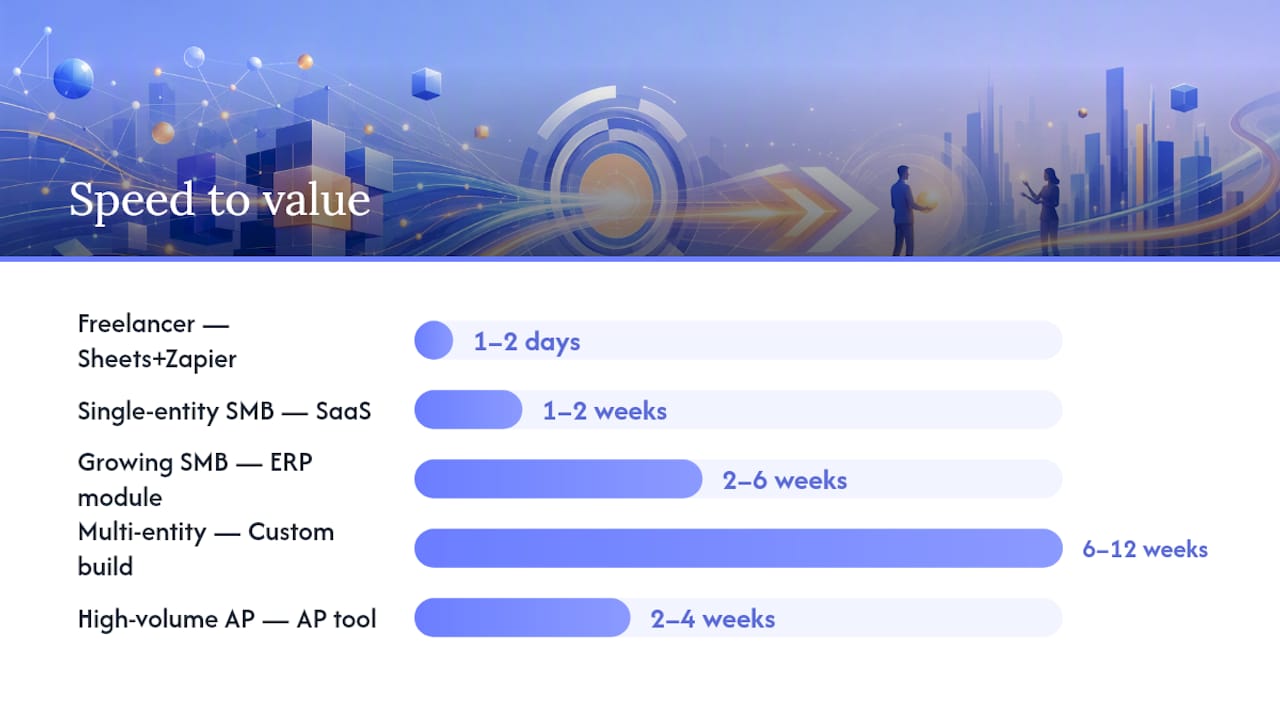
| Freelancer or micro-business, simple recurring invoices | Excel/Sheets template + Zapier connector | 1–2 days | High | None |
| Single-entity SMB, standard billing, low volume | SaaS invoicing tool (e.g., subscription billing platform) | 1–2 weeks | Medium | Medium |
| Growing SMB, moderate complexity, ERP already in place | ERP invoicing module (native or add-on) | 2–6 weeks | Medium | High (ERP vendor) |
| Multi-entity, milestone billing, legacy systems, unique rules | Custom automation build | 6–12 weeks | Very high | None (you own the code) |
| High-volume AP team, multi-vendor, PO matching required | AP automation platform | 2–4 weeks | Medium | Medium–High |
When SaaS is the right call: You have standard billing cycles, a single legal entity, and your accounting software already has a native integration. The off-the-shelf tool covers 90% of your cases and the 10% of exceptions you can handle manually without pain.
When an ERP module makes sense: Your business already runs on a platform like QuickBooks, Xero, or a mid-market ERP, and the invoicing module is underused. Activating it is faster and cheaper than adding a separate tool.
When a custom build is the right answer: Your billing logic does not fit a template. Think milestone-based professional services billing, usage-metered SaaS with complex tier logic, or businesses with legacy systems that no SaaS connector supports cleanly. Custom builds cost more upfront but eliminate the ongoing workarounds and manual exceptions that quietly drain finance team time for years.
The trade-off is real: SaaS gives you speed to value but caps your control. A custom build gives you full control and no vendor lock-in, but requires a capable development partner and a realistic timeline.
How do you implement invoice automation? A practical plan with timelines
Implementation follows a predictable sequence regardless of which solution type you choose. The steps compress or expand based on complexity, but skipping any of them creates technical debt you will pay later.
Implementation checklist:
- Discovery: — Map your current invoice workflow end-to-end. Document every exception, every manual step, and every system that touches an invoice. This is not optional.
- Pilot run: — Process a small batch of real invoices through the new system in parallel with your existing process. Compare outputs, catch discrepancies, and measure extraction accuracy.
Typical timelines and cost drivers:
| Path | Typical Timeline | Primary Cost Drivers |
|---|---|---|
| Spreadsheet + connector (quick win) | 1–2 days | Staff time only; connector tools often free or low-cost |
| SaaS invoicing pilot | 1–4 weeks | Subscription fee, integration setup, data migration |
| Custom automation build | 6–12 weeks | Discovery, development, integration, testing, and documentation |
Roles to assign: Finance owns the business rules and exception definitions. IT or your development partner owns integration mapping and security. An external consultant or custom builder (like Ctrlaltorion) handles architecture, development, and testing when internal capacity is limited.
What are the technical integration and security requirements?
Invoice automation does not live in isolation. It sits at the intersection of your CRM, billing engine, accounting system, and payment gateway. Getting those connections right is where most projects succeed or fail.
How the pipeline connects: Your CRM or project management tool holds client data and contract terms. The billing engine (or your custom automation) pulls that data to generate invoices. The accounting system (QuickBooks, Xero, NetSuite, or a custom ledger) receives the posted invoice and payment records. The payment gateway processes collections and sends confirmation back to close the loop. Every handoff between systems is a potential failure point.
Data format considerations: Most modern tools speak JSON over REST APIs, but legacy systems often require CSV imports, EDI (ANSI X12 or EDIFACT), or SFTP file drops. OCR accuracy on non-standard PDFs varies significantly. Test your actual document types, not vendor demo documents, before committing to a platform.
Security and compliance checklist:
- Encryption in transit (TLS 1.2 or higher) and at rest for all invoice data
- Role-based access controls so AP clerks cannot approve their own invoices
- Immutable audit logs with timestamps, user IDs, and change records retained for at least seven years (IRS record-keeping standard for business documents)
- SOC 2 Type II certification for any SaaS vendor handling your financial data
- Data residency confirmation if you operate in a regulated industry
Pro Tip: Never use a shared password or a single service account to connect your invoice system to your accounting software. Use OAuth tokens or API keys scoped to the minimum permissions required. The blast radius of a compromised credential in a financial system is significant, and rotating a shared password across five integrations is a nightmare.
What are the most common pitfalls in invoice automation projects?
Most automation projects that stall or fail do so for predictable reasons. Knowing the failure modes in advance is half the mitigation.
- Hidden manual exceptions: — Every business has invoice types that “we just handle manually.” Those exceptions need to be documented and either automated or formally excluded from scope. Undocumented exceptions become silent failure points.
When to pause and remediate: If your pilot run shows an error rate above 5% on matched invoices, stop. Do not roll out a system that is wrong one in twenty times. Diagnose the root cause, fix the data or logic, and re-pilot before expanding volume.
When does a custom invoice automation make sense, and what does Ctrlaltorion deliver?
Off-the-shelf tools cover the standard cases well. The cases they do not cover are exactly where custom automation earns its cost back.
Decision criteria for commissioning a custom build:
- Your billing logic involves multiple tiers, milestone triggers, or usage calculations that no SaaS template handles cleanly
- You have legacy accounting or ERP systems with no native connector to modern invoicing tools
- You need proprietary dashboards that surface invoice aging, collections velocity, and exception rates in a format your team actually uses
- Your reconciliation rules are unique enough that manual workarounds consume more than a few hours per week
- You need full ownership of the code with no vendor lock-in or per-invoice pricing that scales against you
What a custom engagement looks like in practice: Ctrlaltorion begins with a discovery phase to map your current workflow, document exceptions, and identify integration endpoints. Development is iterative, with a working pilot delivered before full rollout. The Ctrlaltorion team has reduced client processing times from hours to minutes by replacing manual reporting and data-handling steps with custom automation pipelines and dashboards. That is not a marketing claim about software features; it is a delivered outcome from a scoped project.
Pro Tip: Ask any custom development partner for a written exception-handling specification before they write a line of code. If they cannot tell you exactly what the system does when an invoice fails to match, you will find out the hard way at 2 AM on a billing cycle close.
A soft next step: if your billing complexity is high enough that you have read this far and are still unsure which path fits, a scoping call with a custom automation team is the fastest way to get a realistic estimate. Ctrlaltorion offers exactly that.
Key Takeaways
Invoice automation is a practical, high-ROI operational upgrade for most U.S. businesses, with the right solution type determined by billing complexity, integration depth, and volume, not by budget alone.
| Point | Details |
|---|---|
| Start with the right path | Choose spreadsheet + connector for simple recurring invoices, SaaS for standard billing, or a custom build for complex rules. |
| Clean data first | Fix client records and intake processes before connecting any automation; bad data breaks matching logic immediately. |
| Measure four metrics | Track cost-per-invoice, DSO, error rate, and automation coverage percentage from day one to quantify ROI. |
| Security is non-negotiable | Use scoped OAuth tokens or API keys, role-based access, and immutable audit logs retained for at least seven years. |
| Ctrlaltorion for complex builds | When billing logic, legacy systems, or unique reconciliation rules exceed what SaaS handles, Ctrlaltorion delivers custom automation with measurable processing-time reductions. |
The gap between what automation promises and what actually matters
Most articles on this topic will tell you to “pick the right tool” and show you a feature comparison table. That framing misses the real problem.
The businesses that get the most out of invoice automation are not the ones that bought the most sophisticated platform. They are the ones that spent two weeks mapping their exceptions before touching any software. The exception rate is the number that tells you everything. A business with 5% invoice exceptions and clean client data can automate 95% of its billing with a $50-per-month SaaS tool and a weekend of setup. A business with 30% exceptions and three legacy systems needs a custom build, and no amount of SaaS features will change that math.
There is also a timing trap that catches finance teams repeatedly. They automate invoice creation first because it is visible and satisfying, then discover six months later that reconciliation is still manual and DSO has not moved. The creation step is the easy part. The value is in the full loop: create, send, remind, collect, match, close. If you are not automating reconciliation and collections follow-up, you have automated the least painful part of the process and left the expensive part untouched.
One more thing worth saying plainly: vendor lock-in in invoice automation is a real operational risk. A SaaS platform that owns your invoice history, your client portal, and your payment routing is a platform you cannot leave without significant disruption. Custom builds cost more upfront, but you own the system, the data, and the logic. For businesses with complex or proprietary billing workflows, that ownership is worth the investment.
Ctrlaltorion builds invoice automation that fits your actual billing logic
Most businesses that contact us have already tried a SaaS tool and hit the ceiling. The tool handled 80% of their invoices fine, and the other 20% became a manual workaround that grew until it consumed the time savings the automation was supposed to create.
Ctrlaltorion builds custom invoice automation from the ground up: discovery of your billing rules and exceptions, integration mapping across your CRM, accounting system, and payment gateway, custom dashboards that surface the metrics your finance team actually needs, and iterative delivery so you see a working system before full rollout. We have taken client processing workflows from hours to minutes, not by buying a better tool, but by building the right system for the actual workflow.
If your billing logic is complex, your systems are legacy, or your reconciliation rules do not fit a template, the fastest next step is a scoping call. Reach out to Ctrlaltorion to walk through your current workflow, get a realistic estimate, and define what success looks like before any code is written.
Useful sources and further reading
- Automated Invoice Processing: A Comprehensive Guide
- Automate Invoices — Generate & Send Invoices Without the Busywork | EZdoc
- Client onboarding automation — Content Snare
- Create an Automated Invoice Template in Excel Guide - Harvest
- ctrl + alt + orion
- AI Revenue Operations for Billing, Invoicing & AR | JustPaid
comments
loading comments…
No comments yet. Start the thread.