
Klaviyo is the stronger choice for ecommerce businesses that run on behavioral data, product-aware automations, and revenue attribution. Mailchimp wins when you need fast setup, a lower monthly bill, and an all-in-one toolset that goes beyond email. As Zapier’s comparison puts it, the decision is fundamentally driven by business model, not by a feature checklist.
Quick verdict by use case:
- Choose Klaviyo if your store generates $100K+ annually, you run Shopify or WooCommerce, and you want flows that fire on real purchase events with per-flow revenue reporting.
- Choose Mailchimp if you’re under $50K revenue, your team is non-technical, or you need landing pages, ads, and email from one dashboard without a steep learning curve.
- Need a custom integration or migration? Ctrlaltorion has handled both platforms across ecommerce migrations and can scope your project before you commit to either.
Forbes Advisor frames this cleanly: Klaviyo is for data-driven merchants, Mailchimp is for beginners and small businesses that prioritize simplicity.
Key Takeaways
Klaviyo wins on ecommerce depth and revenue attribution; Mailchimp wins on cost and simplicity, and the right choice depends on your store’s revenue stage and technical resources.
| Point | Details |
|---|---|
| Platform choice is revenue-stage driven | Mailchimp fits stores under $50K; Klaviyo pays off at $100K+ with behavioral data in play. |
| Pricing diverges at scale | At 25,000 contacts, Klaviyo runs roughly $130/mo more than Mailchimp Standard. |
| Migration complexity scales with automation depth | A simple list moves in a weekend; a store with five active flows needs 3–6 weeks. |
| Deliverability is platform-agnostic | SPF, DKIM, DMARC, and list hygiene matter more than which ESP you choose. |
| Ctrlaltorion scopes migrations before you commit | Audit, event mapping, and go-live QA are available as a single engagement. |
Table of Contents
- How Mailchimp and Klaviyo compare side by side
- How pricing models differ and what they mean for your P&L
- Core ecommerce features: data model, segmentation, and automations
- Does your sending reputation hold up under ecommerce volume?
- What a real migration involves and how long it takes
- How to decide which platform fits your business right now
- When we recommend each platform and when we build something custom
- Ctrlaltorion handles your migration from audit to go-live
- Sources
How Mailchimp and Klaviyo compare side by side
Mailercloud’s head-to-head scored Klaviyo 5–3 in ecommerce-specific rounds, with Mailchimp holding its own on ease of use, templates, and entry pricing. Here’s the condensed matrix:
Sample monthly costs (email only, US pricing):
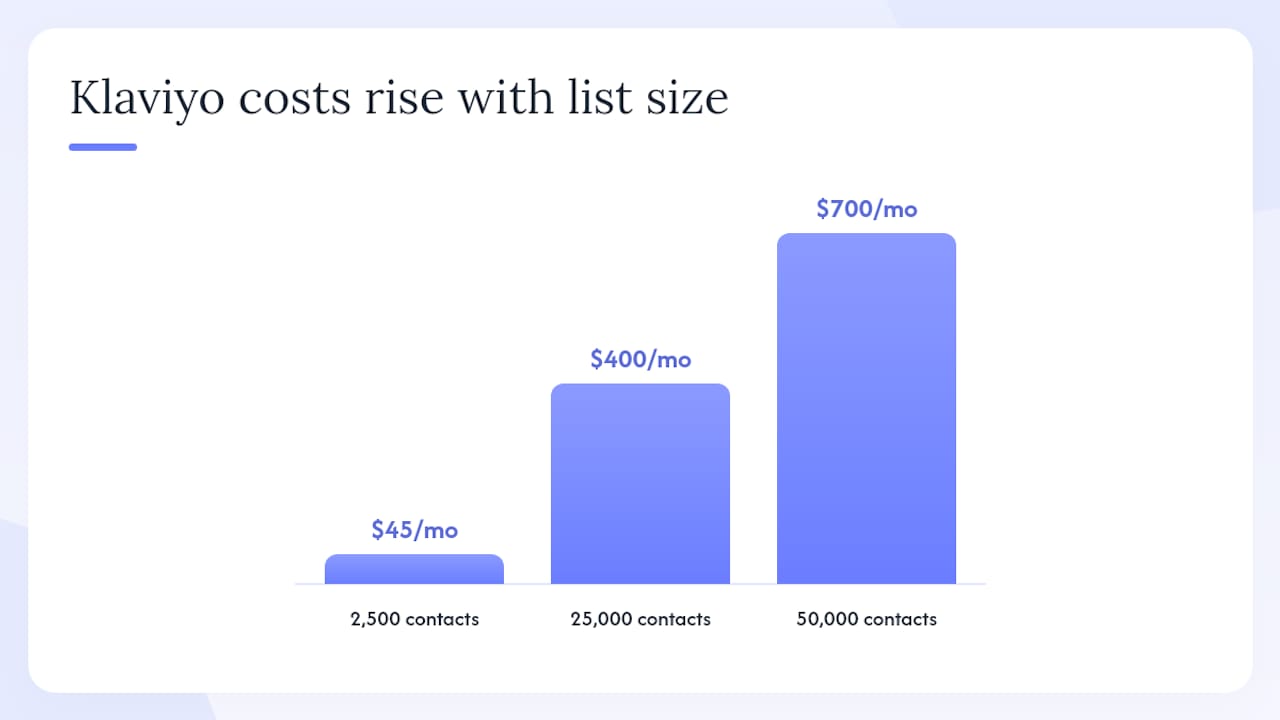
- 2,500 contacts: Mailchimp ~$17/mo (Essentials), Klaviyo free tier (up to 500 active profiles) or ~$45/mo at 2,500.
- 25,000 contacts: Mailchimp ~$270/mo (Standard), Klaviyo ~$400/mo.
- 50,000 contacts: Mailchimp ~$350/mo (Standard), Klaviyo ~$700/mo.
Costs shift further when you add SMS, which Klaviyo prices per message on top of the contact fee.
How pricing models differ and what they mean for your P&L
Mailchimp bills by contact tier regardless of how many emails you send per month (within plan limits). Klaviyo bills by active profiles, meaning contacts who have received a message in the past 90 days, plus a separate SMS usage charge. That distinction matters when your list has a large inactive segment.
Three realistic scenarios:
- 2,500 contacts, basic newsletter store: Mailchimp’s Essentials plan runs roughly $17/mo. Klaviyo’s free plan covers up to 500 active profiles; beyond that, you’re at ~$45/mo. At this size, Mailchimp is the cheaper option by a clear margin.
- 25,000 contacts, mid-size Shopify store: Mailchimp Standard runs roughly $270/mo. Klaviyo lands around $400/mo. The gap is real, but a 2026 cost analysis notes Klaviyo can justify that premium when email-attributed revenue increases materially, typically at $100K–$300K+ in annual store revenue.
- 50,000 contacts, growth-stage brand: Mailchimp Standard is roughly $350/mo. Klaviyo climbs to approximately $700/mo. At this scale, the ROI question becomes: are your abandoned-cart and post-purchase flows generating enough incremental revenue to cover the difference?
Main cost drivers to watch:
- Active contact count (suppress unengaged contacts before billing cycles)
- SMS volume and per-message rates (Klaviyo charges separately)
- Premium add-ons and transactional email credits
- Third-party integration connectors Mailchimp sometimes requires for ecommerce parity
- Agency or developer fees for migration and custom event mapping
For a broader look at SMS pricing alongside email, the best SMS marketing platforms guide breaks down per-message costs across major providers.
Core ecommerce features: data model, segmentation, and automations
The deepest difference between these two platforms is architectural. Klaviyo uses an event-driven, per-profile data model: every order, product view, and cart action is stored on a customer timeline and queryable in real time. Mailchimp uses a list/audience paradigm where contacts belong to audiences and behavioral data is less granular by default.
That architecture gap shows up most in segmentation. Klaviyo lets you build segments like “purchased Product X in the last 30 days, predicted to buy again within 60 days, lifetime value above $200.” Mailchimp’s segments are solid for campaign targeting but don’t natively support predictive CLV or product-aware conditions without extra connectors.
Automation depth:
- Klaviyo ships with prebuilt ecommerce flows (abandoned cart, browse abandonment, win-back, post-purchase) that fire on live order events. SMS and email share a single flow canvas with conditional splits.
- Mailchimp offers Customer Journeys with branching logic, but the triggers are less tightly coupled to order events, and SMS requires a separate add-on.
G2 Learn confirms that Klaviyo ties sends to checkout events more tightly, enabling per-flow revenue attribution that Mailchimp often needs manual configuration or connectors to match.
Integration depth for Shopify, WooCommerce, BigCommerce:
Shopify’s own comparison notes Klaviyo’s native Shopify integration synchronizes product catalog and order data more deeply than Mailchimp’s, which directly improves product-aware automations and attribution accuracy. WooCommerce and BigCommerce integrations follow a similar pattern: Klaviyo’s connectors pass richer event payloads.
| Feature area | Mailchimp | Klaviyo |
|---|---|---|
| Event-driven segmentation | Limited | Native |
| Predictive CLV | No | Yes |
| SMS + email unified flows | Add-on | Native |
| Per-flow revenue attribution | Requires connectors | Native |
| Shopify product sync depth | Standard | Deep |
Pro Tip: Before committing to Klaviyo, map your top three revenue-driving flows (abandoned cart, post-purchase, win-back) and confirm your store’s order event data is clean. Dirty event data produces misleading attribution numbers that can make any platform look underperforming.
Does your sending reputation hold up under ecommerce volume?
Deliverability is where both platforms perform well out of the box, but the tools they give you to manage it differ. Klaviyo provides a dedicated deliverability dashboard with bounce tracking, spam complaint rates, and sending health scores. Mailchimp offers standard reporting but fewer native diagnostics at the campaign level.
Regardless of platform, your sending reputation depends on practices you control. M3AAWG publishes industry best-practice guidance on anti-abuse and sending reputation that applies to any ESP. Certified Senders Alliance maintains a participant listing of senders who meet verified deliverability standards.
Practical deliverability checklist for ecommerce senders:
- Authenticate every sending domain with SPF, DKIM, and DMARC records before your first campaign.
- Suppress hard bounces immediately; let soft bounces accumulate no more than three times before suppression.
- Warm up new sending domains gradually: start at 500 emails/day and double every 3–4 days.
- Segment by engagement recency (90-day active vs. 90–365-day dormant) and send to dormant segments less frequently.
- Run a list hygiene pass before any major migration to avoid importing suppressed or invalid addresses.
On compliance: both platforms support CCPA consent management and provide data-processing agreements for US businesses. Klaviyo’s consent logging is more granular for multi-channel opt-ins, which matters if you run combined email and SMS programs.
What a real migration involves and how long it takes
Migration scope scales with your data complexity. A simple newsletter list with no automations can move in a weekend. A Shopify store with five active flows, custom event mappings, and a 50,000-contact list is a 3–6 week project.
Migration checklist:
- Export contacts with all custom properties and suppression lists from the source platform.
- Map event schema: confirm order, product, and cart events will fire correctly in the destination platform.
- Recreate email templates (neither platform imports the other’s HTML cleanly).
- Rebuild automations and flows with updated trigger logic.
- Update DNS records for sending authentication (SPF, DKIM, DMARC) on the new platform.
- Run a QA send to a seed list before going live.
- Suppress the old platform’s sending to avoid duplicate sends during cutover.
Common pitfalls:
- Duplicate contacts created by mismatched email casing during import.
- API rate limits on large event backfills (Klaviyo’s API caps concurrent requests).
- Broken flow triggers when order event field names differ between platforms.
- Losing historical engagement data that was used for segment conditions.
Pro Tip: Run both platforms in parallel for two weeks post-migration. Keep the old platform’s automations paused but intact. If a critical flow breaks in the new environment, you have a clean rollback path without losing revenue.
For a deeper look at how these platforms compare on integration strategy, the Mailchimp vs Klaviyo feature breakdown at Crowd Company covers additional integration gotchas worth reviewing before you start.
How to decide which platform fits your business right now
Work through this checklist. Your answers will point to one platform clearly.
Decision checklist:
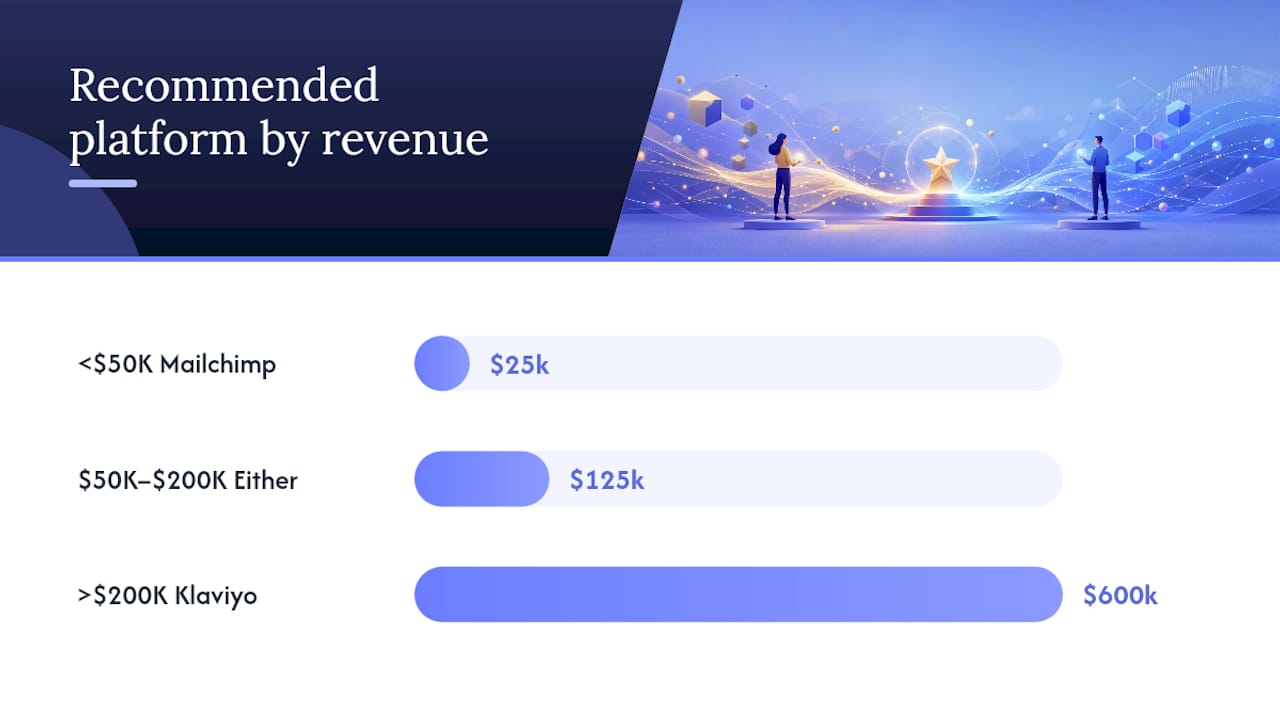
- Annual store revenue under $50K and team of one? Mailchimp.
- Running Shopify or WooCommerce with $100K+ revenue and at least one dedicated marketer? Klaviyo.
- Need landing pages, social ads, and email from one tool? Mailchimp.
- Want abandoned-cart and win-back flows tied to real order events with revenue reporting? Klaviyo.
- No developer on staff and no budget for migration help? Start with Mailchimp, plan to migrate later.
- Already measuring email-attributed revenue and want to improve it? Klaviyo’s attribution model is built for that.
Questions to ask during a trial or demo:
- How does the platform count active contacts, and what triggers a contact to become billable?
- Can you show a sample event mapping for our Shopify order schema?
- What is the SLA for support escalations, and is phone support available?
- How does SMS pricing work per message, and are there volume discounts?
- Does the platform offer migration assistance, and what does it include?
Red flags during evaluation:
- Revenue attribution numbers that can’t be reproduced in your store’s analytics.
- Contact counts that differ between the platform dashboard and your CRM.
- Integration described as “native” but requiring a third-party connector to pass order data.
Persona match:
- Solo founder, under $30K revenue: Mailchimp free or Essentials.
- Small marketing team, $50K–$200K revenue: Either platform; Klaviyo if Shopify-native.
- Growth-stage ecommerce, $200K–$1M revenue: Klaviyo, with developer support for event mapping.
- Enterprise seller, $1M+ revenue: Klaviyo or a custom stack; evaluate API extensibility carefully.
How we framed this comparison
Evaluation axes used:
- Pricing model and real monthly cost at three contact-count tiers
- Ecommerce feature depth (event model, segmentation, automation, SMS)
- Integration depth for Shopify, WooCommerce, and BigCommerce
- Deliverability tooling and sending reputation resources
- Migration effort and technical complexity
- Support availability and community resources
Data inputs: vendor documentation, published pricing pages, third-party reviews from G2 and Zapier, Shopify’s and Forbes Advisor’s independent comparisons, and industry deliverability guidance from M3AAWG and Certified Senders Alliance.
Ctrlaltorion’s implementation experience across ecommerce migrations informs the migration checklist, timeline estimates, and integration gotchas described in this article.
When we recommend each platform and when we build something custom
Klaviyo is our default recommendation for any Shopify or WooCommerce store above $100K in annual revenue that wants to operationalize behavioral data. The learning curve is real, but the revenue attribution and segmentation depth pay off once flows are properly configured. Mailchimp is the right call for early-stage stores, non-ecommerce small businesses, and any team that needs to be live in a day without a developer.
Where things get interesting is the middle ground: stores that have outgrown Mailchimp’s segmentation but aren’t ready to absorb Klaviyo’s migration complexity. In those cases, we often recommend a phased approach: migrate contacts and core flows first, then layer in custom event mappings and product-aware segments over 60–90 days.
When a client’s data model doesn’t fit either platform cleanly (custom order management systems, multi-brand catalogs, or complex loyalty integrations), we build a custom integration layer that feeds clean, normalized events into whichever ESP makes sense. That avoids the “dirty data, misleading attribution” trap that makes both platforms look worse than they are.
Ctrlaltorion handles your migration from audit to go-live
Picking the right platform is step one. Getting the data model, event mapping, and flows right is where most migrations stall or produce broken attribution numbers.
Ctrlaltorion offers end-to-end migration services: contact and suppression list export, event schema mapping for Shopify and WooCommerce, flow rebuilding, DNS authentication setup, and a QA pass before go-live. A typical migration engagement runs 3–6 weeks depending on automation complexity. We scope every project before you commit, so you know the effort and timeline before any work starts.
Ready to move? Request a migration audit and we’ll map your current setup against your target platform in one working session.
Sources
4 refs- Klaviyo vs Mailchimp: Which one should you use? — Zapierzapier.com
- Klaviyo vs. Mailchimp — G2 Learnlearn.g2.com
- Klaviyo vs Mailchimp (2026): Which Is Better? — Mailercloudmailercloud.com
- Klaviyo vs. Mailchimp comparison — Forbes Advisorforbes.com
comments
loading comments…
No comments yet. Start the thread.