Header image: a developer’s laptop with code on screen. Photo: Daniil Komov / Pexels.
Note: This Supabase vs Neon comparison was updated October 9, 2026. The August version of this article had Neon wrong. Neon’s Launch plan has no monthly fee anymore. It’s pure pay-as-you-go. Neon now ships its own auth, which is included on the free plan. And Neon’s site has moved from neon.tech to neon.com. Every number below was rechecked on supabase.com/pricing and neon.com/pricing that day. The scenarios changed, and so did one of the recommendations.
If you’re bootstrapping a SaaS in 2026 and you’ve narrowed the backend decision to Supabase vs Neon, you’ve already skipped the truly bad choices. Both are good products. Both are built on Postgres. Both have free tiers you can actually build on. Both will work.
They’re not the same tool, though, and picking the wrong one costs you money, weekends, or a painful migration in month nine. So here’s the comparison the vendor blogs won’t give you: real numbers, five workloads that look like real life, and a straight recommendation at the end.
Supabase vs Neon: the short verdict
| If you are… | Pick | Why |
|---|---|---|
| A first-time founder shipping a first product | Supabase | The most complete backend-in-a-box, with realtime and a dashboard your team can use |
| Running one small, always-on database under about 20 GB | Neon (barely) | Pay-as-you-go Launch comes in a few dollars under Supabase Pro’s $25 |
| Running a steady app with 40 GB or more | Supabase | Storage is $0.125/GB vs $0.35/GB, and a bigger instance is cheaper |
| Running preview branches for every pull request | Neon | 10 branches per project included, then $1.50 a branch-month |
| Building a hobby project you’ll leave running for months | Neon | Free scales to zero instead of pausing after a week |
| Shipping anything that needs live updates in the browser | Supabase | Realtime is included; Neon doesn’t offer it |
The one-sentence version used to be “Supabase is a backend-in-a-box built on Postgres; Neon is Postgres.” That isn’t true anymore. Neon now sells a whole backend too. The better version for 2026: Supabase is the mature backend-in-a-box with a flat monthly price. Neon is serverless Postgres with a newer set of backend pieces, billed by the hour.
What you’re actually getting with each
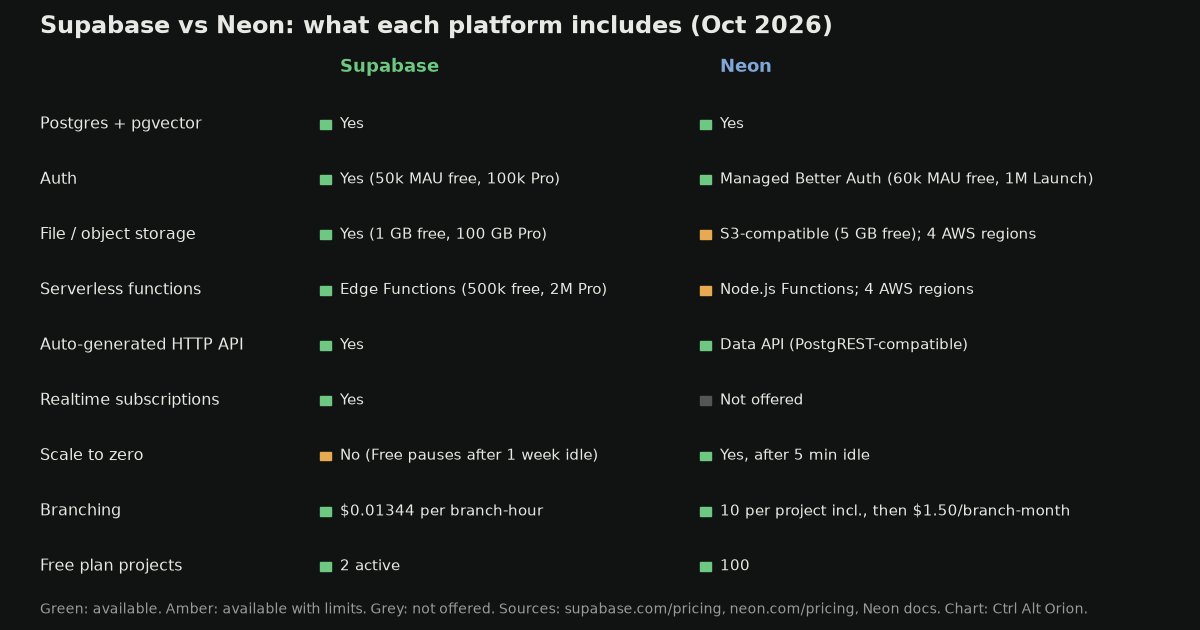
What each platform includes as of October 9, 2026, from the two pricing pages and Neon’s docs. Chart: Ctrl Alt Orion.
Supabase gives you Postgres with auth, file storage, realtime subscriptions, Edge Functions, an API generated from your schema, and a dashboard. When you sign up, you get most of a working backend before you write any application code. Supabase also says plainly that you can use a project as a plain database. Auth, Storage, Realtime, and Edge Functions are included in every project but optional, and “unused products cost nothing.”
Neon started as serverless Postgres: a connection string with three traits nobody else did as well. It scales to zero, it branches like Git, and it autoscales compute. That’s still the core. But Neon, which now describes itself as “from Databricks,” has added more around it:
- Managed Better Auth, built on the open-source Better Auth library. Users, sessions, and settings live in a
neon_authschema inside your own database, and every branch gets its own copy of the auth setup. - Data API, a PostgREST-compatible HTTP endpoint so browsers and edge runtimes can query the database without a Postgres driver.
- Functions (Node.js), Object Storage (S3-compatible), and an AI Gateway for calling language models with one credential.
Some limits matter. Neon’s docs say Object Storage, Functions, and the AI Gateway currently run in only four AWS regions: Ohio, N. Virginia, Frankfurt, and Singapore. The AI Gateway needs a paid plan. Postgres and auth work in any region. And there’s still no realtime product on Neon’s list.
So the gap has narrowed a lot. What’s left is maturity and shape. Supabase’s pieces have been in production for years and are designed as one product. Neon’s backend pieces are newer, and its pricing still assumes your database won’t be busy all the time.
Neon vs Supabase pricing in plain English
Every vendor comparison handles pricing the same lazy way. It lines up the free tiers, mentions “usage-based billing,” and never shows a number that would appear on your card. Let’s not do that.
Supabase plans
Supabase bills per organization, and each project runs on its own compute instance.
- Free: $0. 500 MB of database per project, 50,000 monthly active users (MAU) for auth, 1 GB of file storage, and 5 GB of egress. Free projects are paused after one week of inactivity. You get two active projects.
- Pro: from $25/month. It includes $10 a month in compute credits, which covers one Micro instance (shared compute, 1 GB RAM). Each project includes 8 GB of disk, then $0.125/GB. You also get 100,000 MAU (then $0.00325 per MAU), 250 GB of egress (then $0.09/GB), and 100 GB of file storage. Paid projects are never paused. Spend caps are on by default, so you won’t get a surprise overage bill unless you turn them off.
- Compute sizes: Micro (1 GB RAM) $10, Small (2 GB) $15, Medium (4 GB) $60, Large (8 GB, 2 dedicated vCPUs) $110 a month. The $10 credit applies once per organization. Supabase’s own example: two Micro projects on Pro cost $35 a month.
- Team: from $599/month. It adds SOC 2 and ISO 27001 reports. You don’t need it until customers ask for those.
Neon plans
Neon bills per organization. Its paid plans are pay-as-you-go with no monthly minimum, metered by the hour. Neon doesn’t even collect invoices under $0.50.
- Free: $0. Up to 100 projects, 100 compute-unit hours (CU-hours) per project per month, autoscaling up to 2 CU, 1 GB of storage per project (20 GB across the account), and 5 GB of egress per project. Auth covers up to 60,000 MAU. Computes scale to zero after 5 minutes idle, and on Free you can’t turn that off.
- Launch: no base fee. Compute is $0.106 per CU-hour, autoscaling up to 16 CU. Storage is $0.35/GB-month with no hard cap. You get 10 branches per project, then $1.50 per branch-month. Egress is 500 GB per project, then $0.10/GB. Restore history goes back up to 7 days and costs $0.20/GB-month. Auth covers up to 1 million MAU. Paid plans can turn off scale to zero.
- Scale: $0.222 per CU-hour, 25 branches per project, history up to 30 days, plus SOC 2, HIPAA, and an uptime SLA.
A compute unit is about 4 GB of RAM, so the smallest common size, 0.25 CU, is about 1 GB. That’s the same memory as Supabase’s Micro.
Three things that stand out
- Storage costs 2.8 times as much on Neon: $0.35 vs $0.125 per GB. That was true in August and it’s still true.
- Neon no longer has a floor. In August we priced Launch at $19 a month before usage. Now a tiny database that runs a few hours a day costs a few dollars. Neon’s own docs work through a light-usage Launch example that comes to $2.31 for the month.
- The auth tax on Neon is gone. The August version said to add an auth provider’s bill to every Neon scenario. With Managed Better Auth covering 60,000 MAU free and up to 1 million on Launch, that advice is out of date.
Where the cost lines cross
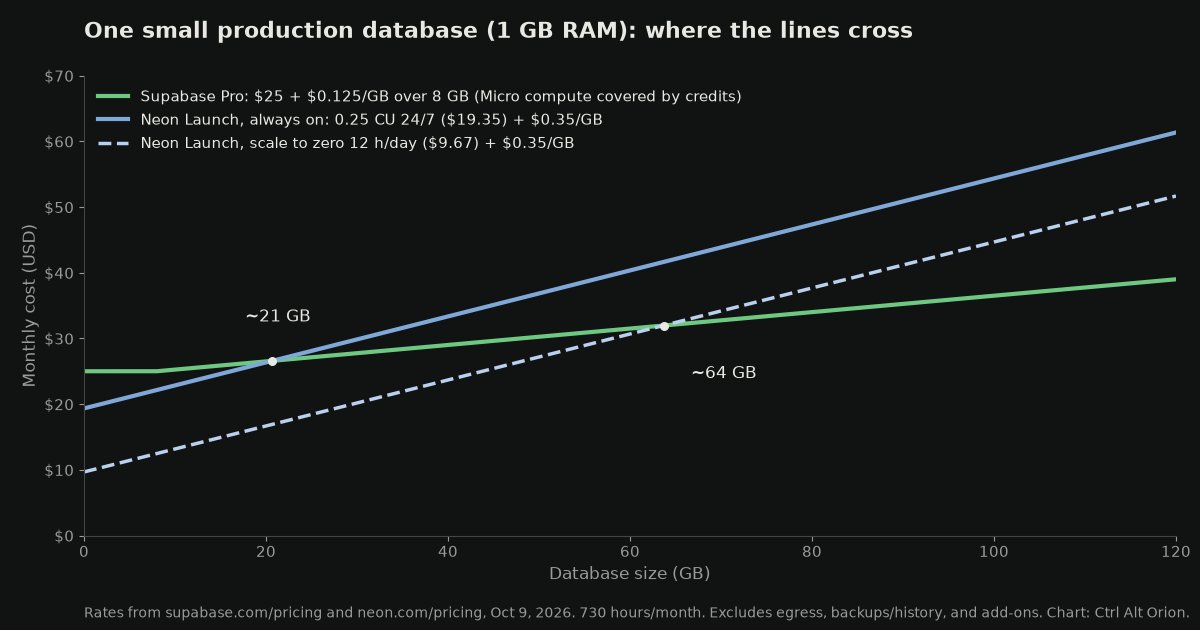
One production database with about 1 GB of RAM, priced at October 9, 2026 rates over 730 hours a month. Excludes egress, restore history, and add-ons. Chart: Ctrl Alt Orion.
Here’s the math, so you can check it.
- Supabase Pro, one Micro project: $25, plus $0.125 for every GB over 8.
- Neon Launch, always on: 0.25 CU × 730 hours × $0.106 = $19.35 of compute, plus $0.35 for every GB.
- Neon Launch, scale to zero, active 12 hours a day: half the compute, $9.67, plus $0.35 per GB.
For an always-on database, Neon is cheaper until about 21 GB, and then Supabase pulls ahead and stays ahead. If your database really sleeps half the day, Neon stays cheaper until about 64 GB.
That flips part of what we said in August. A small always-on app is no longer a clear Supabase win on price. It’s a near tie that tilts slightly to Neon. The storage gap still decides it once your data grows, and most SaaS databases only grow.
Five cost scenarios that look like real life
A cost-per-GB chart leaves out too much, because nobody runs a database where storage is the only thing that changes. Here are five workloads instead.
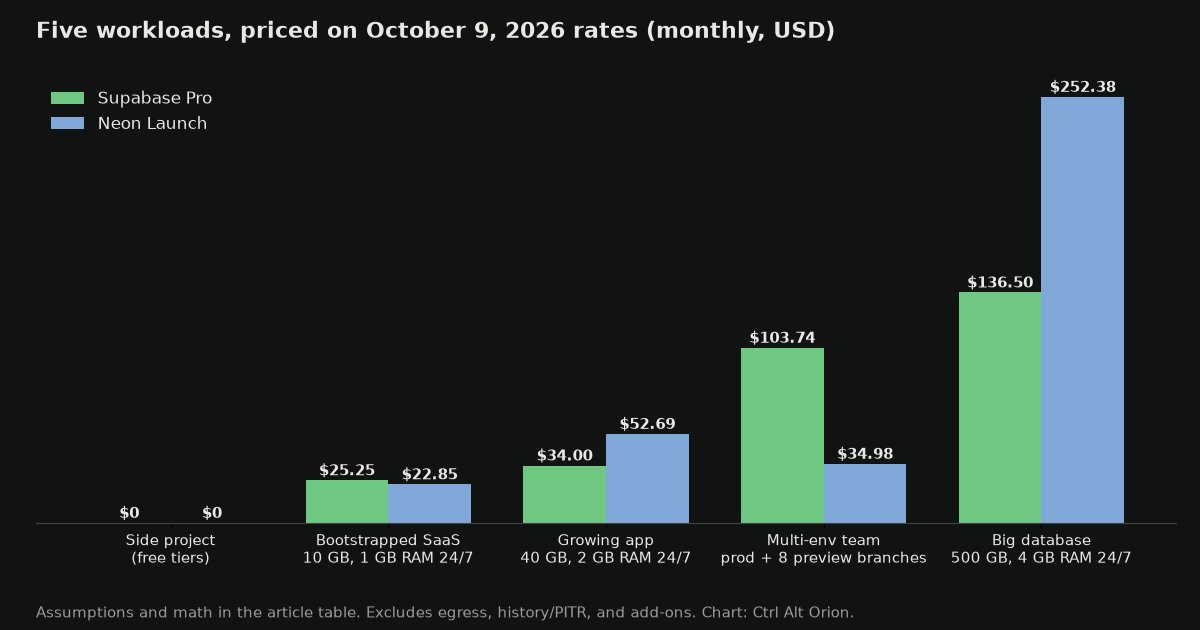
Five workloads priced at October 9, 2026 rates. The assumptions are in the table below. Chart: Ctrl Alt Orion.
| Workload | Assumptions | Supabase | Neon |
|---|---|---|---|
| Side project | Under 500 MB, a few users, fits free limits | $0 (Free) | $0 (Free) |
| Bootstrapped SaaS | 10 GB, 1 GB RAM always on, about 1,000 users | $25 + $0.25 disk = $25.25 | $19.35 compute + $3.50 storage = $22.85 |
| Growing app | 40 GB, 2 GB RAM always on | $25 + $5 (Small after credit) + $4 disk = $34.00 | 0.5 CU 24/7 $38.69 + $14 storage = $52.69 |
| Multi-env team | The bootstrapped SaaS plus 8 preview branches, each active about 2 hours a weekday (44 h/month) at 0.25 CU with about 1 GB of changes | $25.25 + 8 branches × $0.01344 × 730 h = $103.74 | $22.85 + $9.33 branch compute + $2.80 branch storage = $34.98 |
| Big database | 500 GB, 4 GB RAM always on | $25 + $50 (Medium after credit) + $61.50 disk = $136.50 | 1 CU 24/7 $77.38 + $175 storage = $252.38 |
A few things worth noticing:
- The side project ties at $0, but not for the same reason. Supabase pauses a free project after a week of inactivity, and someone has to wake it up. Neon scales to zero and wakes on the next query. Neon Free gives you 100 CU-hours a month per project. That’s about 400 hours of active time at 0.25 CU, which is plenty for a project that’s mostly idle and not enough for one that’s busy around the clock.
- The bootstrapped SaaS is now a near tie. Neon is $2.40 cheaper on paper. But Supabase’s $25.25 already includes realtime, the dashboard, and 100 GB of file storage. If you’d use those, Supabase is the better deal.
- The growing app is a clear Supabase win. Two gigabytes of always-on RAM costs $15 on Supabase, and the $10 credit covers most of that. On Neon, 0.5 CU around the clock costs $38.69, and storage costs 2.8 times as much.
- The multi-environment team is still Neon’s clearest win. Supabase lists branching at $0.01344 per branch-hour, which is about $9.81 a month for each branch that’s left running. Eight long-lived preview branches cost $78.49 in branch fees alone. Neon includes 10 branches per project, so the same eight branches cost only the compute and storage they actually use. If you delete Supabase branches when pull requests merge, the gap shrinks a lot. Most teams don’t.
- The big database is where Neon’s storage price hurts. At 500 GB, Neon costs about $116 more a month. Over a year that’s about $1,390.
The pattern is the same as in August, with one change. Supabase gets cheaper the longer your workload stays on and the more data it holds. Neon gets cheaper the more your workload comes in bursts: idle nights, dev branches, sleeping preview environments, and a database for each customer. The change is that Neon’s lack of a base fee makes it competitive for small always-on apps too.
Cold starts: the detail that decides it
Scale to zero is the reason Neon’s light-usage bills are so low, so you should understand what it costs you. When a Neon compute sits idle for 5 minutes, it suspends. The next query wakes it up. Neon’s docs say it “reactivates automatically within a few hundred milliseconds.”
In August we quoted a range of 500 to 1,500 milliseconds and pointed to a Neon cold-starts page. That page no longer exists at the new domain, and we couldn’t confirm the range, so we’ve dropped it. Neon’s own claim is “a few hundred milliseconds.” Measure it yourself from your app’s region before you build a signup flow on top of it.
The trade-off itself hasn’t changed. A short delay on the first query after idle is fine for a background job, an admin panel, or a preview branch. It might not be fine for the first page a new customer sees. You have two ways out:
- On Neon Launch, turn off scale to zero for the production compute. Then you’re paying the always-on rate, which is the $19.35 line in the chart above.
- Use Supabase, where nothing sleeps on a paid plan. Supabase says Pro projects are never paused, which is why you pay for that compute every hour whether anyone shows up or not.
Neon also notes that scale to zero only applies to computes up to 16 CU. Anything bigger stays on.
The features nobody compares correctly
Auth: Supabase Auth vs Neon’s Managed Better Auth
Supabase Auth is a mature product. It covers 50,000 MAU on Free and 100,000 on Pro, then $0.00325 per user, and it includes social sign-in and row-level security. Neon’s Managed Better Auth is newer. It covers 60,000 MAU on Free and up to 1 million on Launch, and it stores your users in the neon_auth schema so you can query them with SQL and protect them with row-level security.
The clever part of Neon’s version is branching. Every branch gets its own auth environment, so you can test sign-up and password reset on a preview branch without touching real users. If you’ve ever tested auth against production because staging was too much work, you’ll see why that matters.
In practice: if you’re on Supabase, its auth is the obvious choice. If you’re on Neon, you no longer need to budget for Clerk or Auth0 just to get logins.
Branching
Neon’s branching is still its signature feature and is priced like a normal one: 10 branches per project included on Free and Launch, then $1.50 a branch-month, prorated hourly. A child branch starts with no storage, and you pay only for the changes you make on it. Supabase has branching on Pro and above at $0.01344 per branch-hour. That’s fine for a branch that lives a day and costs real money for one that lives a month. If you want a branch for every pull request in CI, Neon is the obvious call. Our guide to stacked PRs and AI code review for small teams covers the review side of that workflow.
Realtime
Supabase Realtime is included on every plan. It isn’t the fastest realtime layer around, and if realtime is the whole point of your product you might look at a dedicated service. But for “update the dashboard when a new order lands,” it’s excellent and costs nothing extra. Neon doesn’t offer a realtime product, so you’d need another service or your own websocket server.
Storage and functions
Both now have file storage and serverless functions. Supabase includes 100 GB of file storage on Pro (then $0.0213/GB) and 2 million Edge Function calls (then $2 per million). Neon’s Object Storage is $0.023/GB-month on Launch with 5 GB free, and Functions are billed in capacity-hours plus $0.60 per million invocations. For a typical app, Supabase’s included 100 GB makes it the cheaper home for files. Neon’s bigger limit is the four regions. If your database lives anywhere else, check the region list before you plan on these.
pgvector and AI workloads
Both support pgvector, and both work fine for embeddings. Neon also has an AI Gateway on paid plans. For most small SaaS apps, AI features won’t decide this choice.
The dashboard
Supabase’s dashboard is a real productivity feature. You can browse tables, edit rows, run SQL, invite teammates, and read logs from one place. Neon’s console has a SQL editor and a Tables view, and it’s built around databases and branches. If people who aren’t engineers will ever need to fix a customer’s email address, Supabase’s dashboard is worth a real share of that $25.
What it feels like to build on each
Supabase feels like a framework. You get productive fast because the pieces are already wired together, and there are official client libraries for the popular languages. The trade-off is that when you outgrow one piece, like auth, storage, or realtime, you have to decide whether to keep it or migrate around it. Most teams keep it. That tells you something.
Neon still feels like a database first. You get a connection string and go, and each backend piece is something you switch on. That makes it easy to bring your own ORM, your own auth, or your own hosting, and to swap any of them later without touching the database. The newer pieces are a real step forward, but they’re newer. Check the regions and read the docs before you bet a launch on them.
The honest test: if a first-time technical founder asked what to use, with no other context, we’d still say Supabase. Not because the database is better, but because what kills bootstrapped SaaS is not shipping fast enough, and Supabase covers the most backend work on day one with the least assembly.
If you’ve done this before and you already have opinions about your auth, your ORM, and your preview environments, Neon is probably the better home for your Postgres. That’s even more true now that its auth branches with your data.
Migration reality check
You can move from either platform to plain Postgres on any host with pg_dump and a weekend. Neither one locks up your data.
The lock-in is in the features, not the database. If you built against Supabase Auth, Storage, and Realtime, leaving means rewriting those parts of your code. That’s a code migration, not a data migration. The same is now true of Neon if you use its auth, Data API, and Functions. With Neon’s auth, your users are rows in a neon_auth schema in your own database, so at least the user data comes with you.
When not to use either one
- You need compliance reports on day one. Supabase puts SOC 2 on the $599 Team plan, and Neon puts it on the Scale plan. If an enterprise customer requires it now, price those tiers, not Pro and Launch.
- Your database will be large and busy around the clock. At hundreds of gigabytes with steady load, a managed Postgres host or your own server may beat both.
- You’re not building software at all. If you need a loyalty program or appointment reminders rather than a SaaS product, you may not need a backend platform. See building your own customer loyalty app or appointment reminders without expensive SaaS.
My recommendation, as a decision tree
- Are you a solo or two-person team shipping a first product? Supabase. Time to first user matters more than anything else on this page.
- Do you need live updates in the browser? Supabase. Realtime is included, and Neon doesn’t offer it.
- Are you building heavy multi-tenancy, or a database per customer? Neon. Scale to zero and up to 100 projects on Free were made for this.
- Do you want a preview environment for every pull request, auth included? Neon. This is still the workflow it was built for.
- Is your workload steady, always on, and heading past 20 GB? Supabase. The included compute and cheaper storage win.
- Is it a small always-on app that will stay small? Either. Neon is a few dollars cheaper, and Supabase gives you more for the money. Pick the one whose dashboard you’d rather open every day.
- Is it a hobby project you’ll leave running? Neon. A free tier that scales to zero instead of pausing is a real feature.
If two answers point the same way, that’s your answer. If they point opposite ways, you’re at the boundary where either one works.
Frequently asked questions
Is Neon cheaper than Supabase?
For small or bursty workloads, yes. Neon Launch has no base fee, so a database that’s idle much of the day can cost a few dollars a month. For an always-on database bigger than about 21 GB, Supabase Pro is cheaper, because its storage is $0.125/GB against Neon’s $0.35.
What does a small bootstrapped SaaS cost on Supabase vs Neon?
For a 10 GB database with 1 GB of RAM running around the clock, about $25.25 a month on Supabase Pro and $22.85 on Neon Launch, at October 9, 2026 rates. Supabase’s price already includes realtime, the dashboard, and 100 GB of file storage.
Does Neon have a monthly minimum now?
No. Neon’s docs say Launch and Scale are pay-as-you-go with no minimum monthly fee, metered hourly, and invoices under $0.50 aren’t collected.
Does Neon have auth like Supabase?
Yes. Neon’s Managed Better Auth is built on the open-source Better Auth library and is included up to 60,000 MAU on Free and up to 1 million MAU on Launch. Supabase Auth covers 50,000 MAU on Free and 100,000 on Pro, then $0.00325 per user.
Did Neon move from neon.tech to neon.com?
Yes. Old neon.tech links now redirect to the same pages on neon.com, and Neon’s docs live at neon.com/docs.
Does a Supabase free project still pause?
Yes. Supabase pauses Free projects after one week of inactivity and limits you to two active free projects. Projects on paid plans aren’t paused.
How long is a Neon cold start?
Neon says a suspended compute “reactivates automatically within a few hundred milliseconds.” Test it from your own region. On paid plans you can turn off scale to zero for production.
Can I use Supabase as just a database?
Yes. Supabase says a project can be a standalone Postgres database that you connect to with any Postgres client or ORM. The other products are included but optional, and you don’t pay extra for the ones you don’t use.
Which is better for preview branches?
Neon. It includes 10 branches per project and charges $1.50 a branch-month after that. Supabase charges $0.01344 per branch-hour, which is about $9.81 a month for a branch that stays up.
Can I switch later?
Yes. Both are plain Postgres, so pg_dump moves the data. The harder part is the code that uses each platform’s auth, storage, and functions.
The bottom line
Neither of these will make or break your business. That’s almost always product-market fit, distribution, and pricing, not the database. Supabase is still the safer default for a first product: one price, the most complete set of pieces, and realtime included. Neon got meaningfully better for small teams this year. It has no base fee, auth is included, and the branching is still the best around. That makes it the better pick for bursty workloads, preview-heavy teams, and founders who want to choose their own pieces.
Pick the one that fits your workload, ship the product, and revisit in eighteen months when you actually know what that workload looks like. That’s most of what we do at Ctrl Alt Orion when founders ask us to look at their stack. We tell them which pieces are worth migrating and which aren’t. Usually the answer is to keep what they have and fix the two things upstream of it. If you’re tracking what your AI tools cost too, here’s how we keep an eye on that spend.
The database is almost never the bottleneck. But if you’re going to pick one anyway, pick it with your eyes open.
Sources
6 refsAll pages checked October 9, 2026.
- Pricing & Fees — Supabase (also published as markdown): Free, Pro ($25), and Team ($599) plans; $10 compute credits; compute sizes and prices; 8 GB disk then $0.125/GB; MAU, egress, storage, Edge Functions, and branching ($0.01344 per branch-hour) rates; free project pausing; spend caps.supabase.com
- Pricing — Neon: Free, Launch, and Scale plans; pay-as-you-go with no monthly minimum; $0.106 and $0.222 per CU-hour; $0.35/GB-month storage; auth MAU limits; Object Storage and Functions rates.neon.com
- Neon plans — Neon Docs: per-plan allowances, 10 branches per project then $1.50 a branch-month, child branch storage billing, history windows, no minimum fee, invoices under $0.50 not collected, light-usage billing example.neon.com
- Scale to Zero — Neon Docs: suspend after 5 minutes, reactivation “within a few hundred milliseconds,” fixed on Free and optional on paid plans, 16 CU limit.neon.com
- Managed Better Auth — Neon Docs: Better Auth foundation,
neon_authschema, row-level security, branch-aware auth.neon.com - How a Neon backend fits together — Neon Docs: Data API, Functions, Object Storage, and AI Gateway; four supported AWS regions; AI Gateway requires a paid plan.neon.com
comments
loading comments…
No comments yet. Start the thread.