Disclosure: some links below are Amazon affiliate links (tag cao04-20). Costs you nothing; the picks don’t change based on that. Every spec and price below is sourced at the bottom.
Note: This runs alongside today’s piece on ChatGPT Ads landing in the Shopify App Store. That one is about a new channel opening. This one is about the boring consequence nobody plans for: every new channel adds another place an order can appear where the person at the counter isn’t looking.
Here’s the failure that costs small shops real money, and it has nothing to do with technology being broken.
An order comes in through the website. It lands in a tab on a tablet that’s currently showing the schedule, or in an email nobody opens between 11:40 and 1:15, or in a marketplace app that only pings the owner’s phone — and the owner is in the walk-in. Forty minutes later the customer calls. Everything worked perfectly. The order was received, confirmed, charged, and never seen by a human being.
The number of places this can happen keeps going up. Your own store, a marketplace, delivery platforms, phone orders somebody typed into a notes app, and now — after this week’s ChatGPT Ads launch inside Shopify — a channel where the customer’s entire buying conversation happened inside somebody else’s chat window before landing in your order queue.
Every one of those is a screen. Screens are shared, dimmed, locked, scrolled away from, and used for six other things. A piece of paper coming out of a machine that beeps is not.
That’s the entire argument for a thermal order printer, and it’s why restaurants standardized on them decades ago while online sellers kept trying to run the same job from a tab.
Receipt printer vs shipping label printer: what this device is (and isn’t)
A thermal receipt printer — also sold as a “POS printer” or “order ticket printer” — prints on heat-sensitive paper, has no ink or toner, and cuts the paper automatically at the end of each ticket. That’s it. It does one thing at about 40 to 50 tickets a minute and lasts for years.
It is not the same device as a shipping label printer. If what you actually need is 4x6 shipping labels for packages, that’s a different machine with a different media path — we covered that category separately in best label printers for small e-commerce sellers. Buying the wrong one of the two is the most common mistake in this category, and the listings do not go out of their way to prevent it.
The pick: Epson TM-T20IV
Epson TM-T20IV thermal receipt printer
The Epson TM-T20IV, the current replacement for the long-running TM-T20III. Photo: Epson.
| Spec | Detail |
|---|---|
| Print speed | Up to 250 mm/sec (Epson’s own spec; some retail listings advertise 310 mm/sec) |
| Paper | 80mm (3-inch) thermal roll |
| Interfaces | USB Type-B + RS-232 serial, or USB + serial + Ethernet 10/100Base-T depending on SKU |
| Reliability | MTBF 360,000 hours; mechanism life 15 million lines |
| Power draw | ~27.2 W operating, ~0.96 W idle |
| Size / weight | 140mm W x 199mm D x 146mm H, 1.7 kg |
| Paper savings | Up to 30% via top-margin and character-height reduction |
| In the box | Printer, starter roll, USB cable, power adapter, AC cable, wall-hanging bracket, setup guide |
| Warranty | 2-year limited, extendable to 5 years with a service plan |
Check current TM-T20IV pricing here.
Street pricing on this class of Epson has historically sat in the high $100s to mid $200s depending on which interface bundle you get — the outgoing TM-T20III has been listed around $180 at big-box retail. Verify at click time; POS hardware pricing moves with channel and bundle more than most categories.
Why this one specifically: the TM-T20 line is the boring, ubiquitous choice in small retail and food service, and that ubiquity is the actual feature. Every POS platform has a driver for it. Every tech support person has seen one. Every parts channel stocks the paper. When something breaks at 6pm on a Friday, you want the machine that 10,000 other shops also have, not the one with the clever spec sheet.
The other reason: Epson’s own spec sheet for the previous generation quotes a 1.5 million cut auto-cutter life and a 150 km printhead. Those are the two numbers that decide whether a receipt printer is a five-year purchase or a fifteen-month one, and they’re the numbers cheap units quietly leave out.
The budget alternative: MUNBYN ITPP047
MUNBYN ITPP047 80mm thermal receipt printer
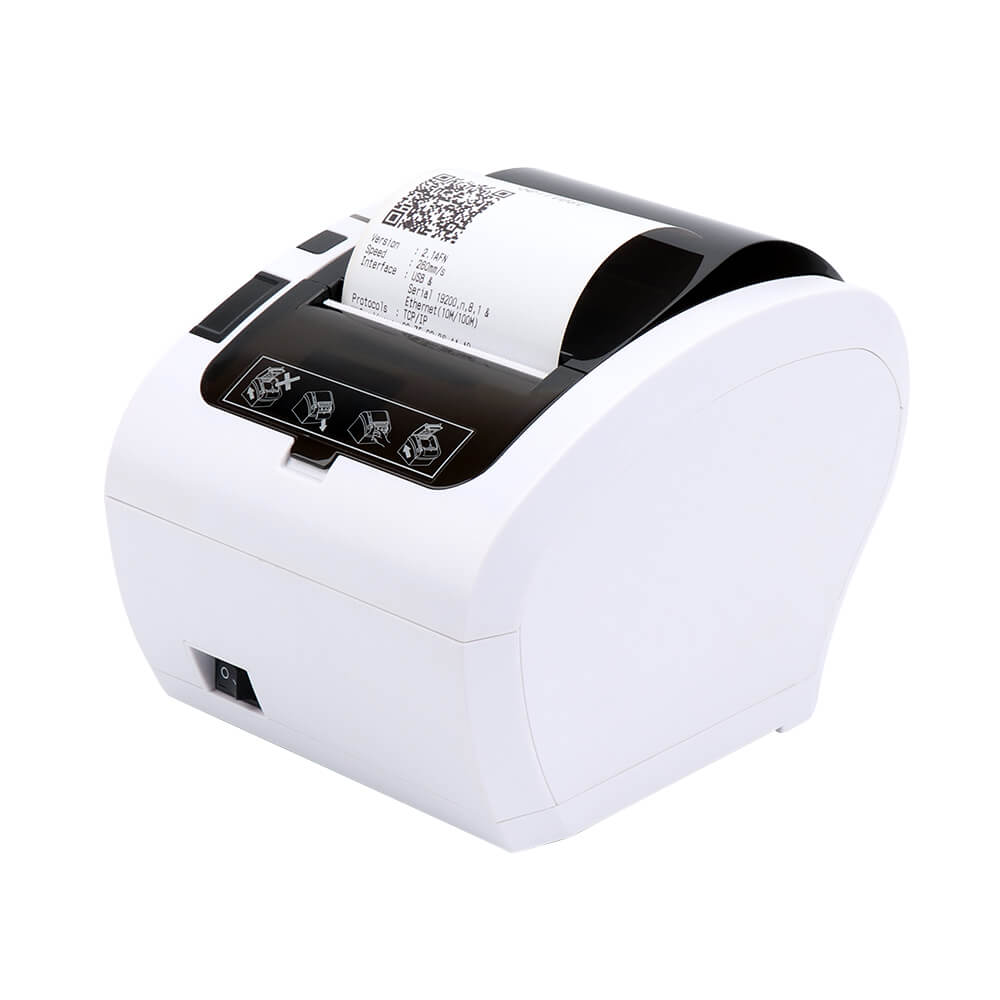 The MUNBYN ITPP047, the common budget 80mm unit. Photo: MUNBYN.
| Spec | Detail |
|---|---|
| Print speed | 230 mm/sec on MUNBYN’s own spec page — listings routinely advertise 300 mm/sec |
| Print width / paper | 72mm print width; supports 48, 52, 56, 64, 68, 76 and 80mm paper; roll ≤ 80mm diameter |
| Interfaces | USB + serial + LAN + Bluetooth, WiFi optional depending on model |
| Auto-cutter | Rated 1.5 million cuts |
| Printhead | 150 km |
| Size / weight | 191mm D x 146mm W x 129mm H, 1.94 kg |
| Compatibility | ESC/POS; Windows, Mac, Linux, Chrome, Android, iOS per the retail listing |
Check current MUNBYN ITPP047 pricing here.
Note the speed discrepancy above, because it’s instructive about this whole category. MUNBYN’s own product specification page lists 230 mm/sec and “over 40 receipts per minute.” The retail listings say 300 mm/sec. Both are MUNBYN’s numbers. That’s not a scandal — marketing speed figures are usually measured under ideal conditions with minimal graphics — but when a vendor’s spec sheet and its listing disagree by 30%, believe the spec sheet, and assume every other number in the listing was picked the same way.
The ITPP047 is a legitimately good value if you’re price-sensitive, and the flexible paper-width support is genuinely useful if you inherited a shop’s existing roll stock. The tradeoffs versus the Epson are driver ecosystem depth, service network, and the amount of institutional knowledge that exists about the machine when it misbehaves.
80mm vs 58mm: the question everyone asks second
The paper width decision is the one people get wrong and then live with for three years, because switching means new rolls, new holder, and often new machine.
| 58mm (2-inch) | 80mm (3-inch) | |
|---|---|---|
| Typical use | Mobile card readers, market stalls, tiny counter footprint, handhelds | Counters, kitchens, packing benches, anything with multi-line orders |
| Characters per line | Roughly 32 | Roughly 42–48 |
| Ticket length for a 6-item order | Long; wraps constantly | Fits, readable at a glance |
| Barcode / QR legibility | Cramped | Fine |
| Roll cost per foot | Lower | Slightly higher, but fewer feet per ticket |
| Paper availability | Common | Extremely common |
| Honest verdict | Buy it for portability only | The default for a fixed location |
The line-wrap problem is the real one. An 80mm ticket shows a multi-item order as a scannable block. A 58mm ticket turns the same order into a ribbon where “Large — no onion — extra sauce” wraps across three lines and the modifier ends up visually attached to the wrong item. In a kitchen or on a packing bench, that’s not an aesthetic complaint, it’s a mis-pick.
Buy 58mm when the printer has to travel — a farmers’ market, a delivery van, a pop-up. Otherwise buy 80mm and stop thinking about it. Stock up on rolls either way: 80mm thermal receipt paper rolls are cheap in bulk, and BPA-free stock is worth the small premium if staff handle receipts all day.
Ethernet vs USB: pick this correctly the first time
This decision matters more than the brand.
USB connects the printer to exactly one machine. It’s simpler, cheaper, and correct if one computer or one tablet dock is the only thing that will ever print.
Ethernet makes the printer a network device with its own IP address. Any station — front counter, back office, tablet, a cloud POS that prints over the local network — can send to it. If you have two stations, or you expect to, or your POS is browser-based, Ethernet is the answer. It’s usually a $30–60 premium on the SKU and it’s the single cheapest piece of future-proofing in this category.
One caution from the network side: putting a printer on the network means putting a printer on the network. Don’t hang it off guest WiFi, and don’t let it sit in the same flat segment as everything else you own. We’ve written both halves of that argument — the small-shop WiFi security setup for the segmentation basics, and why your POS dies at the back of the store for why a wired run to a fixed device beats WiFi at a counter every single time. A printer that misses tickets because of WiFi contention at lunch rush is worse than no printer, because now you trust it.
Also worth checking on your exact SKU: the cash drawer kick port. Epson’s TM-T20 line is commonly deployed with a drawer connected to the printer’s DK port — the printer is what pops the drawer at end of sale. MUNBYN’s retail listing advertises cash-drawer compatibility, while its own specification page doesn’t list the port. If you need the drawer to open, confirm the port on the specific model number before ordering rather than after.
How the order actually gets from the channel to the paper
Everything above is about the box. This section is about the part that decides whether the box helps, and it’s where most “we bought a printer and it didn’t change anything” stories come from. There are three ways a ticket gets printed, and your channels decide which ones are available to you.
1. Your POS drives it. The printer hangs off USB or sits on the LAN, and the POS sends ESC/POS commands to it. This is the standard setup and the one that works best — provided the orders you’re worried about actually land in that POS. If your website orders sync into it, good. If they live in a separate dashboard that the POS has never heard of, this path prints nothing, and buying a printer for it is buying a very reliable way to print the orders you were already seeing.
2. The printer pulls jobs from a server. This is how genuinely cloud-native order printing works, and the direction is the opposite of what most people assume: the printer polls the server, not the other way around. Star’s CloudPRNT has the printer periodically ask a server whether a job is waiting, with jobs returned as JSON — and the same request carries printer status back, so the server knows the cover is open or the paper ran out. Epson’s equivalent, Server Direct Print on the TM-Intelligent line, works the same way: the printer sends an HTTP request to your web application on an interval (Epson’s own documentation uses every 60 seconds as its example) and the application answers with ePOS-Print XML or with nothing.
Two consequences are worth understanding before you spend money:
- Pull printing is why this doesn’t require punching a hole in your firewall. The printer makes outbound requests. Nothing has to reach in to a device sitting on your shop network, which is exactly why the model exists and why it’s the sane one for a small shop with no static IP and no interest in port forwarding.
- It needs the right printer, and the TM-T20IV is not one. Cloud-pull printing lives in the “intelligent” models — Epson’s TM-i series, Star’s CloudPRNT-capable units. A plain TM-T20IV or ITPP047 cannot call a server on its own. If the channel you’re trying to capture only offers CloudPRNT, buy the Star. That’s the one case where the pick above changes, and it’s worth five minutes checking your platform’s supported-printer page before ordering.
3. A local bridge does it. An always-on machine — the back-office PC, a mini PC, a Raspberry Pi — watches webhooks, an inbox, or an API and pushes to a plain networked printer. This is what makes a $200 printer serve five channels, and it’s where most small shops honestly end up. The cost is that you now own a piece of software that has to be running at 11:40 on a Friday. Give it the same treatment as the printer itself: if the bridge dies quietly, you’re back to the missed-order failure you bought the hardware to stop, except now everybody trusts the paper.
One last note on polling, because it bites people who never think about it: with interval-based pull, your worst-case ticket latency is the interval. At 60 seconds nobody notices. When somebody later sets it to five minutes to be polite to a server, expo is running five minutes behind and no one can explain why.
A worked example: what a missed ticket actually costs
Take a small shop doing 40 online or third-party orders a day across three channels, with a $38 average order.
Say the “nobody saw the tab” failure happens twice a week. Each time it costs you:
| Line item | Cost |
|---|---|
| The order, refunded or comped | $38 |
| Staff time handling the complaint (15 min at $22/hr loaded) | $5.50 |
| Probability-weighted loss of that customer’s next 3 orders (~30% churn on a bad miss) | ~$34 |
| Occasional public review damage | Unmodeled, occasionally enormous |
| Per incident | ~$77 |
Twice a week is about $8,000 a year in the same money you were trying to save by not buying a $200 printer. You can argue with every number in that table — do, they’re estimates for a hypothetical shop, not measurements — and the conclusion barely moves, because the printer is a one-time cost and the misses are a recurring one.
The printer doesn’t eliminate misses. It changes the failure mode from silent to loud. A ticket that prints and sits on a spike is visible to everyone in the room. That’s the whole mechanism.
The other math: what it costs to run for a year
The purchase price is the expensive part of this machine. That’s unusual for anything with a consumable in it, and it’s worth showing rather than asserting.
A standard 80mm POS roll is 3 1/8” x 230 feet — that’s the common Uline stock size and the same one every supplier carries. 230 feet is 2,760 inches. A typical multi-line order ticket runs about four inches, which puts a roll at roughly 690 tickets.
| At 40 tickets a day | Number |
|---|---|
| Tickets per 230-ft roll (~4” each) | ~690 |
| Days per roll | ~17 |
| Rolls per year | ~21 |
| Paper cost per year at $2–3 a roll in case quantity | ~$45–65 |
| Paper cost per printed ticket | Under half a cent |
Now set that against the rated life figures from Epson’s spec sheet for this line: 1.5 million cuts on the auto-cutter, 150 km of printhead life. A four-inch ticket is about 0.1 metres of paper, so 150 km works out to roughly 1.5 million tickets — which lines up neatly with the cutter rating, and at 40 tickets a day is on the order of a century of service.
You will obviously not get a century out of it. Rated life is a lab number. Real units die from grease, dust, a drop off the counter, a power event, or cheap paper shedding lint onto the printhead. But the size of the gap matters: a small shop prints on the order of 15,000 tickets a year against a machine rated for a million and a half. At that ratio you are nowhere near the wear limits, which means what actually ends your printer’s life is an accident or a driver that stops being supported — not use. That’s the real reason to buy the boring, ubiquitous model over the clever one. You’re not buying durability you’ll consume; you’re buying a decade of drivers and a parts channel.
Setup notes worth ten minutes
- Mount it where the work happens, not where the outlet is. The Epson ships with a wall-hanging bracket for exactly this reason. A printer under the counter is a printer nobody hears.
- Turn on the audible alert. Most POS integrations support a beep or a buzzer on new ticket. If yours doesn’t, an inexpensive external buzzer on the same bench is a legitimate fix.
- Spike the tickets in order and don’t clear them until the order leaves. The paper is only a system if it has a physical workflow attached. Printed-and-immediately-trashed is theater.
- Keep two spare rolls within arm’s reach and one case in the back. Running out mid-rush is how a shop goes back to the tab-on-a-tablet method permanently.
- Print a test ticket every morning at open. Ten seconds. Catches a dead printer before the first customer does, which matters more than anything else on this list.
- Thermal paper fades. It’s fine for operational tickets, bad for anything you need to keep. If a receipt is a record, store the digital copy, not the paper.
When not to buy this
This is the section that matters, and the honest answer is that a good number of shops reading this should not buy one.
- Your POS already prints and staff already use it. Then the problem you have isn’t hardware. It’s that orders from other channels don’t reach that POS. Solve the routing; don’t add a second printer nobody wired up.
- You need shipping labels, not tickets. Different machine entirely. Go read the label printer breakdown instead — a receipt printer cannot produce a 4x6 shipping label and no amount of configuration will change that.
- You’re under about five orders a day. At that volume a phone push notification with sound enabled genuinely works. Buy the printer when the volume makes checking a screen unreliable, not before.
- The printer would live in a hot or greasy kitchen line. Thermal paper darkens with heat and smears with oil. For hot-line kitchens, an impact (dot-matrix) kitchen printer with two-ply paper is the correct tool and has been for thirty years. A thermal unit belongs on the expo side or the counter.
- Nobody will own the paper spike. The printer is a workflow artifact. If there’s no agreed rule for what happens to a printed ticket, you’ve bought a machine that converts electricity into clutter.
- Your real problem is inventory accuracy or channel sync. If orders are getting missed because stock counts are wrong across platforms, printing them faster just prints wrong orders faster. That’s the multi-channel inventory sync problem, and it’s upstream of everything here.
The one-line version
New channels keep adding new screens, and screens are where orders go to be ignored. A $200 printer that makes each order physical, audible, and impossible to scroll past is one of the few pieces of small-shop hardware that pays for itself in weeks rather than years — provided somebody actually owns the spike it prints onto.
Buy 80mm. Buy Ethernet if there will ever be a second station. And test it every morning before the first customer does it for you.
Sources
8 refs- Epson TM-T20IV Thermal Receipt Printer — Epson US product page — source for the TM-T20IV print speed (up to 250 mm/sec), interface options, up-to-30% paper savings claim, included accessories including the wall bracket, and the 2-year limited warranty extendable to 5 years.epson.com
- Epson TM-T20IV, thermal POS receipt printer — Epson Europe product specifications — source for the interface detail (USB Type-B, RS-232 D-Sub 9-pin, Ethernet 10/100Base-T/TX), dimensions and weight, MTBF of 360,000 hours, 15 million line mechanism life, and power consumption figures.epson.eu
- Epson TM-T20III specification sheet (PDF) — Epson — source for the 1.5 million cut auto-cutter life and 150 km printhead life figures quoted for the previous generation of the same line.mediaserver.goepson.com
- MUNBYN ITPP047 series thermal receipt printer specifications — MUNBYN POS — source for the ITPP047’s 230 mm/sec rated speed, 72mm print width, supported paper widths, 1.5 million cut auto-cutter, 150 km printhead, dimensions and weight, and interface list.pos.munbyn.com
- Star CloudPRNT Developer Guide (PDF) — Star Micronics — source for the CloudPRNT pull model described above: the printer polls a server at intervals for waiting jobs and reports its own status back in the same request.starmicronics.com
- Server Direct Print — Epson TM-Intelligent technology reference — source for Epson’s pull-printing mechanism on the TM-Intelligent line, including the periodic HTTP request to the web server (60-second example interval) and the ePOS-Print XML response format.download4.epson.biz
- Thermal Cash Register Paper, 3 1/8” x 230’ (S-16161) — Uline — reference for the standard 80mm roll length used in the consumables math above.uline.com
- Epson TM-T20III at Walmart — reference point for street pricing on the outgoing generation of this line.walmart.com
comments
loading comments…
No comments yet. Start the thread.