Header image: the drive bays of a four-bay NAS. Photo: Jakub Zerdzicki / Pexels.
Disclosure: some links below are Amazon affiliate links (tag cao04-20). Costs you nothing; the picks don’t change. The Raspberry Pi and cloud links are plain links.
Note: This cheap backup server guide was updated October 9, 2026. Prices were checked that day. Raspberry Pi raised the price of its 2GB boards on October 1, eight days ago, and hard drive prices have been climbing all year. Expect the numbers below to move.
Everyone agrees backups matter, and almost nobody has real ones. “Set up a backup system” sounds like a weekend project with a learning curve, so it stays on the someday list until the morning a drive dies and takes the customer database with it.
So let’s keep it small. You don’t need to understand servers. You need one rule, a box, and some drives. This year there’s a catch: the drives cost much more than they used to, so the cheap build takes a little more thought than it did when we first published this in June.
The only rule for a backup server at home: 3-2-1
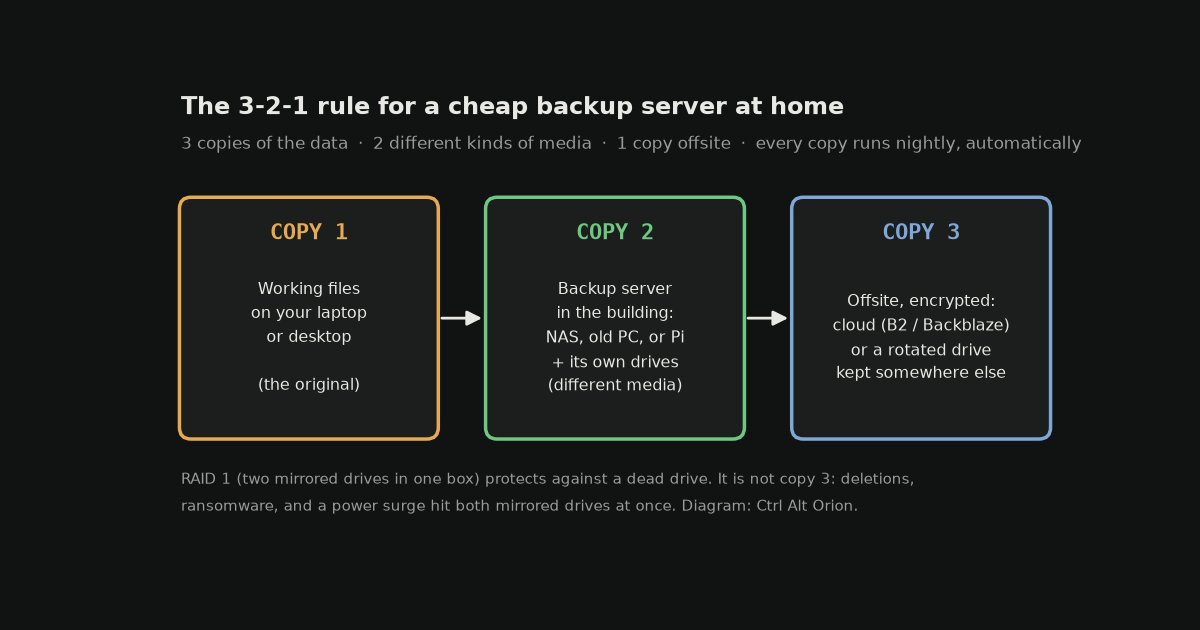 Three copies, two kinds of media, one offsite. Diagram: Ctrl Alt Orion.
This is all the theory you need, and every product in this space is just a way of meeting it:
- 3 copies of anything you can’t afford to lose.
- 2 different kinds of media, so the same failure can’t take both.
- 1 copy offsite, so a fire, flood, or theft can’t take the building and your backups at once.
Your laptop’s working files are copy one. The backup server you’re about to build is copy two. The offsite copy is a cloud backup running quietly in the background, or a drive you rotate to another location. Skip the offsite copy and you don’t have a backup system. You have two drives in one room waiting for the same disaster.
A mirror is not a backup. Two drives in RAID 1 protect you from one drive failing. They don’t protect you from a deleted file, ransomware, or a power surge that fries both drives, because every one of those hits both mirrored disks at the same moment. RAID keeps you running. The offsite copy is what lets you recover. You want both.
Cheap backup server picks and prices (October 2026)
| Pick | What it is | Price (Oct 9) | Best for |
|---|---|---|---|
| Your old PC or laptop | Free OS (TrueNAS or Ubuntu) plus drives | $0 for the box | Cheapest real build |
| Raspberry Pi 5, 2GB | Tiny always-on Linux board plus USB drive | $77.50 list | Small, quiet, low effort to run |
| UGREEN NASync DXP2800 | 2-bay NAS, Intel N100, 8GB DDR5, 2.5GbE | $346.99 | Turnkey value |
| Synology DS225+ | 2-bay NAS, Celeron J4125, 2.5GbE | $364.99 | Most polished backup software |
| WD Red Plus 8TB | CMR NAS hard drive | $354.99 | Drives for a NAS or old PC |
| Seagate Expansion Desktop 8TB | USB external desktop drive | $344.28 | Pi or old-PC builds |
| APC BE600M1 | 600VA/330W UPS | $83.99 | Clean shutdowns in an outage |
Box prices are from Amazon on October 9, except the Raspberry Pi, which is Raspberry Pi’s list price after its October 1 increase. UGREEN’s own store showed the same $346.99 for the DXP2800, against a $439.99 regular price.
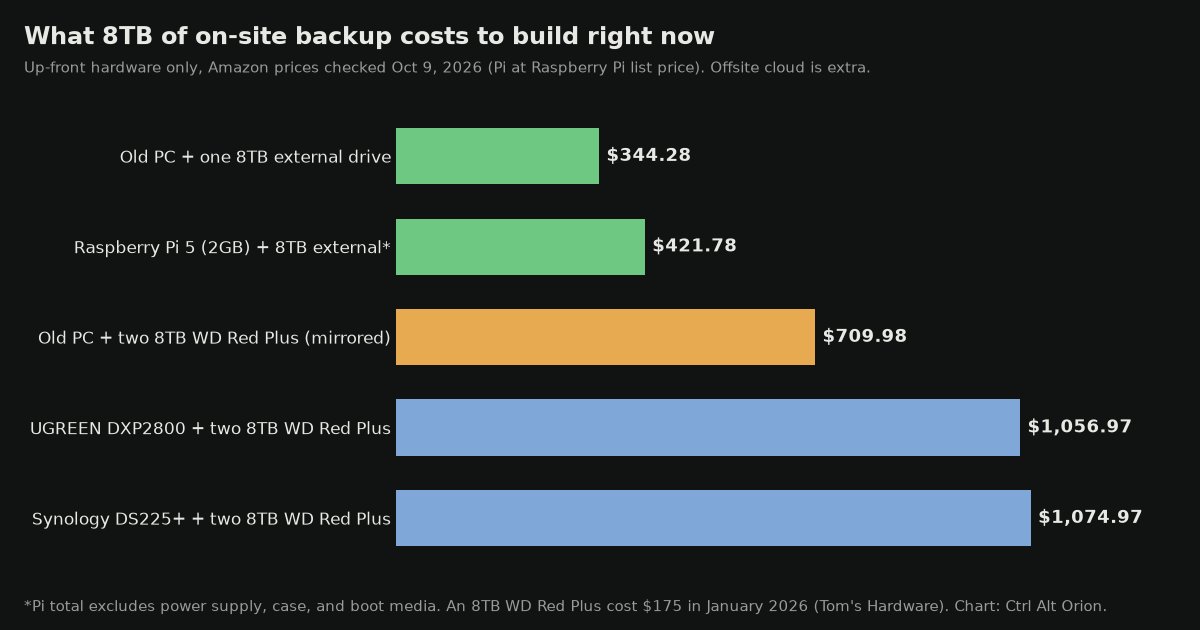 The box is the cheap part now. Drives are most of the bill. Chart: Ctrl Alt Orion.
Our take on each pick
These ratings are for one job: being a backup target in a home or small office. They’re based on the manufacturers’ spec pages, the Amazon listings, and the reporting cited in this article, weighed against the October 9 price. We haven’t tested these units ourselves, so treat them as a buyer’s read of the specs, not lab results.
Our take: UGREEN NASync DXP2800 — 4/5
The strongest hardware here for the money on paper. Its backup software has a shorter track record than Synology’s, which keeps it at 4.
- Pro: Intel N100 and 8GB of DDR5 (expandable to 16GB), per UGREEN’s spec page
- Pro: 2.5GbE port and two M.2 NVMe slots
- Pro: $346.99, the cheapest turnkey NAS on this list
- Con: Newer software with a shorter track record than Synology’s backup apps
Price: $346.99 on Amazon, checked October 9, 2026 (UGREEN’s store showed the same price against a $439.99 regular price).
Our take: Synology DS225+ — 4/5
The most polished backup software in this price range, on older hardware and with a drive policy you need to understand. That balances out to 4.
- Pro: Synology’s backup apps have the longest track record of anything here
- Pro: 2.5GbE port, up to 40TB of raw storage
- Pro: DSM 7.3 accepts third-party hard drives when you create a storage pool
- Con: Older Celeron J4125 chip, and $18 more than the UGREEN
- Con: Drives not on Synology’s list show as “Unverified,” and support may push you toward Synology’s own drives
Price: $364.99 on Amazon, checked October 9, 2026.
Our take: Raspberry Pi 5 (2GB) — 3/5
Small, quiet, and capable, but it’s no longer the $35 bargain, and setup takes the most effort of any option here.
- Pro: Tiny always-on Linux board that fits in your hand
- Pro: Uses less power and makes less noise than a repurposed old PC
- Con: $77.50 for the 2GB board after the October 1 increase, before a power supply, case, and boot storage
- Con: Hobbyist setup: expect some time on drive mounting and configuration
Price: $77.50 list price at Raspberry Pi, checked October 9, 2026 (buy from an Approved Reseller).
Our take: WD Red Plus (8TB and 4TB) — 4/5
The right kind of drive for a NAS mirror. The price, about double January’s, is the only reason it isn’t higher.
- Pro: Amazon lists it as CMR, which is what you want in a RAID mirror
- Pro: Designed for always-on NAS use
- Pro: The 8TB works out to about $44/TB
- Con: Prices have roughly doubled since January, when Tom’s Hardware had the 8TB at $175
- Con: The 4TB costs about $61/TB, much worse value than the 8TB
Price: 8TB $354.99 and 4TB $244 on Amazon, checked October 9, 2026.
Our take: Seagate Expansion Desktop 8TB — 3.5/5
The cheapest 8TB on this list and fine for a Pi or single-drive build, but it was low on stock and isn’t a NAS drive.
- Pro: $344.28, the lowest price for 8TB here
- Pro: Has its own power adapter, so it doesn’t rely on the Pi’s USB power
- Pro: USB 3.0, plug and play on Windows and Mac (Time Machine needs a reformat, per the listing)
- Con: Low stock on October 9
- Con: A desktop external, not a NAS-rated drive for a mirrored box
Price: $344.28 on Amazon, checked October 9, 2026.
Our take: WD Elements Desktop 14TB — 4/5
Ties the WD Red Plus 8TB for the best price per terabyte here and gives you the most room in one drive, but it costs the most up front.
- Pro: About $44/TB, tied for best value on this list
- Pro: 14TB in one USB drive with its own power supply
- Con: $619.99 up front is a lot to spend on a single drive
- Con: A desktop external, not a NAS-rated drive for a mirrored box
Price: $619.99 on Amazon, checked October 9, 2026.
Our take: APC BE600M1 — 4/5
Enough battery to shut a two-bay NAS and a router down cleanly, at a small-office price. It’s not built for long outages.
- Pro: 600VA/330W, about 23 minutes at a 100W load, per the Amazon listing
- Pro: 5 battery-backed outlets plus 2 surge-only outlets
- Pro: The battery can be replaced without replacing the whole unit
- Con: Short runtime: it buys you a clean shutdown, not hours of uptime
Price: $83.99 on Amazon, checked October 9, 2026.
Our take: CyberPower CP1500PFCLCD — 4/5
The step up when you’re protecting a server closet rather than one NAS. It’s more than a single backup box needs.
- Pro: 1500VA/1000W with pure sine wave output, per the Amazon listing
- Pro: 6 battery-backed outlets, an LCD status panel, and automatic voltage regulation
- Pro: 3-year warranty, including the battery
- Con: $239.95 is almost three times the APC, which is enough for a two-bay NAS and a router
Price: $239.95 on Amazon, checked October 9, 2026.
Why a cheap backup server costs more this year
In June, the box was the expensive decision and the drives were an afterthought. That has flipped.
Tom’s Hardware reported in January that hard drive prices had risen an average of 46% since September 2025, citing ComputerBase’s tracking of popular drives. At the time, an 8TB WD Red Plus cost $175 in the US. On October 9, Amazon had the same drive at $354.99, roughly double. Tom’s Hardware’s explanation is that AI data centers are soaking up hard drive production, and manufacturers are shifting to high-capacity enterprise drives, which leaves less supply for everyone else.
Memory is up too. Raspberry Pi has raised prices several times this year because of memory costs, most recently on October 1, when the 2GB Pi 5 went to $77.50. CNX Software lists the 4GB Pi 5 at $110 and the 8GB at $175 after Raspberry Pi’s April increase. (Our RAM and SSD price shock piece covers why.)
What that means for you:
- Buy the capacity you need now, not three years of headroom. The old advice was to buy more than you need because backups grow. That’s still true, but when drives cost twice as much, a smaller pair now and a bigger pair when prices recover is a reasonable plan. Size your first purchase to what you actually have to protect, plus room for a year of growth.
- Bigger drives aren’t automatically better value. On October 9 the 4TB WD Red Plus was $244 and the 8TB was $354.99, so the 8TB cost much less per terabyte. Check the price per TB before you buy.
- The free box matters more than ever. If you have a working old PC, putting the money into drives instead of a NAS chassis gets you the most protection per dollar.
Pick your backup server tier honestly
There are three real ways to build the on-site box. The right one depends on how much tinkering you’re willing to do. Don’t let a Reddit thread shame you into a fancier tier.
Tier 1, “I just want it done”: a turnkey NAS
A two-bay network-attached storage box with two NAS-rated drives is the easiest path. You put the drives in, mirror them, install the built-in backup app, and point your computers at it. It costs the most up front and saves you the most weekends. For most small-business owners, this is the right answer.
Synology DS225+ ($364.99). Synology’s spec page lists an Intel Celeron J4125, a 2.5GbE port, and up to 40TB of raw storage. Its software is the reason to buy it. Drive support has been a sore point on Synology’s 2025 Plus models. With DSM 7.3, Synology now says these models “offer more flexibility for installing third-party HDDs” when creating storage pools. They still recommend drives from their compatibility list, and unlisted drives show up as “Unverified.” So WD Red Plus or IronWolf drives work, but Synology’s support will push you toward its own drives if anything goes wrong.
UGREEN NASync DXP2800 ($346.99). UGREEN lists an Intel N100, 8GB of DDR5 (expandable to 16GB), a 2.5GbE port, and two M.2 NVMe slots. On paper it’s the stronger box for less money. The trade-off is software: Synology’s backup apps have a much longer track record. If you’ll only use it as a backup target, either one is fine.
Whichever you pick, budget for two drives and plan on the drives costing more than the box.
Tier 2, “I have an old PC and a Saturday”: repurpose it
The laptop or desktop you replaced makes a perfectly good backup server. Wipe it and install a free server OS: TrueNAS Community Edition if you want a polished storage appliance (it’s free, open source, and built on OpenZFS), or plain Ubuntu if you’re comfortable in a terminal. Add drives, either inside the case if it has bays or as externals, and you’ve spent $0 on the computer and paid only for storage.
This is still the best value on the list if you have a working old computer. It also uses more power than a NAS or a Pi and is louder, so put it somewhere it won’t bother anyone. If you’re deciding between building your own file server and paying for a SaaS product, our DIY NAS vs SaaS file share breakdown walks through that decision.
Tier 3, “I want it tiny and cheap”: a Raspberry Pi
A Raspberry Pi 5 with a USB drive attached is a small, always-on backup target that fits in your hand. It’s no longer the $35 option. The 1GB Pi 5 lists at $45, the 2GB at $77.50, and you still need a power supply, a case, and something to boot from. Raspberry Pi’s own advice in its October price announcement is to make sure “you’re not paying for headroom you don’t need.” For a box whose only job is receiving copies, the cheaper memory tiers are the place to start. Buy from a Raspberry Pi Approved Reseller. The company says those resellers stick to its published maximum prices and warns that some unauthorized sellers charge inflated prices.
This is the hobbyist option. It takes a little more setup and some “why won’t this drive mount” moments, but it’s capable, and it’s a good way to learn what the turnkey boxes are doing for you. If editing the fstab file sounds stressful, go back to Tier 1.
Drives for a backup server at home: what to buy
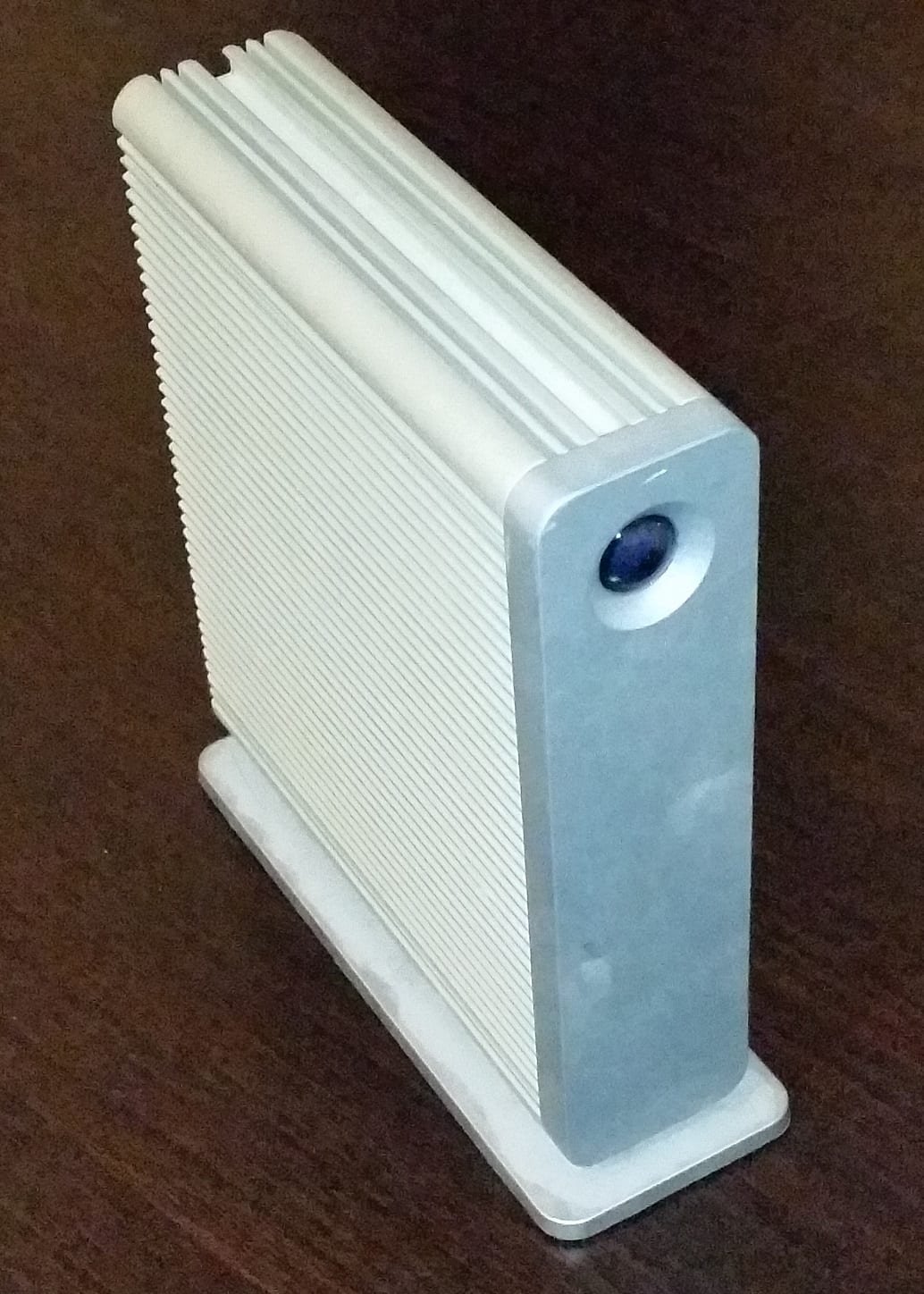 A backup drive doesn’t need to be exciting. It needs to be separate from your main computer. Photo: とある白い猫 / Wikimedia Commons, CC BY-SA 4.0.
You need drives, and you need to avoid cutting corners in the wrong place:
- Inside a NAS or old PC, use NAS-rated CMR drives, like the WD Red Plus 8TB ($354.99) or WD Red Plus 4TB ($244). Amazon lists the WD Red Plus as CMR, which is what you want in a RAID mirror. They’re designed for the always-on duty of a backup box.
- For a Pi or a single-drive old-PC build, a desktop external is fine. The Seagate Expansion Desktop 8TB ($344.28, low stock on October 9) and the WD Elements Desktop 14TB ($619.99) both plug into USB and have their own power supply, so they don’t depend on the Pi’s USB power.
- Buy two of whatever you buy if you plan to mirror, and buy them at the same time so they match in size.
- Check the price per terabyte, not the sticker. On October 9, the 14TB WD Elements was about $44/TB and the 8TB WD Red Plus about $44/TB, while the 4TB Red Plus was $61/TB.
If you plan to rotate a drive offsite, one more option is worth knowing about: a dedicated offline drive that stays unplugged. We covered that setup in the offline backup drive guide.
Offsite copy: the part a home backup server can’t do alone
The on-site box covers “a drive died.” The offsite copy covers “the building is gone.” There are two clean options, and you need one of them.
1. Cloud backup. This is the cheapest, most automatic, and most important part of the whole setup. Here are Backblaze’s current prices, as an example:
- Backblaze Personal Backup is $99 a year per computer for unlimited data, including external drives that are directly connected to that computer. But Backblaze says plainly that network (NAS) drives “do not get backed up.” Backblaze’s clients are native Mac and Windows apps, so this fits an old Windows PC or Mac with the backup drive plugged into it. It doesn’t fit a Pi running Linux, and it doesn’t work for a NAS.
- Backblaze B2 costs $6.95 per TB per month, pay as you go, and the first 10GB is free. This is the one to use with a NAS. If 1TB of your files truly matter, that’s about $7 a month. If you mirror all 8TB, it’s about $56 a month, which is a good reason to be selective about what goes offsite.
Synology’s DS225+ page also mentions its own C2 Storage for Hyper Backup, which is a paid subscription. Whichever service you use, encrypt the data before it leaves the building if it includes customer or financial records.
2. A rotated drive. Keep a second external drive that you sync weekly and store at another location. It’s free if you already own the drive, but it’s only as reliable as your discipline. One Backblaze detail matters here if you combine the two: Personal Backup deletes its copy of an external drive that has been unplugged for more than 30 days on the default plan.
Either option covers the “1” in 3-2-1. Both is better.
Backup server home setup: automate it, then test a restore
A backup you have to remember to run is a backup you’ll eventually forget to run. Whatever tier you choose, put the copy job on a schedule. The NAS apps do this for you. On Linux, it’s a cron job running rsync or restic. The goal is a system that backs itself up every night while you sleep and only bothers you when something goes wrong.
Then do the step everyone skips: restore something. Once a month, pick a file at random, delete a scratch copy of it, and restore it from the backup server and from the offsite copy. A backup you’ve never restored from is only a guess.
Put the whole setup on a battery backup. The APC BE600M1 (600VA/330W, $83.99) is enough for a two-bay NAS and a router. If you also have a server closet to protect, our CyberPower UPS guide covers bigger units, like the CyberPower CP1500PFCLCD ($239.95). A backup server that loses power in the middle of a write can corrupt the data it’s supposed to protect, so a clean shutdown matters most on the machine whose whole job is being reliable.
When a home backup server is the wrong answer
- All your important data already lives in SaaS apps. If your books are in QuickBooks Online, your store is on Shopify, and your files are in Google Drive, a box in the closet doesn’t back up any of that unless you export it. Start by figuring out what you’d actually need to restore.
- You’ll never check on it. An unmonitored NAS can fail silently. If nobody will read its alert emails, a cloud backup service that emails you on failure is the better first step.
- You have more than a few TB of irreplaceable video. At current drive prices, that’s a real budget decision, not a “cheap” build. Price it per TB and decide what really needs three copies.
Frequently asked questions
What is the cheapest backup server I can build?
An old PC or laptop you already own, running a free OS like TrueNAS Community Edition or Ubuntu, plus one external drive. With an 8TB Seagate Expansion Desktop at $344.28, that’s about $344 up front, plus a cloud backup for the offsite copy.
Is a Raspberry Pi good for a backup server at home?
Yes, for a single-drive backup target, if you’re comfortable with Linux. It isn’t as cheap as it used to be. The 2GB Pi 5 lists at $77.50 after Raspberry Pi’s October 1 price increase, and you’ll also need a power supply, a case, and boot media.
Synology DS225+ or UGREEN DXP2800 for backups?
The UGREEN has more hardware for less money: an N100, 8GB of DDR5, and two M.2 slots for $346.99. The Synology costs $364.99 and has the more mature backup software. If you just want backups that run without fuss, buy the Synology. If you want to run other apps on the box too, buy the UGREEN.
Can a Synology DS225+ use WD Red or Seagate IronWolf drives?
Yes. Since DSM 7.3, Synology’s 2025 Plus models accept third-party hard drives for new storage pools. They show up as “Unverified,” and Synology still recommends drives from its compatibility list.
Is RAID 1 a backup?
No. A mirror protects you from one drive failing. Deleted files, ransomware, and power surges hit both drives at the same time. You still need an offsite copy.
Which drives should I put in a backup server at home?
Inside a NAS or old PC, use NAS-rated CMR drives like the WD Red Plus. On October 9 the 8TB was $354.99 (about $44/TB) and the 4TB was $244 (about $61/TB), so the 8TB was the better value. For a Pi or a single-drive build, a desktop external such as the Seagate Expansion Desktop 8TB ($344.28) is fine.
How much does the offsite copy cost?
Backblaze B2 is $6.95 per TB per month, with the first 10GB free: about $7 a month for 1TB, or about $56 a month for all 8TB. Backblaze Personal Backup is $99 a year per computer and covers directly connected external drives, but not a NAS. A drive you rotate to another location costs nothing if you already own it.
Do I need a UPS for a backup server?
Yes. A backup server that loses power in the middle of a write can corrupt the data it’s supposed to protect. The APC BE600M1 ($83.99) is enough to shut down a two-bay NAS and a router cleanly.
Does Backblaze back up a NAS?
Not with Backblaze Personal Backup, which excludes network drives. Use Backblaze B2 ($6.95 per TB per month) or another cloud storage service as the target for your NAS backup app.
Why are hard drives so expensive right now?
Demand from AI data centers. Tom’s Hardware reported prices up an average of 46% between September 2025 and January 2026, and an 8TB WD Red Plus that cost $175 in January was $354.99 on Amazon on October 9, 2026.
The bottom line
The cheapest working version is your old PC, one or two drives, a free OS, a nightly rsync, and a cloud backup for the offsite copy. That’s a real 3-2-1 system for the price of the drives. The turnkey version is a Synology or UGREEN box and twenty minutes of setup. Both are better than the system you have now, which, if you’re honest, is one drive and a prayer.
If your business data is spread across spreadsheets, app exports, and platform accounts, and you’re not sure what a complete backup would even include, that’s a different problem than hardware. Nobody has mapped where your business actually keeps its data. That mapping, and the automated pipeline that keeps the important data flowing somewhere safe, is what we set up for clients. The drive is the easy part. Knowing what’s worth protecting is the part to get right.
Sources
6 refsAll prices and pages checked October 9, 2026.
- Hard drive prices have surged by an average of 46% since September — Tom’s Hardware (January 16, 2026): 46% average increase, $175 8TB WD Red Plus in January, AI data center demand as the cause.tomshardware.com
- Price increases for 2GB Raspberry Pi 4 and Raspberry Pi 5 — Raspberry Pi (October 1, 2026) and CNX Software’s April price table: $77.50 2GB Pi 5, $45 1GB, $110 4GB, $175 8GB, Approved Reseller guidance.raspberrypi.com · cnx-software.com
- Drive compatibility policies for Synology storage systems (DSM 7.3) — Synology and DS225+ product page — Synology: third-party HDD support on 2025 Plus models, “Unverified” label, Celeron J4125, 2.5GbE, up to 40TB raw, paid C2 Storage.kb.synology.com · synology.com
- UGREEN NASync DXP2800 — UGREEN: Intel N100, 8GB DDR5 expandable to 16GB, 2.5GbE, two M.2 NVMe slots, $346.99 sale vs $439.99 regular price.nas.ugreen.com
- Backblaze Cloud Backup pricing, B2 Cloud Storage pricing, and Backing up External Hard Drives — Backblaze Help: $99/year Personal Backup, $6.95/TB/month B2 with 10GB free, NAS drives excluded, 30-day unplugged-drive rule.backblaze.com · help.backblaze.com
- TrueNAS Community Edition — TrueNAS: free, open-source storage OS built on OpenZFS.truenas.com
comments
loading comments…
No comments yet. Start the thread.