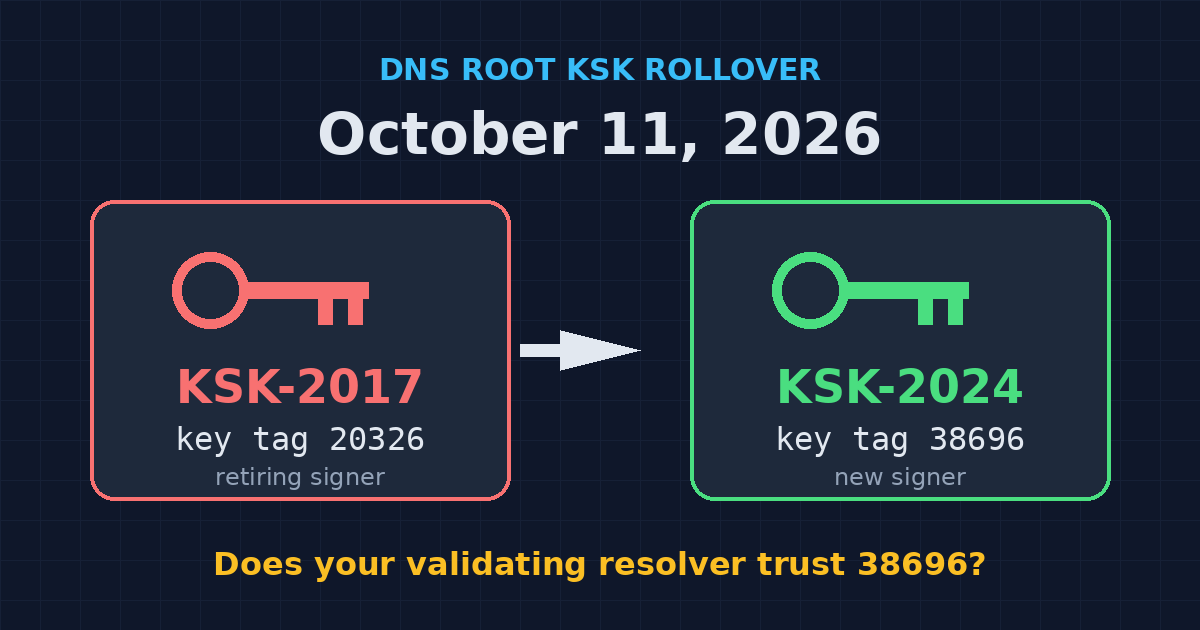
Header image credit: The retiring root key, KSK-2017 (key tag 20326), hands off to KSK-2024 (key tag 38696) on October 11, 2026. Graphic: Ctrl Alt Orion.
Note: The root KSK rollover is scheduled for Sunday, October 11, 2026. That’s three days after this was published on October 8. If you run a validating resolver, do the check today, not Saturday night.
If you run your own DNS resolver (a Pi-hole with Unbound in the closet, a BIND box someone set up in 2019, a Windows Server doing DNS for the office), there’s a weekend deadline you might not have on the calendar. On October 11, the DNS root zone switches to a new key-signing key. A resolver that validates DNSSEC and doesn’t trust the new key stops resolving names. Not one site. Potentially all of them.
The annoying part is how it fails. Nothing necessarily breaks the moment the switch happens. ICANN says failures show up at some point in the 48 hours after the rollover, as cached keys expire. So the office can lose DNS on Monday morning, with the websites fine and the internet connection fine, and nobody connects it to a key change that happened the day before.
The good news: the check takes five minutes, most people don’t need to do anything at all, and the fix (if you need one) is a key update and a restart. Here’s who needs to act, how to test, and what to run on BIND, Unbound, Pi-hole, Windows, and Linux.
What the root KSK rollover actually is
DNSSEC lets a resolver check that a DNS answer is authentic: that the address it got for your bank’s domain is the one your bank published, not one someone slipped in along the way. It works as a chain of signatures. The root vouches for .com, .com vouches for example.com, and example.com signs its own records.
The root has no parent to vouch for it. So every validating resolver ships with a copy of the root’s public key (or its fingerprint) that it trusts in advance. That’s called a trust anchor, and it’s where the whole chain starts.
The root uses two kinds of keys. The zone-signing key (ZSK) signs the root’s records, including the DS records for top-level domains like .com. The key-signing key (KSK) signs only the root’s key set, the DNSKEY records. Your resolver uses the KSK it trusts to verify that key set, then uses the ZSK from it to verify everything else.
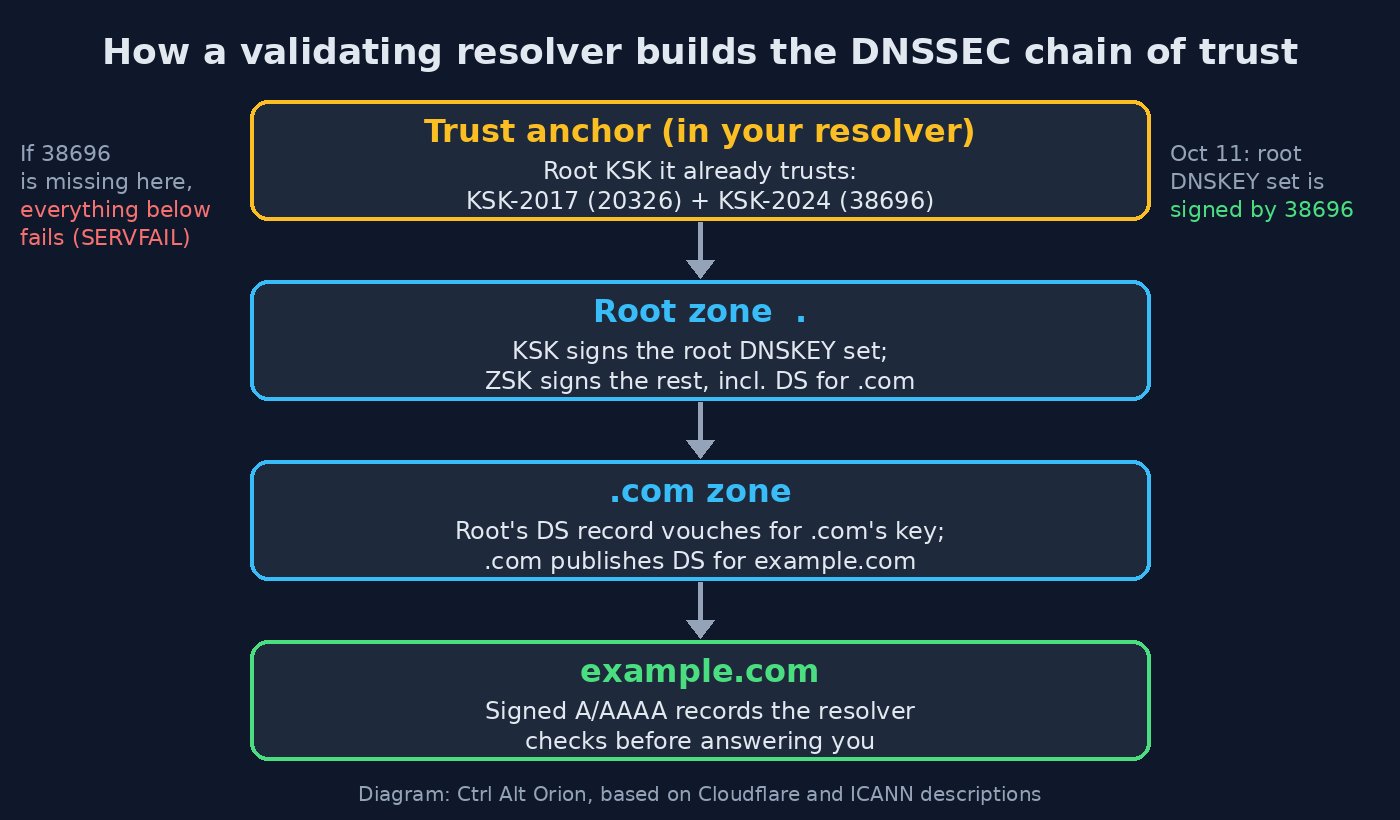 If the trust anchor at the top doesn’t include the key signing the root, nothing below it validates. Diagram: Ctrl Alt Orion, based on Cloudflare and ICANN descriptions.
A DNSSEC KSK rollover replaces that top key. This is only the second root KSK rollover ever. The first happened in October 2018, a year later than planned, because data showed too many operators hadn’t updated their systems yet.
The specifics for this one:
- Old key: KSK-2017, key tag
20326. It has signed the root key set since the 2018 rollover. - New key: KSK-2024, key tag
38696. - Switch date: October 11, 2026. From then on, the root key set is signed by KSK-2024.
- Same algorithm: both keys are RSA/SHA-256 with 2048-bit keys, so your resolver software doesn’t need new crypto support, just the new key.
Why now, after eight years? ICANN’s original plan called for a rollover every three years. The COVID-19 pandemic forced remote-only key-signing ceremonies for a while, and a later upgrade to new hardware security modules meant generating a brand-new key, which became KSK-2024.
Root KSK rollover timeline: how we got to October 11
This rollover has been running in slow motion for almost two years. KSK-2024 was published in the root’s key set on January 11, 2025. That’s roughly 21 months of notice before it takes over, a longer pre-publication period than in 2018.
That long runway exists because of RFC 5011, the standard that lets resolvers learn a new root key automatically. A resolver sees the new key published alongside the old one, and because the old key signs the set containing the new one, it can verify the newcomer. RFC 5011 then makes the resolver wait at least 30 days, re-checking the whole time, before it starts trusting the new key.
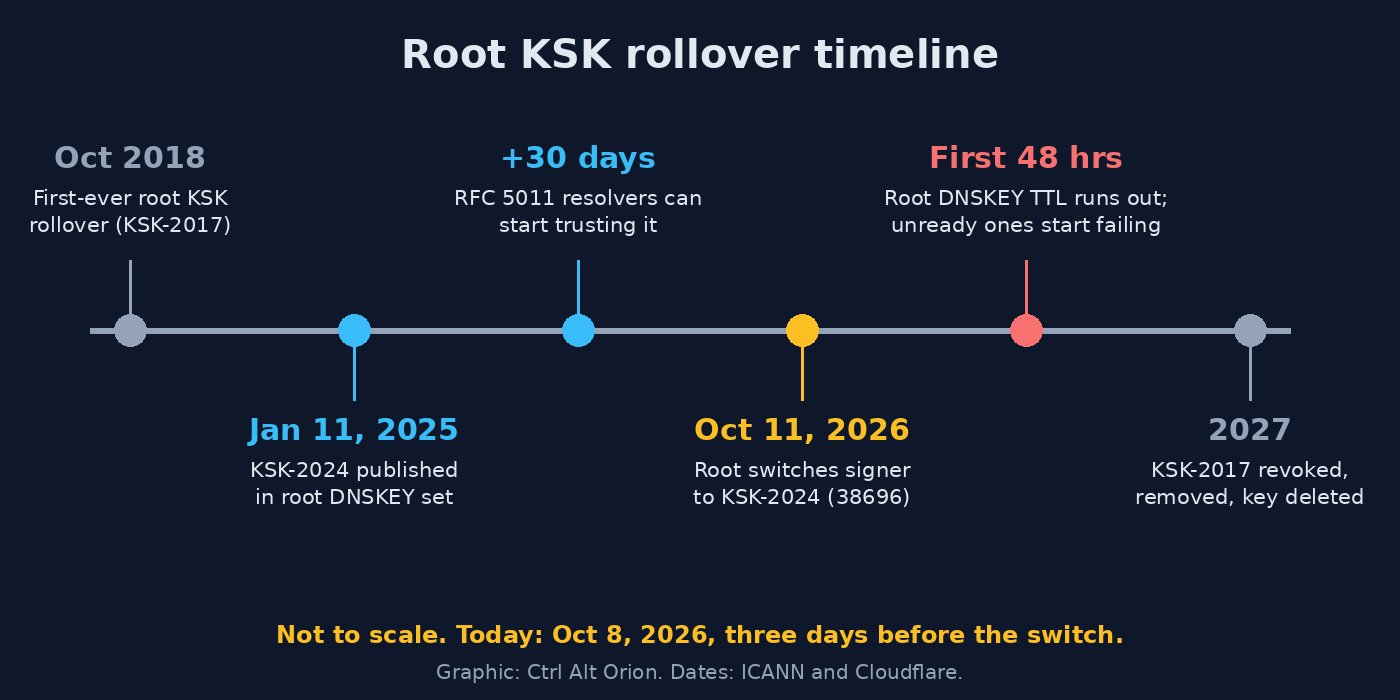 Not to scale: the 21-month runway was the point. Graphic: Ctrl Alt Orion. Dates: ICANN and Cloudflare.
ICANN’s July 2026 numbers are encouraging: more than 95 percent of reporting resolvers have recognized and adopted KSK-2024, and the adoption curve nearly mirrors the successful 2018 rollover. That’s also exactly why you should check. “More than 95 percent of reporting resolvers” says nothing about the one in your server closet.
The rollover doesn’t end on October 11 either. Per Cloudflare, ICANN plans to revoke KSK-2017, remove it from the root zone, and delete its private key in 2027. ICANN expects the next rollover, estimated to conclude in 2029, to also change the algorithm to ECDSA. That’s a separate event.
Who needs to act on the DNS KSK rollover (and who doesn’t)
The short version from ICANN: if your resolver doesn’t do DNSSEC validation, the rollover doesn’t affect it. If it validates and already trusts KSK-2024, you won’t notice anything. The only people in trouble are running a validating resolver that never picked up the new key.
| Your setup | Do you need to act? | What to do |
|---|---|---|
| Devices using 1.1.1.1 or Cloudflare Gateway DNS | No | Cloudflare says its systems already trust KSK-2024 |
| Domain hosted on Cloudflare DNS | No | Cloudflare says no action is needed; this rollover is a resolver problem, not a website problem |
| Devices using your ISP’s resolver | Not you | That’s your ISP’s job. Run the browser test if you’re curious |
| Resolver that doesn’t validate DNSSEC | No | ICANN says non-validating resolvers are unaffected |
| Pi-hole running Unbound as its upstream | Yes, check | Unbound is the validating resolver. Check its root.key for 38696 |
| BIND recursive resolver | Yes, check | Run the managed-keys status check below |
| Unbound, PowerDNS Recursor, Knot Resolver | Yes, check | Check the trust anchor file (root.key or root.keys) |
| Windows Server DNS with DNSSEC validation on | Yes, check | Check the server’s trust anchors for the root |
| Containers or apps with a resolver baked in at build time | Maybe | ICANN flags these; find out which resolver they actually use |
That last row is easy to miss. ICANN’s guidance points out that containerized services and apps using DNS-over-HTTPS or private stub resolver settings may use a resolver chosen at build or deploy time, independent of the host’s settings. If a container image points at an internal validating resolver, that resolver is the one to check.
One more case for small offices: if your guest Wi-Fi hands out a different DNS server than the staff network (a sensible design, and one we cover in our guest network setup guide), check both. ICANN notes that if one of your configured resolvers is ready and another isn’t, lookups may get slower but still work. If they’re all unready, users lose DNS.
How to test DNS resolver readiness: the one-click check
The fastest DNS resolver test for this rollover is Cloudflare’s readiness page at dnstest.dev/ksk-2024. Open it in a browser on the network you want to check. It asks whatever resolver your browser is using whether it trusts KSK-2024, and runs five checks:
- A validly signed name that should resolve. If it doesn’t, the rest can’t be trusted.
- A deliberately broken DNSSEC name that a validating resolver should reject. This proves validation is on.
- A sentinel query for the current key (KSK-2017, 20326), to confirm the resolver supports the sentinel protocol.
- is-ta-38696: should resolve if KSK-2024 is trusted.
- not-ta-38696: should be blocked if KSK-2024 is trusted.
Three caveats from the page itself, because they’ll trip people up:
- The browser test checks your browser’s resolver, which may not be your network’s. If Secure DNS (DNS-over-HTTPS) is on in Chrome, Edge, or Firefox, or a VPN is connected, you’re testing that path, not your Pi-hole or BIND box. Turn those off for the test, or use the command-line checks below.
- “Inconclusive” doesn’t mean broken. If your resolver doesn’t support the sentinel protocol, the page can’t tell whether it trusts the new key. It says so explicitly: an inconclusive result alone doesn’t mean the key is missing.
- It’s a snapshot. Results can come from cache, and it says nothing about every resolver on a network with several.
RFC 8509 sentinel testing: how the check works
The trick behind the test is RFC 8509, the root key trust anchor sentinel. It lets you ask a resolver “do you trust key X?” using ordinary DNS queries with specially formatted names. No admin access needed.
Names starting with root-key-sentinel-is-ta-<key-tag> and root-key-sentinel-not-ta-<key-tag> trigger special handling in a resolver that supports the sentinel. The resolver validates the answer as usual, then decides whether to hand it over or replace it with SERVFAIL, based on whether that key tag is in its trust anchors:
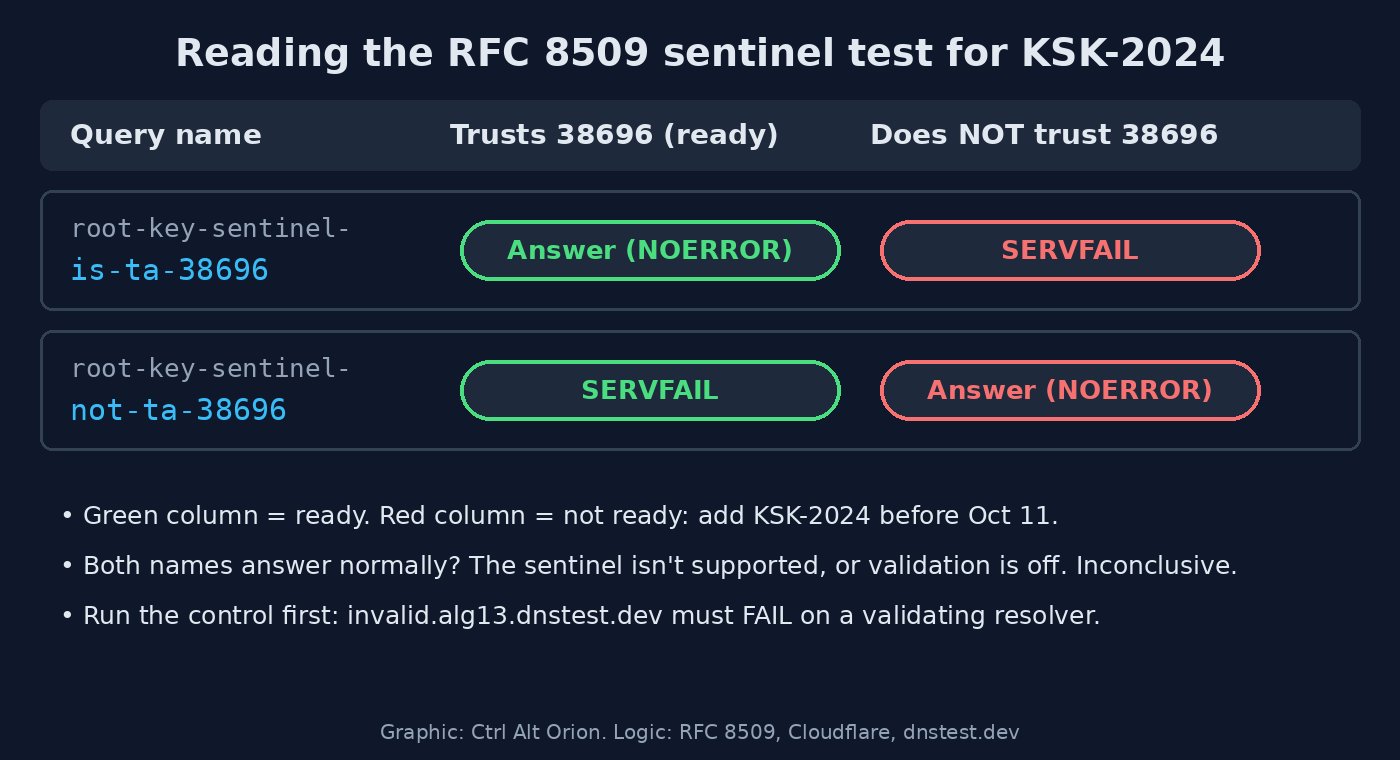 The sentinel answers a yes-or-no question with a deliberate failure. Graphic: Ctrl Alt Orion. Logic: RFC 8509, Cloudflare, dnstest.dev.
| Query | Resolver trusts KSK-2024 | Resolver doesn’t trust KSK-2024 |
|---|---|---|
root-key-sentinel-is-ta-38696.dnstest.dev | Normal answer | SERVFAIL |
root-key-sentinel-not-ta-38696.dnstest.dev | SERVFAIL | Normal answer |
Yes, a SERVFAIL on the not-ta name is the good result. If both names resolve normally, the sentinel isn’t supported on that path (or validation is off), and you need to check the trust anchors directly. Unbound has a root-key-sentinel option that’s on by default, and BIND has its own root-key-sentinel option, so on current versions of either you can usually get a clear answer unless someone turned it off.
The sentinel labels work under any DNSSEC-signed domain. The dnstest.dev names are just the ones Cloudflare set up for this.
How to check DNS resolver in Linux
On Linux (or macOS, or a Pi-hole box), dig does the job. First, figure out which resolver you’re actually testing. On systems using systemd-resolved, resolvectl status shows the upstream servers; otherwise look at /etc/resolv.conf. If you want to test a specific resolver, put its address after @.
Start with the control, then the two sentinel queries. These are the commands from the dnstest.dev page, pointed at your own resolver (replace 192.168.1.10 with yours):
# Control: a broken DNSSEC name. A validating resolver must return SERVFAIL.
dig @192.168.1.10 invalid.alg13.dnstest.dev A +dnssec

# Should return an answer (status: NOERROR) if KSK-2024 is trusted
dig @192.168.1.10 root-key-sentinel-is-ta-38696.dnstest.dev A +dnssec

# Should return status: SERVFAIL if KSK-2024 is trusted
dig @192.168.1.10 root-key-sentinel-not-ta-38696.dnstest.dev A +dnssec
Look at the status: field in each response header. If the invalid name comes back NOERROR with addresses, your resolver isn’t validating DNSSEC at all, and per ICANN the rollover won’t affect it (whether you should be validating is a separate conversation).
For a Pi-hole running Unbound, test Unbound directly on its own port. The Pi-hole Unbound guide sets Unbound to listen on port 5335:
dig @127.0.0.1 -p 5335 root-key-sentinel-is-ta-38696.dnstest.dev A +dnssec
dig @127.0.0.1 -p 5335 root-key-sentinel-not-ta-38696.dnstest.dev A +dnssec
Here’s what a ready resolver looks like. I ran the same five dnstest.dev checks against 1.1.1.1 from a test box this morning:
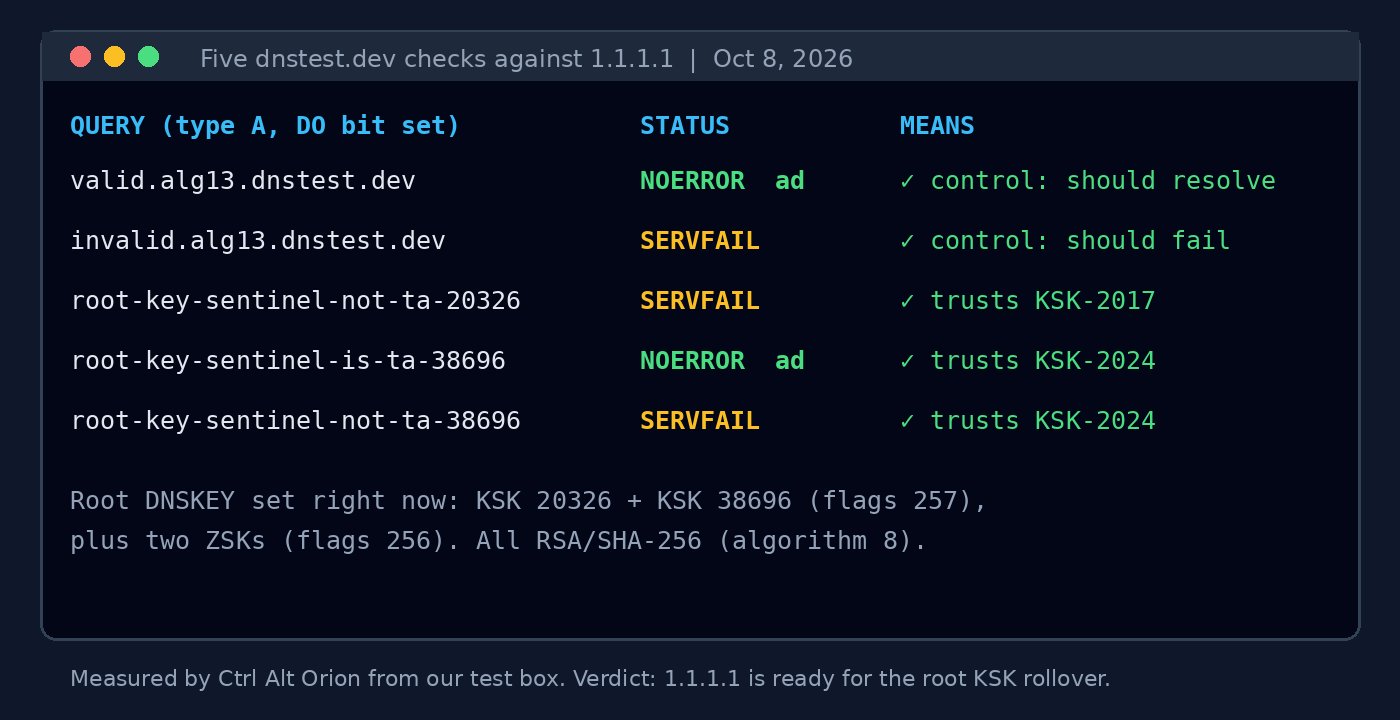 A ready resolver: the controls behave, is-ta-38696 answers, not-ta-38696 fails. Measured by Ctrl Alt Orion against 1.1.1.1 on October 8, 2026.
Every row matched a ready resolver, which lines up with Cloudflare’s statement that 1.1.1.1 already trusts KSK-2024. A root DNSKEY query from the same box also showed both KSKs, 20326 and 38696, currently published in the root key set. You can see that yourself with dig . DNSKEY +multiline, which prints a key id comment next to each key. Just remember that only proves the root publishes the new key. It doesn’t prove your resolver trusts it. The sentinel queries do that.
Check BIND for KSK-2024: rndc managed-keys status
BIND keeps root trust anchors that are maintained by RFC 5011 in its managed-keys database. To see what’s in it:
rndc managed-keys statusLook for key ID 38696 in the output and check that its entry reports the key as trusted. If BIND has seen the new key but hasn’t finished its hold-down, or the key is missing entirely, you can force an immediate refresh query instead of waiting for the normal interval:
rndc managed-keys refreshThen run status again. ICANN’s blog lists bind.keys as BIND’s trust anchor file, so it’s worth confirming that your BIND version’s copy includes KSK-2024 too.
Avoid rndc managed-keys destroy unless you know exactly why you’re running it. The BIND manual says it should be used “only with extreme caution.”
If the key is still missing, ICANN’s advice is to confirm automatic trust-anchor updates are enabled and that the resolver has write permission to its storage directory. A resolver that can’t save what it learned forgets it on every restart, which is exactly what Cloudflare saw during the 2018 rollover when software upgrades and machine moves wiped learned trust anchors.
Check Unbound (and Pi-hole with Unbound): root.key and unbound-anchor
Unbound tracks the root key in the file named by its auto-trust-anchor-file setting. Paths vary by distro, so ask Unbound where it is:
unbound-checkconf -o auto-trust-anchor-fileThen search that file for the new key tag (use the path the previous command printed):
grep 38696 /var/lib/unbound/root.keyEach key line in Unbound’s state file includes an id = comment with the key tag and a state marker. You want the line for 38696 to show VALID. ADDPEND means Unbound has seen the key but is still in its 30-day hold-down. No line at all means it never learned the key.
To repair it, unbound-anchor writes or updates the root trust anchor file, then restart Unbound:
sudo unbound-anchor -a /var/lib/unbound/root.key
sudo systemctl restart unbound
Per the Unbound manual, unbound-anchor exits with 1 if it updated the anchor from its certificate or used the built-in root anchor, and with 0 if no update was necessary, if RFC 5011 tracking can handle the update, or if an error occurred. So the exit code alone won’t tell you you’re fixed. Re-run the grep and the sentinel queries after the restart. Also check file ownership: the unbound user needs to be able to write that file, or RFC 5011 updates silently go nowhere.
If your Pi-hole and Unbound live on the same small always-on box as your file backups (we covered that setup in our cheap home server guide), that box is now also the thing standing between your office and the entire internet. Treat it accordingly.
How to check DNS resolver in Windows
There are two different Windows jobs here: testing from a Windows client, and checking a Windows Server that runs DNS.
From any Windows PC: nslookup and Resolve-DnsName
The quick check with nslookup (the second argument is the DNS server to ask; leave it off to use your default):
nslookup root-key-sentinel-is-ta-38696.dnstest.dev 192.168.1.10
nslookup root-key-sentinel-not-ta-38696.dnstest.dev 192.168.1.10
A ready resolver returns addresses for the first and a server failure for the second.
Resolve-DnsName in PowerShell gives you more control. -Server picks the resolver, -DnssecOk sets the DNSSEC OK bit, and -DnsOnly skips LLMNR and NetBIOS fallbacks so you’re only testing DNS:
Resolve-DnsName -Name root-key-sentinel-is-ta-38696.dnstest.dev -Type A -Server 192.168.1.10 -DnssecOk -DnsOnly
Resolve-DnsName -Name root-key-sentinel-not-ta-38696.dnstest.dev -Type A -Server 192.168.1.10 -DnssecOk -DnsOnly
The first should return A records. The second should fail with an error instead of returning addresses. Run the invalid.alg13.dnstest.dev control the same way first.
On Windows Server DNS: check the root trust anchor
If your Windows Server does DNSSEC validation itself, list its trust anchors for the root zone:
Get-DnsServerTrustAnchor -Name .Look for KSK-2024’s key tag, 38696, in the output. If there’s no root trust anchor at all, that server probably isn’t validating against the root on its own. Many office domain controllers just forward to an ISP or public resolver, in which case the forwarder is the resolver that matters, and you’re back to the sentinel queries above.
Missed the DNSSEC KSK rollover? What failure looks like and how to recover
Say you skip all this and your resolver isn’t ready. ICANN’s “What to Expect” document lays out what happens:
- Nothing, at first. Your resolver still has the root key set cached from before the switch. The TTL on those records is 48 hours, so the failure starts at some point in the 48 hours after the rollover, whenever the resolver refetches the key set and can’t validate it.
- Then it cascades. Web pages fail to load or load partially, email stops arriving, and it gets worse until no program can pull anything new from the internet. Automated systems fail too, not just people.
- It’s inconsistent. Two people hitting the same site can get different results if they use different resolvers, which makes the root cause harder to pin down.
- You might not hear about it by email. ICANN notes that an operator whose resolvers are all broken may only hear about the outage by phone.
To recover quickly, ICANN describes two stopgaps: temporarily disable DNSSEC validation, or configure a negative trust anchor for the root zone (RFC 7646). Either should make the problem stop immediately. Then install KSK-2024 as a trust anchor as soon as possible and turn validation back on. Don’t leave validation off “until things calm down.” That’s how a two-hour fix turns into a permanent hole.
FAQ
What is the root KSK rollover?
It’s the replacement of the DNS root zone’s key-signing key, the top key in the DNSSEC chain of trust. On October 11, 2026, the root stops signing its key set with KSK-2017 (key tag 20326) and starts signing it with KSK-2024 (key tag 38696). It’s only the second time this has happened; the first was in October 2018.
Do I need to do anything if I use 1.1.1.1?
No. Cloudflare says 1.1.1.1 and Gateway DNS already trust KSK-2024, and our own sentinel test against 1.1.1.1 on October 8 matched a ready resolver.
What is key tag 38696?
It’s the identifier for KSK-2024, the new root key. Checking a resolver means confirming 38696 is in its trust anchors, either by looking at the trust anchor file or database, or by asking the resolver with an RFC 8509 sentinel query.
My dnstest.dev result says inconclusive. Is my resolver broken?
Not necessarily. It usually means your resolver doesn’t support the RFC 8509 sentinel, so the test can’t tell either way. Check the trust anchors directly using the BIND, Unbound, or Windows Server steps above.
What happens if my resolver doesn’t trust KSK-2024?
Starting sometime in the 48 hours after October 11, it fails DNSSEC validation for everything and returns errors instead of answers. To users, that looks like websites and email going down. The fix is to add KSK-2024 as a trust anchor, or as a stopgap, temporarily disable validation or set a negative trust anchor for the root.
Does the DNSSEC root key rollover change the algorithm?
No. Both KSK-2017 and KSK-2024 use RSA/SHA-256 with 2048-bit keys. An algorithm change to ECDSA is expected in a future rollover, which ICANN estimates will conclude in 2029.
How do I test my DNS resolver for the root KSK rollover?
Open dnstest.dev/ksk-2024 in a browser on the network you want to check, with Secure DNS and any VPN turned off, or run the sentinel queries with dig against your resolver. A ready resolver answers root-key-sentinel-is-ta-38696.dnstest.dev and returns SERVFAIL for root-key-sentinel-not-ta-38696.dnstest.dev.
Does the DNS KSK rollover affect my website?
Not if your domain is hosted on Cloudflare DNS. Cloudflare says no action is needed there, because this rollover is a resolver problem, not a website problem. What matters is whether the validating resolvers your devices use trust KSK-2024.
Do I need to check my Pi-hole?
Only if it runs Unbound as its upstream, because then Unbound is the validating resolver. Check Unbound’s root.key for 38696 (the line should show VALID), and test Unbound directly on port 5335 with the sentinel queries.
The bottom line
For most people, the root KSK rollover is a non-event: if you use 1.1.1.1 or a resolver that doesn’t validate DNSSEC, there’s nothing to do, and if you use your ISP’s resolver, readiness is your ISP’s job. If you run your own validating resolver, spend five minutes before Sunday: open dnstest.dev/ksk-2024 with Secure DNS and the VPN off, or run the two sentinel queries against your resolver, and confirm key tag 38696 is trusted. If it’s missing, update the trust anchor, make sure the resolver can write its state file, and restart. Then add “check the resolver’s trust anchors” to the same recurring list as patching and backup tests in your small business data security checklist, because ICANN expects the next rollover, which also changes the algorithm, to conclude around 2029.
Sources
6 refs- The keys to the Internet change on October 11, 2026. Are you ready? — Cloudflare Blog: KSK-2024 (key tag 38696) replacing KSK-2017 (20326) on October 11, 2026; second root KSK rollover ever; no action needed for 1.1.1.1, Gateway DNS, or Cloudflare-hosted domains; KSK-2024 published since January 11, 2025; RFC 5011’s 30-day wait; KSK-2024 added to Cloudflare’s resolver in July 2024; trust anchors lost during 2018 upgrades and machine moves; sentinel queries and expected results; KSK-2017 revocation and removal in 2027.blog.cloudflare.com
- Is your resolver ready for the 2026 root key rollover? — dnstest.dev: the five browser checks and their dig commands, how to read results, Secure DNS and VPN caveats, inconclusive results not meaning the key is missing.dnstest.dev
- Root Zone KSK Rollover — ICANN: resolver operators should verify KSK-2024 (key tag 38696) is in their trust anchors and not assume automatic updates succeeded.icann.org
- Preparing for the Root Zone KSK Rollover: What You Need to Know — ICANN Blog, July 27, 2026: first rollover in October 2018 after a one-year postponement; pandemic and HSM upgrade delays; more than 95 percent of reporting resolvers adopting KSK-2024; trust anchor file names for BIND, Unbound, PowerDNS Recursor, and Knot Resolver; enabling automatic updates and write permissions.icann.org
- What to Expect During the Root KSK Rollover — ICANN (PDF), July 27, 2026: non-validating resolvers unaffected; roughly 21 months of pre-publication; RSA/SHA-256 with 2048-bit keys; next rollover estimated to conclude in 2029 with ECDSA; 48-hour TTL and failure window; failure symptoms; containers and DoH caveat; recovery via disabling validation or a negative trust anchor.icann.org
- RFC 8509: A Root Key Trust Anchor Sentinel for DNSSEC — RFC Editor: the root-key-sentinel-is-ta and root-key-sentinel-not-ta labels and the SERVFAIL response logic.rfc-editor.org
comments
loading comments…
No comments yet. Start the thread.