Disclosure: some links below are Amazon affiliate links (tag cao04-20). Costs you nothing; the picks don’t change based on that. Every spec and price below is sourced at the bottom.
Note: This runs alongside today’s piece on the NSA/CISA/FBI joint advisory AA26-251A, which describes federal guidance telling AI vendors to quietly degrade accounts whose usage pattern looks like industrial-scale distillation — a pattern that overlaps uncomfortably with ordinary overnight automation. That piece’s point: you may never be told if your account gets caught in that net. This is the hardware fix for the part of your workload that doesn’t have to depend on anyone else’s account at all.
Here’s the honest framing before the pitch: buying a GPU is not a defense against your specific API account getting flagged tomorrow. Nothing in this piece stops that from happening if it’s going to happen. What it does is shrink the amount of your business that depends on the outcome. The routine, repetitive, high-volume slice of your AI usage — the exact slice that looks most like the behavioral pattern federal regulators just told vendors to watch for — doesn’t need to touch a cloud API at all anymore. It can run on a graphics card sitting in a box you own, with no account, no usage cap, and no fraud-detection system deciding whether you look legitimate today.
That capability shift is recent and real, not hype. Two 30B-class open-weight models built specifically for always-on local agent work — Meta’s Muse Glimmer and NVIDIA’s Nemotron 3.5 Lightning — shipped a day apart in August 2026, both aimed squarely at “the high-volume execution layer” of agent work: batch processing, tool calls, validation, the unglamorous stuff that runs all night while nobody’s watching. Running that layer locally is now a hardware decision, not a research problem.
The pick: ASUS Dual GeForce RTX 4060 Ti 16GB
ASUS Dual GeForce RTX 4060 Ti 16GB
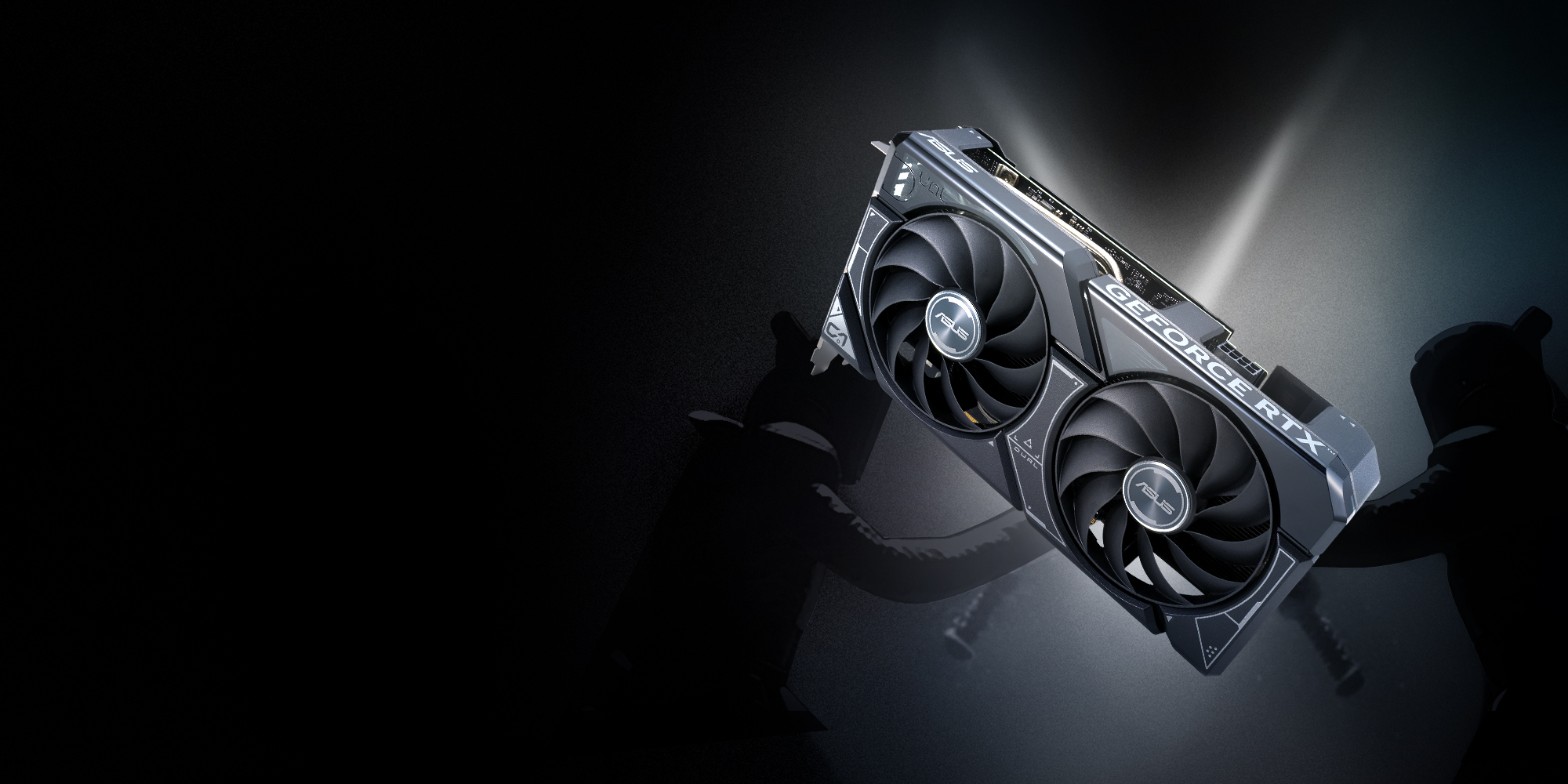 ASUS Dual GeForce RTX 4060 Ti 16GB — a 2.5-slot dual-fan card built for exactly this box: enough VRAM to hold a genuinely useful quantized model, without the RTX 5090’s price tag. Photo: ASUS.
| Spec | Detail |
|---|---|
| VRAM | 16GB GDDR6 |
| Price | ~$500-600 as of September 2026 (see pricing note below) |
| Length | 22.7cm, 2.5-slot design |
| Cooling | Dual Axial-tech fans, 0dB idle (fans stop under light load) |
| Compute (vendor-stated) | 353 AI TOPS |
| Power | Single 8-pin or 16-pin connector depending on variant — check your specific model and PSU before buying |
| Best fit here | Quantized 7B–20B local models comfortably; tight but workable for smaller 4-bit 30B-class models with reduced context |
Sources: ASUS, Dual GeForce RTX 4060 Ti 16GB official product page.
Check current RTX 4060 Ti 16GB pricing here.
A pricing note worth reading before you buy anything in this category: GPU prices in 2026 are elevated for the same underlying reason covered in the piece on the DRAM/NAND price shock — AI data centers are buying up memory capacity at a scale that’s dragging consumer GPU and RAM prices up with it. U.S. street prices for graphics cards were running roughly 22% over MSRP as of spring 2026, and high-end cards have kept climbing since. This is not the cheapest this card will ever be. It’s also not obviously getting cheaper soon. Buy based on whether the workload justifies it today, not on waiting for a price drop that may not come this year.
Why 16GB, and what it actually fits
VRAM is the number that matters most for this use case, more than clock speed or generation. A quantized (4-bit) large language model needs roughly 0.5-0.6GB of VRAM per billion parameters, plus overhead for context window. That math is the whole buying decision:
| Model size (4-bit quantized) | Approximate VRAM needed | Fits on 16GB? |
|---|---|---|
| 7B–8B | ~4-5GB | Yes, comfortably, with plenty of room for a large context window |
| 13B–14B | ~7-9GB | Yes, comfortably |
| 20B–24B | ~11-14GB | Yes, tight — reduce context window if you’re running other things on the same machine |
| Nemotron 3.5 Lightning (30B MoE, 3B active) | Vendor-claimed to run on a single RTX 5090 | Runs, but you’re trading context room and headroom; the 5090’s 32GB gives NVIDIA’s own benchmark numbers room to breathe that 16GB doesn’t |
| Muse Glimmer (30B dense) at Q4_K_XL | ~19GB | Does not fit on 16GB. This is the model that needs the 24GB tier below. |
If your actual job is running Glimmer specifically, or you want real headroom on any 30B-class model, this card is the wrong size and you should look at the 24GB tier instead — a used RTX 3090 is the community’s standard answer here, currently running $900-1,100 due to the same memory-driven demand pushing every price in this category up this year. That’s a real cost jump from what this card used to run just a year or two ago, and it’s worth checking current listings rather than trusting older price references anywhere online, including this one by the time you read it.
For the much larger set of small-shop jobs that don’t need a full 30B model — document classification, structured data extraction, drafting and validation passes, tool-calling agents that mostly do narrow, repeatable tasks — a well-chosen 7B-14B open-weight model running on this card handles the work fine, and 16GB is the sweet spot that avoids both underbuying (8GB cards that can’t hold a useful model with real context) and overbuying (a $2,000+ card sized for a workload you don’t have).
The breakeven math, worked with real numbers
“It depends on volume” is true but not useful without a worked example, so here’s one. Say your nightly document-classification job currently runs through a cloud API at $0.15 per 1,000 output tokens (a realistic blended rate for a mid-tier hosted model in September 2026), processing roughly 2 million tokens a night across a batch of invoices, receipts, and inventory records. That’s $300/night, or roughly $9,000/month, which is a genuinely large number for a small shop and usually means the job either already got scaled back to “sample only what we can afford” or is quietly costing more than anyone budgeted for.
Move that same job to a locally-run 13B model on this card: the marginal cost per run drops to electricity only. A card like this draws roughly 165W under sustained load; running that batch job for, say, three hours a night at 165W costs about 0.5 kWh, or roughly 6-9 cents at typical U.S. commercial electricity rates. Call it $3/month in power for the same nightly job. The card pays for itself against the cloud-API cost of that one job in less than a day of usage at that volume — which is exactly the kind of lopsided math that makes people assume local models are always the right call. They’re not; this example is deliberately a high-volume, low-complexity job, which is the best-case scenario for local hardware. A shop running one or two AI-assisted chat sessions a day against a frontier model might spend $20-40/month on the API — nowhere near enough volume to justify a $500-600 card, an idle machine, and the electricity to keep it available around the clock. The math only flips in the card’s favor once volume is high and the task is simple enough for a 7B-14B model to handle well. Run your own numbers before buying, not this example’s numbers.
Quantization trade-offs, honestly
The VRAM table above treats “4-bit quantized” as a single category, but the quantization level you choose inside that category is itself a real trade-off, not a technical footnote. Lower-bit quantization (Q4, sometimes Q3) shrinks the model further and leaves more VRAM headroom for context length, at the cost of measurably worse output on anything requiring precision — math, exact quotes, structured formats with strict schemas. Higher-bit quantization within the same model family (Q5, Q6, Q8) keeps more of the original model’s accuracy at the cost of needing more VRAM and supporting a shorter context window on the same card.
For a 14B model on this 16GB card, the realistic choice is between a Q4_K_M (smaller, more headroom, some quality loss on edge cases) and a Q6_K (noticeably better accuracy, tighter context budget). There’s no universally correct answer — a document-classification task with a fixed, simple label set tolerates Q4 fine, because the task doesn’t require the model to reason carefully about ambiguous cases. A structured-extraction task pulling exact dollar amounts and dates out of messy invoice text is much more sensitive to quantization loss, because a single misread digit is a real error, not a stylistic quibble. Test both quantization levels on your actual task’s failure modes — not a generic benchmark — before deciding which one you’re running in production. This is a fifteen-minute test in Ollama (pull both quantizations, run the same 20 real examples through each, compare) that a lot of people skip and then wonder why the “same model” behaves inconsistently between two setups.
What this actually replaces, and what it doesn’t
Be precise about the job this does. It replaces the specific slice of your AI usage that’s repetitive, high-volume, and doesn’t require frontier-model reasoning — the exact category the distillation advisory’s behavioral indicators are built to catch when it happens against someone else’s API. Nightly batch jobs, document processing, structured extraction, routine validation passes, first-draft generation that a human reviews after. That’s real, meaningful spend and risk removed from the cloud-API side of your operation.
It does not replace your frontier-model subscription for the hard cases — genuinely novel reasoning, complex multi-step planning, anything where you want the best available model’s judgment, not a locally-run open-weight model’s approximation of it. The two-tier router pattern is the right mental model here: cheap/local model handles the routine 80%, escalate to a frontier API for the hard 20% that actually needs it. This card is the hardware half of that pattern, not a full replacement for a cloud subscription.
Setup, honestly: what it actually takes
This isn’t plug-and-play the way buying a mini PC and running a web app is. Realistic setup:
- A machine to put it in. A desktop with a free PCIe x16 slot, a power supply that can handle the card’s draw (check the specific variant’s connector requirement — some 4060 Ti models need a single 8-pin, others use the newer 16-pin/12VHPWR connector with an included adapter), and enough case clearance for a 22.7cm card.
- Ollama or LM Studio for the easiest on-ramp — both handle model downloading, quantization selection, and serving a local API endpoint your existing agent code can point at with minimal changes, since most of these tools mimic the OpenAI API format.
- A model. Start with something in the 7B-14B range at 4-bit quantization to confirm the whole pipeline works before reaching for anything bigger.
- Point your existing automation at the local endpoint instead of the cloud API, for the specific job you’re moving over. Don’t migrate everything at once — move one well-understood, low-risk job first, run it in parallel with the cloud version for a week, compare outputs, then cut over.
Budget half a day for the first setup if you’ve never run a local model before. It’s genuinely not hard, but it’s not zero-effort either, and the honest expectation matters more than a “takes five minutes” claim that sets you up to feel like you did something wrong when it takes longer.
The used RTX 3090 alternative, for the 24GB-and-up crowd
Worth spelling out explicitly since it comes up in almost every conversation about this category: if you know your workload needs the full 24GB tier — running Muse Glimmer specifically, holding a larger context window, or leaving room to run more than one model resident at once — a used RTX 3090 is the standard recommendation from the local-LLM community, and for good reason. It shipped in 2020 with 24GB of GDDR6X, which was already generous for its era, and secondhand units have been the go-to budget entry into 24GB VRAM for years. The catch in 2026 specifically is price: the same memory shortage pushing new-card prices up has also pulled used-3090 prices up to $900-1,100, which is a very different value proposition than the sub-$700 pricing this card carried through most of 2024 and early 2025. It’s still usually cheaper than a new 24GB-class card, but “usually cheaper” and “cheap” aren’t the same claim right now, and it’s worth checking whether your workload actually needs that extra 8GB before paying the premium for it.
This is a genuinely different purchase from the high-end RTX 5090 rig covered elsewhere on this site as a GPU-rental income play — that piece is about a $2,400 rig earning its cost back by renting idle capacity to strangers. This is about a much smaller, cheaper card whose only job is quietly running your own routine work in-house. Different budget, different goal, same underlying shift: compute you own instead of compute you rent by the token.
When not to buy this
If your AI usage is already light and mostly manual — a person occasionally using a chat interface, not automated batch jobs — you don’t have the usage pattern this piece is solving for, and a $500-600 GPU purchase to solve a problem you don’t have is just a worse use of the money than a cloud subscription you use lightly.
If you don’t have a spare desktop to put it in. This card needs a real PC around it — a case, a compatible motherboard, a PSU with the right connector, cooling. If you’re starting from zero on all of that, the total cost climbs well past the card itself, and renting GPU time to prove the workflow first is the smarter first move before committing to owning hardware.
If your actual workload needs frontier-model reasoning quality, not just volume. A locally-run 7B-14B open-weight model is not a drop-in replacement for GPT-6-class or Claude-class reasoning on genuinely hard, novel problems. This is a tool for the repetitive 80%, not a full substitute for your existing subscription on the hard 20%.
If you were specifically hoping to also run the full-size Muse Glimmer model. This card’s 16GB doesn’t fit it at a usable quantization level — see the VRAM table above. Look at a used 24GB card instead, and budget for the fact that used GPU prices are elevated right now too.
If GPU prices are still climbing when you’re reading this and the math no longer works. Prices in this category move fast in the current environment. Check the current listing before assuming the figures above still hold — that’s not a disclaimer for liability’s sake, it’s a real risk given how much this specific market has moved in the last two quarters.
Quick answers
Do I need to be a developer to set this up? You need to be comfortable installing software and editing a config file or two. Ollama and LM Studio have both made this dramatically easier over the past two years — LM Studio in particular has a GUI that handles most of the process without touching a terminal. It’s closer in difficulty to setting up a home NAS than to writing code from scratch.
Can I use a laptop GPU instead of a desktop card? Laptop GPUs in this VRAM range exist but cost more for the same specs, run hotter under sustained load, and share a thermal budget with the rest of the laptop. If the workload is genuinely always-on, a desktop card in a machine that stays put and can be cooled properly is the better long-term fit.
Does this work with AMD cards instead of NVIDIA? Yes, though the tooling is less mature. Most local-model serving software (Ollama, llama.cpp, LM Studio) supports AMD ROCm, but NVIDIA’s CUDA ecosystem has broader compatibility and fewer rough edges as of today. If you already own a capable AMD card, it’s worth trying before buying new NVIDIA hardware — just budget extra troubleshooting time.
What happens to the model quality compared to the cloud API I’m replacing? Expect a real, noticeable quality gap on genuinely hard tasks — a locally-run 7B-14B open-weight model is not benchmark-competitive with a frontier cloud model on complex reasoning. On narrow, repetitive, well-scoped tasks (classification, extraction, validation against clear rules), the gap matters much less, and testing the specific job you have in mind against both is the only way to know for your case.
Is this actually cheaper than just paying for the API? It depends entirely on volume. At light usage, a cloud API subscription is cheaper — you’re not paying $500-600 upfront plus electricity for a card that sits mostly idle. The math flips once a job runs often enough and at high enough volume that the per-call API cost, summed over months, exceeds the hardware cost. Track your actual per-job API spend for a month before buying anything, the same way the AI spend meter piece recommends — guessing at the breakeven point is how people overbuy or underbuy hardware for this exact use case.
Sources
4 refsAll prices and specs accessed September 9, 2026.
- Official specifications and product images — ASUS, Dual GeForce RTX 4060 Ti 16GB official product pageasus.com
- Vendor AI TOPS performance claim — ASUS, Dual GeForce RTX 4060 Ti 16GB tech specsasus.com
- Current GPU pricing trends and memory-shortage context — TechSpot GPU pricing tracking, cited via Astute Group, “GPU pricing set for reset as AI-driven memory shortages push costs sharply higher”astutegroup.com
- Nemotron 3.5 Lightning and Muse Glimmer memory requirements and hardware framing — always-on-local-agent-30b-small-shop, this site’s own reporting on the August 2026 model releases
Bottom line
The federal distillation advisory this piece pairs with is a reminder that your AI vendor account’s fate isn’t entirely in your hands — a detection system built for someone else can catch you too, quietly, with no notification. You can’t fully control that risk. You can control how much of your business depends on it. A 16GB card and a few hours of setup moves the routine, high-volume slice of your automation onto hardware you own, with no account to flag and no usage pattern to misjudge. It won’t replace your frontier-model subscription. It removes one entire category of risk from the part of your workload that never needed frontier reasoning in the first place.
comments
loading comments…
No comments yet. Start the thread.