Disclosure: some links below are Amazon affiliate links (tag cao04-20). Costs you nothing; the picks don’t change based on that. Every spec and price below is sourced at the bottom.
There’s a specific ninety seconds that happens in every small business, and it’s always at the worst time.
A customer is on the phone disputing something. A vendor says you agreed to different terms. An inspector wants the paperwork from a job in March. And you’re standing at a filing cabinet — or a box, or the drawer under the register, or a stack on the corner of a desk that has geological layers — flipping through paper, saying “give me one second” for the fourth time.
You will find it. You almost always find it. That’s not the problem. The problem is that finding it cost you ninety seconds of a conversation you were trying to control, and that this happens somewhere between three and thirty times a week, and that the total across a year is measured in days.
Here’s the part that’s newer, and the reason this piece exists now rather than five years ago.
Every single system you’ve adopted in the last two years reads files. Your accounting software imports files. Your cloud drive searches files. Whatever AI tooling you’ve pointed at your business — a chat assistant you paste things into, a document Q&A setup, a local model on a box in the closet — reads files. The entire modern small-ops stack assumes the information exists as a file somewhere.
Your paper is not a file. It is the only category of business record you own that is invisible to every tool you bought. You can search seven years of email in two seconds and you cannot search last Tuesday’s signed delivery receipt at all.
That gap has a price, and it’s about $400.
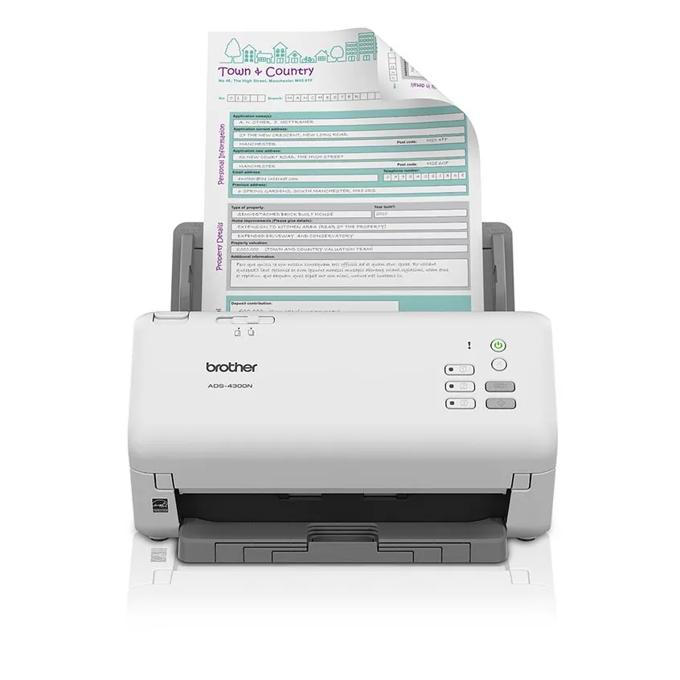
The pick: Brother ADS-4300N
Brother ADS-4300N Professional Desktop Scanner
| Spec | Detail |
|---|---|
| MSRP | $399.99 (street price varies) |
| Speed | Up to 40 ppm simplex / 80 ipm duplex, single pass |
| Feeder | 80-page automatic document feeder |
| Daily duty cycle | Up to 6,000 pages |
| Connectivity | Gigabit Ethernet, SuperSpeed USB 3.0 |
| Scan destinations | Network folder (CIFS/SMB), FTP, SFTP, email, SharePoint, cloud services, USB memory stick, PC |
| Resolution | 600 × 600 dpi optical (up to 1200 × 1200 interpolated) |
| Drivers | TWAIN, WIA, ISIS, SANE |
| Security | IP filtering, TLS/SSL, 802.1X |
| Warranty | 3-year limited |
Sources: Brother’s official ADS4300N product page.
Check current ADS-4300N pricing here.
The one spec that actually decides this purchase
Almost every scanner comparison you’ll read ranks on pages per minute. Speed is close to irrelevant for a small shop. If you’re scanning forty pages a month, the difference between 30 ppm and 40 ppm is eighteen seconds a month. Nobody’s business was saved by eighteen seconds.
The spec that decides it is this: can the scanner put the file where it belongs without a computer being awake and logged in?
That sounds like a minor convenience. It is the entire difference between a scanner that gets used and a scanner that becomes a shelf ornament, and here’s the mechanism.
A PC-tethered scanner creates a four-step ritual: wake the computer, open the vendor’s scanning application, scan, then save the file somewhere — which means choosing a folder in a dialog box and typing a name. Four steps, one of which requires a decision. It works beautifully for the first two weeks, when you’re motivated. Then one day you’re busy, the paper goes in the “I’ll scan that later” pile, and the pile becomes the new filing cabinet. Now you own a filing cabinet and a scanner.
A network scanner with scan-to-folder collapses it: put paper in the feeder, press a button on the front panel, walk away. The scanner talks SMB directly to a share on your NAS or server and writes the PDF there. No computer involved. No dialog box. No decision. The paper lands in the same place, every time, whether it’s you or the part-timer who’s been here three weeks.
That’s what the Ethernet port on the ADS-4300N buys, and it’s why it’s the pick over cheaper machines with nearly identical scan engines. You’re not paying for speed. You’re paying for the removal of two steps and one decision, which is the actual determinant of whether a workflow survives contact with a busy Tuesday.
We’ve mentioned a good sheet-fed scanner before, in passing, in the desk-gear roundup — as a thing that deletes a chore. That was the tidiness argument, and the pick there (a ScanSnap iX1600) is a fine machine if you want a polished touchscreen and you scan at your own desk. This piece is making a different argument about a different job: not “keep the desk clear” but “make the archive machine-readable without a human in the loop,” which is why the recommendation lands on a networked model instead.
If you already run a NAS — and if you don’t, we’ve made the case for a small one over paying per-seat for cloud file sharing — this is the single best thing to point at it after backups.
The honest math on whether this is worth $400
Let’s not hand-wave the ROI. Here’s the arithmetic, with numbers you can argue with.
Retrieval time. Say a paper lookup takes 90 seconds when the filing is good and five minutes when it isn’t. Call it a two-minute average. Say it happens eight times a week — conservative for any business handling contracts, work orders, or vendor invoices.
| Paper | Searchable PDF archive | |
|---|---|---|
| Lookups per week | 8 | 8 |
| Average time per lookup | 2 min | 10 sec |
| Weekly time | 16 min | 1.3 min |
| Annual time | ~13.9 hours | ~1.2 hours |
| Time recovered | ~12.7 hours/year |
At any plausible value of an owner-operator’s hour, 12.7 hours covers the scanner in year one. That’s the boring case, and it’s the weakest argument.
The stronger arguments are the ones that don’t show up as time:
- The document you can’t find at all. Not slow — gone. A signed change order, a warranty registration, a signed waiver. The cost isn’t minutes, it’s the outcome of a dispute you lose because you can’t prove your side. One of those a year dwarfs the retrieval math.
- Tax season. Every deduction you don’t claim because the receipt is in a box you can’t face is a direct cash loss. Not theoretically — numerically.
- The bus factor. Paper filing lives in one person’s head. “It’s in the blue folder, behind the yellow one, unless Dana filed it, in which case it’s in the drawer.” A dated folder structure on a share is knowledge that survives a resignation.
- Insurance and disaster. Paper in a building is paper that burns, floods, or gets stolen with the building. A scanned archive that’s part of your backup routine is a business that can be reconstituted. We’ve written about keeping an offline copy of the things you cannot re-create — your document archive belongs in that set the moment it exists.
The cheaper options, and exactly who they’re for
We’re not going to pretend $400 is nothing. Two real alternatives, both from companies that make good scan hardware.
Brother ADS-1350W — the compact, PC-tethered option
Brother ADS-1350W Wireless Compact Desktop Scanner
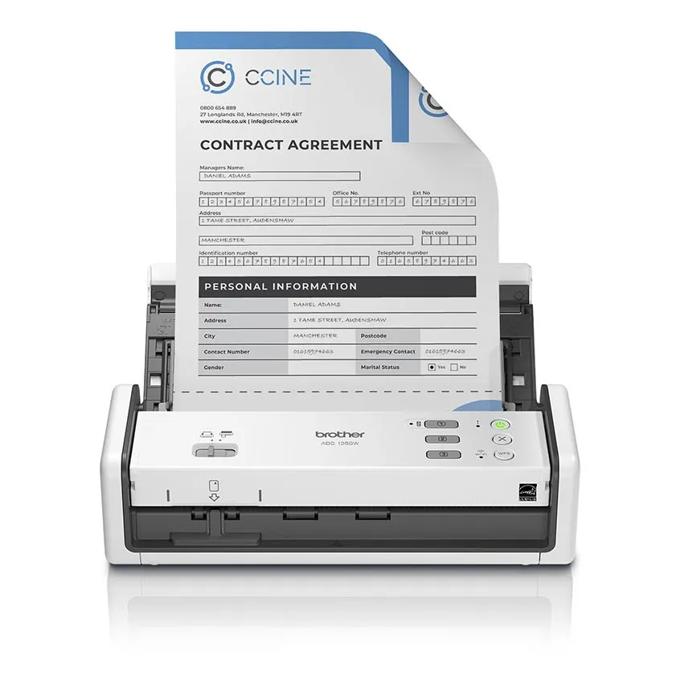
MSRP $289.99. Up to 30 ppm / 60 ipm duplex single-pass, a 20-page feeder, 600 × 600 dpi optical, 802.11 b/g/n wireless plus Micro USB 3.0, and a 1,000-page maximum daily duty cycle with a 1-year limited warranty. Scan-to destinations are email, cloud services, PC, and USB memory stick — there’s no standalone SMB network-folder scanning of the kind the 4300N does.
Buy this if: you need something physically small, you’re scanning at a desk rather than at a shared station, your volume is genuinely low (a few dozen pages a week), and you’re disciplined enough that the extra steps won’t kill the habit. It’s also the right call for a mobile setup — a contractor scanning job paperwork from a truck or a hotel desk.
Note the value trap, though: at MSRP the gap to the 4300N is $110, and for that $110 you get four times the feeder capacity, six times the duty cycle, three years of warranty instead of one, and the network-folder feature that determines whether the thing gets used. If your street prices land anywhere near MSRP, the 1350W is only the right pick when small or portable is a hard requirement, not when cheap is.
Epson WorkForce ES-C220 — the budget entry
Epson WorkForce ES-C220 Compact Document Scanner
The ES-C220: the vertical-feed design is the point — it takes very little desk. Photo: Epson.
$279.99 list, frequently discounted (Epson’s own store was showing $239.99 at the time of writing). 30 ppm / 60 ipm duplex, 20-page ADF, 600 dpi optical with 1,200 dpi available, handles sheets up to 8.5” × 120”, USB-connected (the ES-C320W is the wireless sibling). The vertical-feed body is the differentiator — Epson claims roughly 60% desk-space savings versus a conventional sheet-fed design, and that’s a real consideration if this is going on a counter rather than in a back office.
Buy this if: desk space is the binding constraint, you’re USB-tethered to one machine anyway, and you want the lowest defensible entry price from a manufacturer that will still exist in three years.
The comparison that matters
| ADS-4300N | ADS-1350W | ES-C220 | |
|---|---|---|---|
| MSRP | $399.99 | $289.99 | $279.99 |
| Feeder | 80 sheets | 20 sheets | 20 sheets |
| Speed (duplex) | 80 ipm | 60 ipm | 60 ipm |
| Daily duty cycle | 6,000 pages | 1,000 pages | — |
| Ethernet | Yes | No | No |
| Wireless | No | Yes | No (ES-C320W) |
| Scan to SMB folder, no PC | Yes | No | No |
| Warranty | 3 years | 1 year | 1 year (limited) |
One row in that table changes your workflow. The rest change your receipt.
The part everybody skips: a scanner without a naming convention is a digital junk drawer
This is the failure mode nobody warns you about, and it’s more common than the scanner going unused.
You buy the machine. You are, briefly, a person who scans things. Six months later you have a network folder containing 1,400 files named Scan_20260412_001.pdf through Scan_20260930_117.pdf, and finding a document in there is worse than the filing cabinet was, because at least the cabinet had dividers.
Decide the structure before the first scan. Here’s a version that works for most small operations and takes about ten minutes to set up:
/documents
  /vendors
    /2026
      2026-09-24_acme-supply_invoice_4471.pdf
  /customers
    /2026
      2026-09-19_j-martinez_signed-estimate.pdf
  /compliance
    /2026
      2026-09-02_fire-inspection_pass.pdf
  /internal
    /2026
      2026-09-15_payroll-change_form.pdf
  /_inbox
Three rules that make it hold up:
- Date first, in
YYYY-MM-DD. This is the whole trick. It sorts chronologically in every file browser on earth, and it means you never have to remember whether you wrote “Sept”, “Sep”, or “09”. - Then who, then what.
2026-09-24_acme-supply_invoice_4471.pdfreads like a sentence. Lowercase, hyphens inside a field, underscores between fields — so a search foracme-supplyreturns everything from that vendor regardless of year. _inboxis the scanner’s target, and it is not storage. The scan button drops everything into_inbox. Once a week — Friday, ten minutes, coffee in hand — you rename and file what’s in there. The underscore keeps it at the top of the folder list where it nags you. An inbox you never empty is a pile with a nicer name, so if you won’t do the Friday pass, don’t pretend; file at scan time instead.
Turn on OCR and make it non-optional. Both Brother and Epson ship software that outputs searchable PDF — the scan is an image, but OCR adds an invisible text layer underneath it. Without it, your files are pictures, and pictures are not searchable by your OS, your cloud drive, your accounting import, or any AI tool. Set searchable PDF as the default output for every scan profile on the machine and never think about it again. A non-OCR archive solves the fire risk and none of the retrieval problem.
Pointing the scanner at that folder: what setup actually involves
The scan-to-SMB feature is the whole reason this machine is the pick, so here is what configuring it actually looks like rather than a promise that it’s easy. It is a browser form, done once, and the only part that bites people is the last item.
You reach the ADS-4300N’s settings by typing its IP address into a browser — Brother calls this Web Based Management — and the factory password is printed on a sticker on the back of the machine, marked Pwd. Read that sentence again while remembering what happened this morning to 996 switches whose factory password nobody ever changed, then change it before this box goes into service. From the navigation menu you go to Scan → Scan to FTP/SFTP/Network, choose Network, and fill in one profile:
| Field | What a four-person shop puts in it |
|---|---|
| Profile Name | INBOX (14 characters max, and it shows on the front panel — make it obvious, not clever) |
| Network Folder Path | the CIFS path to the _inbox above, e.g. \\nas\documents\_inbox |
| Username / Password | the dedicated scan service account, as domain\user or user@domain — not your login, for the reasons in the next section |
| File Type | searchable PDF, set here so nobody has to choose it later |
| File Name | a date-stamped preset, so two scans in one minute don’t collide |
| 2-sided Scan | on, permanently — duplex costs nothing and back sides carry terms |
| Skip Blank Page | on, unless you have a reason not to |
Then assign that profile to a front-panel button so the finished operation is: paper in feeder, one press, walk away.
Two things that make this fail in ways the error message won’t explain. First, this model authenticates with NTLMv2, so if your NAS has legacy SMB and older authentication turned off — it should — confirm NTLMv2 is still permitted on the share. Second, Brother’s own documentation requires that the scanner’s clock match the CIFS server’s: set SNTP, or set date, time and time zone by hand. A scanner with a wrong time zone produces a profile that looks perfectly correct and refuses to write, and there is no line in the manual you’ll think to check while you’re standing there with a stack of invoices.
What a searchable archive actually unlocks — and where OCR still lets you down
This is the reason we’re writing about a scanner in 2026 rather than 2019, and it’s worth being precise rather than breathless about it.
Once your paper is searchable PDF in a known folder structure, it becomes an input. Concretely:
- Full-text search across every document you own — with one caveat worth knowing before you promise it to yourself. Spotlight indexes PDF text layers on a Mac with no help at all. Windows Search is fussier about anything that isn’t a local disk: Microsoft’s own documentation lists network-attached storage and “network shares that aren’t available offline or remotely indexed” as unsupported locations for Windows libraries, and an unindexed location quietly drops the library to what Microsoft calls basic behavior — grep-only searching, and no results at all from Start menu search. So you pick one of three fixes, all of which work: turn on the NAS’s own content indexing (Synology’s Universal Search, QNAP’s Qsirch), mark the share “Always available offline” on the single machine that does the searching so it gets indexed locally, or accept slower brute-force content searches from File Explorer. What you don’t get is any of it happening by default, which is why “I’ll just search the folder” disappoints people about a month in.
- Bookkeeping ingestion. Most accounting platforms accept PDF receipt and invoice uploads and will attach them to transactions. A folder full of consistently named PDFs is a bulk-upload away from a clean audit trail.
- Document Q&A over your own records. Point a local model at the folder and ask “what did we agree to with Acme on payment terms” instead of remembering which contract it was in. This is the genuinely new capability, and the reason it’s now practical on your own hardware rather than someone else’s is the same reason running a model locally is finally reasonable for small shops — the hardware caught up.
The honest limits, because this is where these pieces usually oversell:
OCR is not perfect. It handles clean printed text very well, typical business forms well enough, and handwriting badly — a handwritten delivery note will produce an accurate image and a garbage text layer. Ink stamps, carbon-copy triplicate forms, thermal receipts that have started to fade, and anything photocopied twice are all degraded inputs. And an AI model reading your OCR’d contracts will occasionally get a number wrong, which matters enormously when the number is a dollar figure or a date. Use it to find the document; read the document yourself before you act on it. The scan is the retrieval layer, not the authority.
Yes, this is another networked box with a web interface
We’d be hypocrites to skip this, given what we published this morning about a thousand cheap managed switches getting emptied because nobody ever changed the factory password.
A network scanner is exactly the same category of device: it has an embedded web UI, an admin password, firmware nobody updates, and — uniquely — it stores the credentials for a share on your file server, because that’s how scan-to-SMB works. Compromise the scanner, get the share credentials. That’s not hypothetical; stored SMB credentials on multifunction devices have been a standard penetration-testing finding for a decade.
Five minutes at install, and you never think about it again:
- Change the admin password on the device’s web interface. Not later. During setup, before it’s in service.
- Create a dedicated service account for scan-to-folder, with write access to exactly one directory and nothing else. Do not put a user account — much less an admin account — into the scanner’s SMB settings. If the box gets compromised, the blast radius should be one folder.
- Never port-forward it. There is no legitimate reason for a scanner to be reachable from the internet. If you need to scan remotely, scan to the folder and reach the folder through your VPN.
- Use the IP filtering it ships with. The ADS-4300N supports restricting management access by source address. Set it to your admin workstation.
- Add it to your device census — the one-page list of everything on your network with a login, its firmware version, and the vendor’s advisory page. If you don’t have one, that piece explains why you want one.
When not to buy this
The genuinely honest section, because there are several real cases where the answer is “don’t.”
Your volume is under about 20 pages a month. At that rate a phone scanning app is fine and free. The break-even isn’t about image quality — modern phone apps produce perfectly acceptable, OCR’d, deskewed PDFs. It’s about batch. A phone handles one document at a time, well. It handles a 40-page stack miserably. If you never have a stack, you don’t need a feeder, and you shouldn’t buy one.
Your paper is mostly receipts you already get digitally. A lot of shops are scanning documents that exist as PDFs upstream. Before buying hardware, spend an hour asking your three biggest vendors to email invoices instead of printing them, and turn on digital receipts in your POS. Every document you stop generating on paper is worth more than a scanner, because it costs nothing and it’s permanent. Do this first regardless.
You have a multifunction printer that already scans to a folder — and you’ve never set it up. Plenty of small offices own an MFP with scan-to-SMB sitting unused because nobody configured it. The dedicated scanner is faster and has a better feeder, but if your existing machine can do the job, spend the afternoon configuring it and save the $400. The workflow is the asset; the hardware is just what runs it. Check your MFP’s “Scan to Network Folder” or “Scan to SMB” menu before you buy anything.
You don’t have anywhere for the files to go yet. Scan-to-folder requires a folder — on a NAS, a server, or an always-on machine with a share. If your “file server” is a laptop that goes home at night, the network scanner’s headline feature does nothing for you, and you should either fix that first or buy the cheaper USB model that matches your actual setup.
You won’t maintain the naming convention. This is the one people hate hearing. If you know, honestly, that you will not do the Friday ten-minute filing pass and will not name files consistently, a scanner converts a physical mess into a digital one and charges you $400 for the privilege. The digital mess is still marginally better — it’s backed up and fire-proof — but you’re buying disaster insurance, not retrieval. Price it accordingly and skip the premium model.
Your problem is actually upstream. If you’re drowning in paper because your process generates paper — triplicate work orders, printed schedules, handwritten counts that get keyed in later — the scanner is a very good bandage on a process that shouldn’t exist. Digitizing the form beats scanning the form. We’ve made this argument at length about the spreadsheet that quietly became your business system, and it applies identically here: when you find yourself buying equipment to survive a manual process, that’s the signal the process is the problem.
One more, on the lead pick specifically: if you already own a working sheet-fed scanner that’s PC-tethered and you’re using it consistently, don’t replace it for the network feature. Upgrade when the current one dies or when the habit breaks — not because a table in an article says 80 sheets instead of 20.
The short version
Paper is the last category of business record that none of your tools can read. A sheet-fed duplex scanner with a searchable-PDF default and a folder structure you decided on in advance turns it into something searchable by you, your bookkeeper, your successor, and anything you build on top of it.
The spec that determines whether it works isn’t speed. It’s whether the file lands in the right place without anyone making a decision — which is why the network model with scan-to-SMB is worth the extra hundred dollars, and why the cheap one is only right when small or portable is a hard requirement.
And before you spend anything: go ask your vendors to stop mailing you paper. That fix is free, and it’s the only one that gets better over time.
Sources
8 refs- Brother ADS4300N official product page — source for the $399.99 MSRP, 40 ppm / 80 ipm speeds, 80-page ADF, 6,000-page daily duty cycle, Ethernet and USB 3.0 connectivity, the scan-to destination list including network folder (CIFS) / FTP / SFTP / SharePoint, the IP filtering and TLS/802.1X security features, and the 3-year limited warranty.brother-usa.com
- Brother ADS1350W official product page — source for the $289.99 MSRP, 30 ppm / 60 ipm speeds, 20-page ADF, 1,000-page daily duty cycle, 802.11 b/g/n plus Micro USB 3.0 connectivity, the scan-to destination list (which does not include standalone SMB network folder), and the 1-year limited warranty.brother-usa.com
- Epson WorkForce ES-C220 official product page — source for the $279.99 list price and the discounted $239.99 figure observed at the time of writing, the 30 ppm / 60 ipm duplex speeds, 20-page ADF, 600 dpi optical resolution, and USB connectivity with the ES-C320W as the wireless variant.epson.com
- Epson WorkForce ES-C220 specification sheet (PDF) — manufacturer spec sheet, source for the 8.5” × 120” maximum scan length, the 1,200 dpi high-resolution mode, and the ~60% desk-space-saving claim for the vertical-feed design.mediaserver.goepson.com
- Brother, “Set up a Scan to Network Profile” (ADS-4300N / ADS-4700W / ADS-4900W) — vendor documentation, source for the Web Based Management setup path (Scan → Scan to FTP/SFTP/Network), the profile fields and the 14-character profile name limit, the
domain\user/user@domaincredential formats, the NTLMv2 authentication requirement, the default password printed on the back of the machine and marked “Pwd”, and the requirement that SNTP or the manually set date/time/time zone match the CIFS server’s clock.support.brother.com - Microsoft, “Windows Libraries” — supported storage locations and indexing requirements — source for the full-text search caveat: NAS devices and network shares that aren’t available offline or remotely indexed are unsupported library locations, and an unindexed location reverts the library to “basic” functionality with grep-only searches and no Start menu results.learn.microsoft.com
- GreyNoise, “Open Season on Kapibala” — source for the networked-device security section: the campaign that compromised 996 Zyxel GS1900 switches, 564 of which were still on factory-default credentials, which is the model for why you change the admin password on any embedded web UI before it goes into service.greynoise.io
- CISA, “CISA Adds One Known Exploited Vulnerability to Catalog” (September 21, 2026) — source for the KEV listing of CVE-2026-7273 referenced in the hardening section.cisa.gov
comments
loading comments…
No comments yet. Start the thread.