Header image: a Wi-Fi router and a mesh node on a table. Photo: TechieTech Tech on Unsplash.
Disclosure: some links below are Amazon affiliate links (tag cao04-20). Costs you nothing; the picks are the same either way.
Note: This was written on October 14, 2026, during a grid emergency order covering PJM’s 13-state region; see the dated section below for context. Prices were checked on Amazon on October 14, 2026, and runtime figures come from APC’s and CyberPower’s published numbers. We haven’t tested these units ourselves.
If you’re shopping for the best UPS for modem and router gear, start with what an outage actually costs. When the power drops at a small shop or a home office, the lights coming back isn’t the expensive part. The expensive part is the ten minutes after: the modem rebooting, the router rebuilding its connections, the card reader that can’t reach the processor, the video call that dropped mid-sentence, the cloud POS that shows “offline” while a customer waits at the counter.
The fix is cheap and boring: a UPS battery backup for modem and router gear. A modem and router use very little power, so a small battery backup (a UPS, or uninterruptible power supply) can keep them running through a short outage, and often well past an hour. The trick is buying the right size, and the box won’t tell you that. The big number on the box is in VA. The number that matters is watts. And the runtime that matters is the one at your load, not at the “half load” the spec sheet prints.
This guide is about one job: keeping the internet up. If you’re protecting a server or a NAS in a closet, that’s a different problem with a different answer, and we covered it in our CyberPower UPS guide for the server closet.
Best UPS for modem and router: the short answer
- Modem and router only (most people): the APC Back-UPS BE600M1 ($83.99). APC’s chart rates it at 1 hour 7 minutes at 40W and 4 hours 18 minutes at 10W.
- Network gear plus a small desktop, on a budget: the CyberPower CP900AVR ($159.95), a 900VA/560W unit with voltage regulation.
- A real PC plus the network, or anything with an Active PFC power supply: the APC Back-UPS Pro BR1500MS2 ($299.99), with pure sine wave output and 73 minutes rated at 100W.
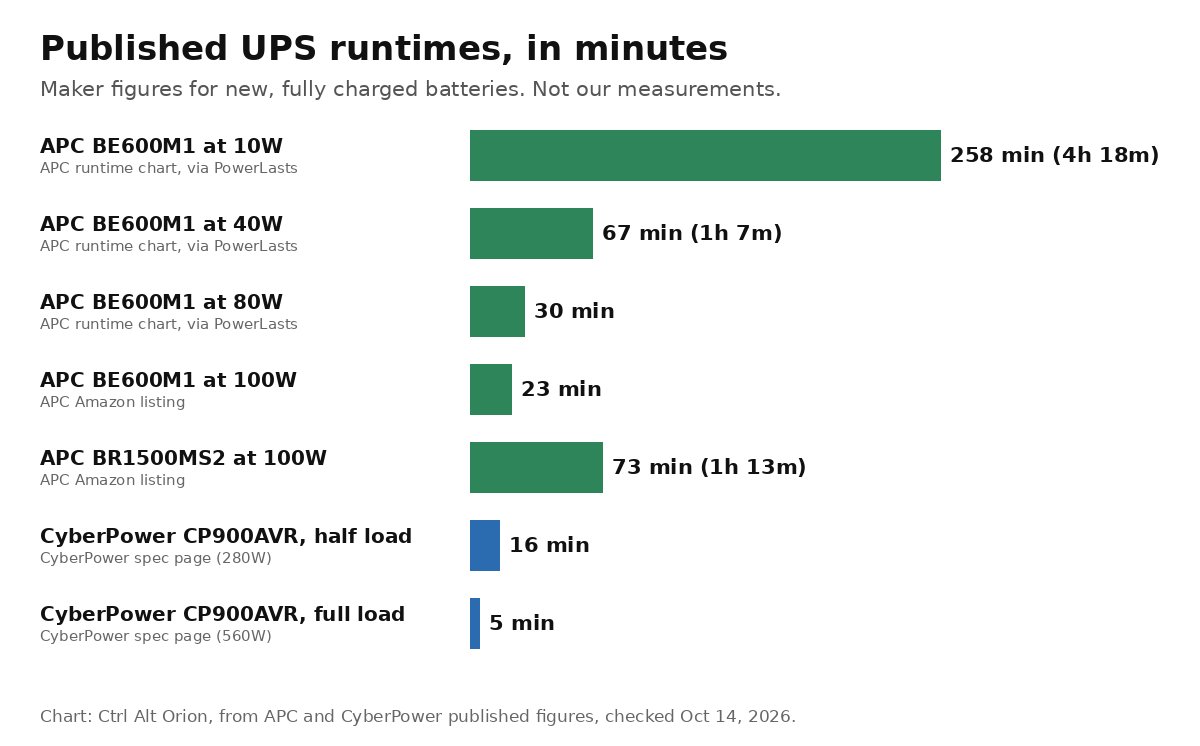 Runtime falls fast as load goes up. A router-only load is where small UPS units shine. Chart: Ctrl Alt Orion, from APC and CyberPower published figures.
How much power does a modem and router use?
Less than most people think. PowerLasts, a site that publishes UPS sizing guides, uses planning presets of 15W for a router alone, 23W for a router plus a fiber ONT, 25W for a router plus a cable modem, and 45W once you add a network switch (PowerLasts). Those are starting assumptions, not measurements, and PowerLasts says so.
So “a modem plus a router draws about 15 to 35 watts” is a fair rough range for planning. Your gear can land outside it. A big Wi-Fi 7 router, a router with a USB drive attached, or a gateway with a built-in phone line will draw more. Measure it.
How to measure: plug the modem and router into a plug-in power meter (the kind that sits between the wall and the plug) and read the combined watts during normal use. PowerLasts makes an important point here: the number printed on a power adapter is its maximum output rating, not what the device actually draws. A router with a “12V 2A” brick (24W) may draw half that.
Count everything that has to stay on. On cable internet, that’s the modem and router. On fiber, it’s the ONT and router, and the ONT is sometimes in a utility closet with its own outlet, so it needs its own backup. Add any mesh nodes and switches the connection passes through. If one of those boxes loses power, the network goes down no matter how big the UPS on your desk is.
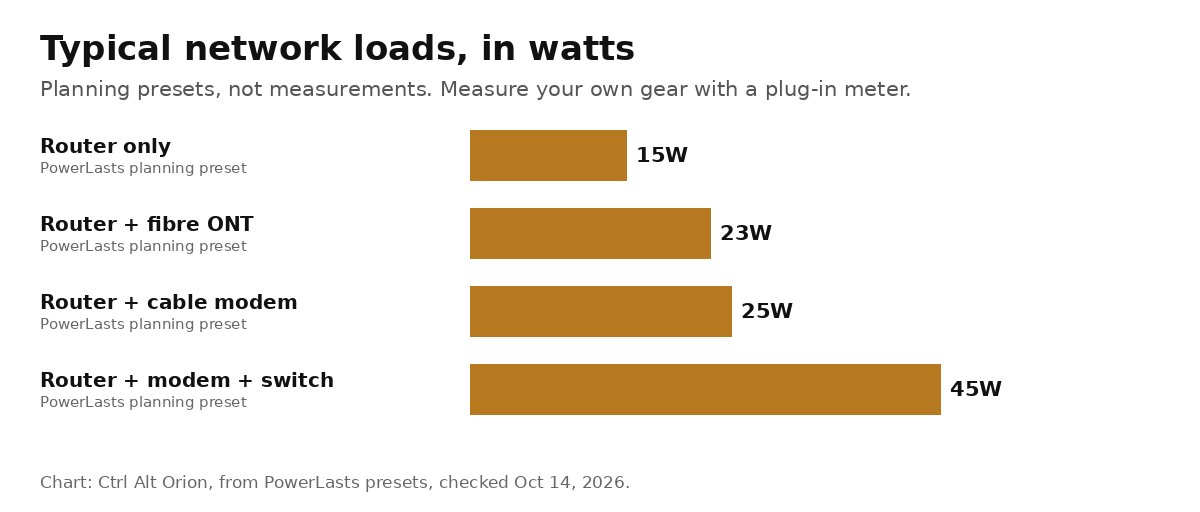 Planning presets, not measurements. A plug-in meter gives you the real number. Chart: Ctrl Alt Orion, from PowerLasts.
Size a UPS by watts, not VA
Every UPS lists two ratings, like “600VA/330W.” VA is the larger, more impressive number, so it goes on the front of the box. Watts is the one to check against your load. The BE600M1 is 600VA but 330W (Amazon). The CP900AVR is 900VA and 560W (CyberPower). The BR1500MS2 is 1500VA and 900W.
The rule is simple: your measured watts must sit comfortably below the UPS’s watt rating. For a modem and router, every unit here has huge headroom. The watt rating only starts to matter once a desktop PC and monitor join the load.
But the watt rating doesn’t tell you runtime. That’s the mistake that matters. A 330W rating means the UPS can deliver up to 330W. It says nothing about how long it lasts at 25W. For that you need the runtime chart.
How long will a UPS power a modem and router?
Read the maker’s runtime chart at your load. Runtime isn’t linear: halve the load and you get more than double the runtime, because batteries deliver more total energy when they’re drained slowly.
Here are the published points we could verify for the three picks:
| UPS | Load | Published runtime | Source |
|---|---|---|---|
| APC BE600M1 | 10W | 4h 18m (258 min) | APC runtime chart, via PowerLasts |
| APC BE600M1 | 40W | 1h 7m (67 min) | APC runtime chart, via PowerLasts |
| APC BE600M1 | 80W | 30 min | APC runtime chart, via PowerLasts |
| APC BE600M1 | 100W | 23 min | APC’s Amazon listing |
| APC BR1500MS2 | 100W | 73 min | APC’s Amazon listing |
| CyberPower CP900AVR | Half load (280W) | 16 min | CyberPower spec page |
| CyberPower CP900AVR | Full load (560W) | 5 min | CyberPower spec page |
A few caveats. PowerLasts retrieved the BE600M1 points from APC on September 11, 2026, and warns that makers revise these curves. We couldn’t load APC’s own runtime chart from our end, so check it before you buy. CyberPower only publishes half-load and full-load figures on the CP900AVR spec page; its runtime tool shows the full curve, but we couldn’t pull low-load numbers from it, so we haven’t quoted any.
What that means for a 25W modem and router on a BE600M1: somewhere between APC’s 40W figure (1 hour 7 minutes) and its 10W figure (4 hours 18 minutes). PowerLasts deliberately doesn’t calculate between points, and neither will we. Look up your exact wattage on APC’s chart. For most homes and small shops, “comfortably over an hour” is the honest answer.
Runtime shrinks with age. These figures are for a new, fully charged battery. Amazon’s listing says the BE600M1’s battery lasts 3 to 5 years, depending on use. Plan on less runtime in year three than in month one, and test it.
Transfer time: why your router might still reboot
These are standby and line-interactive UPS units. When the power drops, they take a moment to switch to battery. APC lists a typical transfer time of 6 to 10 milliseconds for the BE600M1 and BR1500MS2 on their Amazon listings, and CyberPower lists 8 milliseconds for the CP900AVR. APC says that’s fast enough that most devices won’t notice.
Most modems and routers ride through that without blinking. But “most” isn’t “all,” so test yours: with everything plugged into the battery outlets, unplug the UPS from the wall and see whether the connection stays up. PowerLasts makes the same recommendation.
Plug into the right outlets. Every UPS here has two kinds of outlets: battery-backed and surge-only. The surge-only ones go dark in an outage. The BE600M1 has 5 battery outlets and 2 surge-only, the CP900AVR has 5 and 5, and the BR1500MS2 has 6 and 4. A surprising number of “my UPS didn’t work” reviews come down to the router being in the wrong row.
Your ISP can still go down. A UPS keeps your equipment powered. It can’t keep your provider’s equipment up the street powered. In a wide outage, you may have a working router and no internet. In a short, local blip, which is the common case, the UPS is exactly what keeps you online.
Power grid emergency in 13 states (October 13-16, 2026): context, not alarm
On October 12, 2026, Energy Secretary Chris Wright issued emergency order No. 202-26-50 under section 202(c) of the Federal Power Act, directing PJM Interconnection to dispatch specified generating units as needed. It also authorized PJM to direct backup generation to run as a last resort before or during an Energy Emergency Alert level 3. The order runs from October 13 through October 16, 2026 (DOE). DOE cited elevated demand, a high rate of planned generator outages during the fall maintenance season, and numerous planned transmission outages.
PJM runs the grid for more than 67 million people across all or parts of 13 states (Delaware, Illinois, Indiana, Kentucky, Maryland, Michigan, New Jersey, North Carolina, Ohio, Pennsylvania, Tennessee, Virginia and West Virginia) plus Washington, D.C. (Newsweek). PJM issued a Maximum Generation Alert and Load Management Alert for October 13, blamed on unusually warm fall weather and planned maintenance outages, and said the alert “does not require any action from customers” (PJM). A PJM spokesperson told Newsweek it didn’t expect impacts to customers.
The useful context is that this is routine. DOE’s 2026 list of 202(c) orders runs to dozens of entries this year, several of them for PJM. None of that means outages are coming. It’s a reminder that the grid has busy weeks, and that local outages from storms, equipment failures and traffic accidents happen anyway. A UPS for your network is cheap insurance for all of them, and the right time to buy one is a quiet week, not the afternoon the lights flicker.
What a small shop should actually back up
The goal is to keep taking payments and stay reachable. That usually means:
- The modem or ONT and the router. This is the whole point. A BE600M1 covers it.
- The switch, and any mesh node the POS uses. If your card terminal reaches the internet through a mesh node in the back room, that node needs power too. Our mesh vs. extender guide for POS Wi-Fi explains why that node placement matters.
- The card terminal’s base, if it’s wired. Some terminals have their own battery: Square, for example, says its Square Terminal can run cordlessly on a battery designed to last all day (Square). Check your model’s specs; countertop units that run off wall power, and any Ethernet hub or base they connect through, need a battery outlet.
- Not the printer. APC doesn’t recommend putting laser printers on a Back-UPS at all, battery or surge-only outlets, because of their high power draw, and suggests a separate surge protector instead (APC/Schneider Electric).
If you run a guest network, it keeps working as long as the router does, so nothing extra to plan. Our guest Wi-Fi setup guide covers splitting it from the network your payments use.
Best UPS for home office: UPS battery backup for a computer
Adding a desktop PC changes the math. A desktop and monitor can easily draw a few hundred watts under load, which is where the small units run out of both watts and minutes. At that point, the job changes from “ride it out” to “save your work and shut down cleanly.”
That’s where the BR1500MS2 fits. It’s 1500VA/900W with pure sine wave output, which APC says suits PCs with Active PFC power supplies, and it adds automatic voltage regulation (AVR), an LCD showing load and battery level, and USB-A and USB-C charging ports (Amazon). APC rates it at 73 minutes at 100W. A laptop-based office uses far less power than a desktop and gets far more runtime.
The CP900AVR sits in between: 560W, AVR, and 5 battery outlets, but simulated sine wave output on battery (CyberPower). That’s fine for modems and routers. CyberPower itself warns that PCs with Active PFC power supplies may shut down unexpectedly on simulated sine wave battery power (CyberPower), so if you’re running a newer gaming PC or workstation, the pure sine wave BR1500MS2 is the safer choice.
If the computer is a home server holding your backups, read our cheap home server for file backups piece too. A clean shutdown matters more for a drive full of backups than for a router.
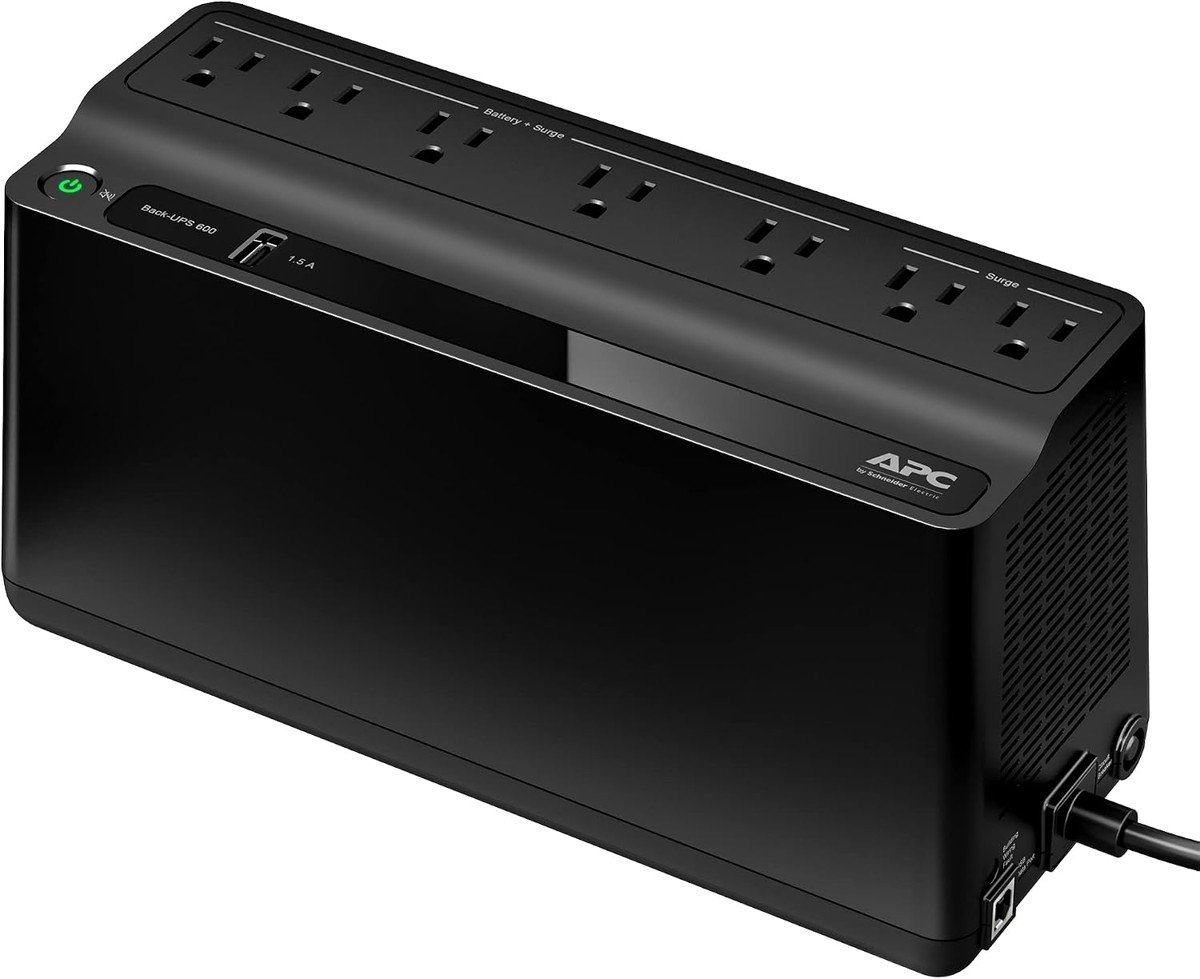 The BE600M1. Five outlets are battery-backed; the two on the right are surge-only. Image: APC via Amazon.
Our take on each UPS
These ratings are for one job: keeping a home office or small shop’s internet, and in one case a PC, running through a power outage. They’re based on APC’s and CyberPower’s published specs, the Amazon listings, and the sources cited here, weighed against the October 14 price. We haven’t tested these units ourselves, so treat them as a buyer’s read of the specs, not lab results. None of these three models is covered in our server-closet UPS piece, so no ratings overlap.
Our take: APC Back-UPS BE600M1 — 4/5
The right size and price for a modem and router, with a published low-load runtime chart that answers the question most buyers actually have.
- Pro: APC rates it at 1h 7m at 40W and 4h 18m at 10W, plenty for network gear
- Pro: $83.99 for 5 battery outlets, 2 surge-only outlets and a 1.5A USB charging port
- Pro: User-replaceable battery (APCRBC154) and a 3-year warranty
- Con: Only 330W, and 23 minutes at 100W, so it’s not a PC UPS
- Con: Amazon’s review summary notes complaints about beeping and whine, and mixed battery reliability reports
Price: $83.99 on Amazon, checked October 14, 2026.
Our take: CyberPower CP900AVR — 3.5/5
A solid middle step with voltage regulation and a strong warranty, but we couldn’t verify its runtime at network-gear loads, and the Amazon offer we found is from a third-party seller.
- Pro: 900VA/560W with automatic voltage regulation for flaky power
- Pro: 3-year warranty including the battery, plus a $300,000 connected-equipment guarantee
- Pro: Coax and Ethernet surge protection
- Con: CyberPower’s spec page lists only 16 minutes at half load and 5 at full load; check its runtime tool for your wattage
- Con: On October 14 the Amazon offer was from Provantage, not Amazon, with low stock
Price: $159.95 on Amazon (sold by Provantage LLC), checked October 14, 2026. CyberPower lists an MSRP of $164.95.
Our take: APC Back-UPS Pro BR1500MS2 — 4/5
The pick when a desktop PC joins the network gear: pure sine wave, real headroom, and 73 rated minutes at 100W, at more than three times the BE600M1’s price.
- Pro: 1500VA/900W with pure sine wave output for Active PFC power supplies
- Pro: 6 battery outlets, AVR, LCD load display, and USB-A plus USB-C charging
- Pro: Coax and Ethernet surge protection, user-replaceable battery (APCRBC163)
- Con: $299.99 and 27.6 pounds, overkill for a modem and router alone
- Con: Amazon’s review summary flags coil whine complaints, which matters in a quiet office
Price: $299.99 on Amazon (list $339.99), checked October 14, 2026.
When a UPS isn’t the right answer
- If you need internet for many hours, not one or two, a traditional UPS isn’t the tool. PowerLasts notes some UPS models support external battery packs; otherwise, look at a portable power station and check its low-load behavior first. Don’t chain UPS units together.
- If your outages are always the ISP’s, a UPS won’t help. A cellular backup line will.
- If the gear is a server, NAS or rack, read the server-closet UPS guide instead. That job is about clean shutdowns, not staying online.
- If your UPS is over three years old, test it before you trust it. A dead battery makes a UPS an expensive power strip.
FAQ
What’s the best UPS for modem and router setups? For most homes and small shops, a small standby unit like the APC BE600M1. A modem and router draw a few dozen watts, so the big units mostly add cost and weight.
How long will a UPS power a modem and router? It depends on your measured watts and the exact model’s runtime chart. APC rates the BE600M1 at 1 hour 7 minutes at 40W and 4 hours 18 minutes at 10W, for a new, fully charged battery.
How many watts does a modem and router use? Often around 15 to 35W combined, but measure yours with a plug-in meter. PowerLasts uses 25W as a planning preset for a router plus a cable modem.
VA or watts, which matters? Watts. Check that your load is well below the UPS’s watt rating, then use the runtime chart to estimate how long it lasts.
Do I need a pure sine wave UPS battery backup for a computer? Not for a modem and router. For a desktop PC with an Active PFC power supply, yes: CyberPower warns those can shut down on simulated sine wave battery power. The BR1500MS2 is pure sine wave.
What’s the best UPS for a home office with a desktop PC? The APC Back-UPS Pro BR1500MS2. It’s 1500VA/900W with pure sine wave output and APC rates it at 73 minutes at 100W, enough to save your work and shut down cleanly.
Sources
9 refs- U.S. Department of Energy: Energy Secretary Secures Mid-Atlantic Grid Ahead of Anticipated Stressed System Conditions (October 12, 2026), and 2026 DOE 202(c) Orders: Order 202-26-50, its scope and October 13 to 16 dates.energy.gov
- PJM Inside Lines: PJM Issues Maximum Generation Alert for Oct. 13, Extends Capacity Advisory to Oct. 14 (October 12, 2026): alerts, causes, and “no action from customers.”insidelines.pjm.com
- Newsweek: Map Shows the 13 States Under Emergency Order to Prevent Blackouts (October 13, 2026): the PJM states and PJM’s statement on customer impact.newsweek.com
- PowerLasts: What Size UPS Do I Need for a Router and Modem?: network load presets and APC BE600M1 runtime points.powerlasts.com
- CyberPower: CP900AVR product page and runtime tool: specs, runtimes, MSRP, transfer time.cyberpowersystems.com
- APC listings on Amazon for the BE600M1 and BR1500MS2: specs, transfer time, runtimes at 100W and prices, checked October 14, 2026.amazon.com
- APC/Schneider Electric: Recommendations for protecting a laser printer.se.com
- CyberPower: PFC Sinewave Series and Active PFC.cyberpowersystems.com
- Square Terminal technical specifications.squareup.com
comments
loading comments…
No comments yet. Start the thread.