Header image: a small shop owner checking her phone. Photo: Amina Filkins / Pexels.
Note: Updated October 9, 2026. This version adds a step-by-step section on how to export Instagram followers to Excel or a CSV file, since Instagram’s own download only comes as JSON or HTML. We also rechecked Meta’s messaging rules (its developer page was updated September 28, 2026), the Oversight Board’s June 2026 accounts decision, and the CAN-SPAM penalty amount, which the FTC left unchanged for 2026.
I talk to a lot of small businesses that are doing great on Instagram. Real engagement, good Reels, a follower count that sounds impressive out loud.
Then I ask the only question that matters: if your account were disabled tomorrow morning, how would you contact those people?
The pause that follows is the whole article. But the usual comeback deserves a real answer, because it sounds right: I can export my followers. You can. Instagram will hand you a file, and below we’ll show you how to get it into Excel. Let’s start there, because what’s actually in that file settles the argument faster than any amount of marketing philosophy.
You can export Instagram followers. It just isn’t a contact list.
Request your information from Instagram and you choose a format: HTML or JSON. Meta describes HTML as “an easy-to-view format” you open in a web browser, and JSON as “a machine-readable format.” Neither one is a spreadsheet. In the JSON export, your followers arrive in a file called followers_1.json (big accounts get followers_2.json and more). Each entry holds a username, a profile URL, and a Unix timestamp of when they followed you.
That’s it. That’s the asset.
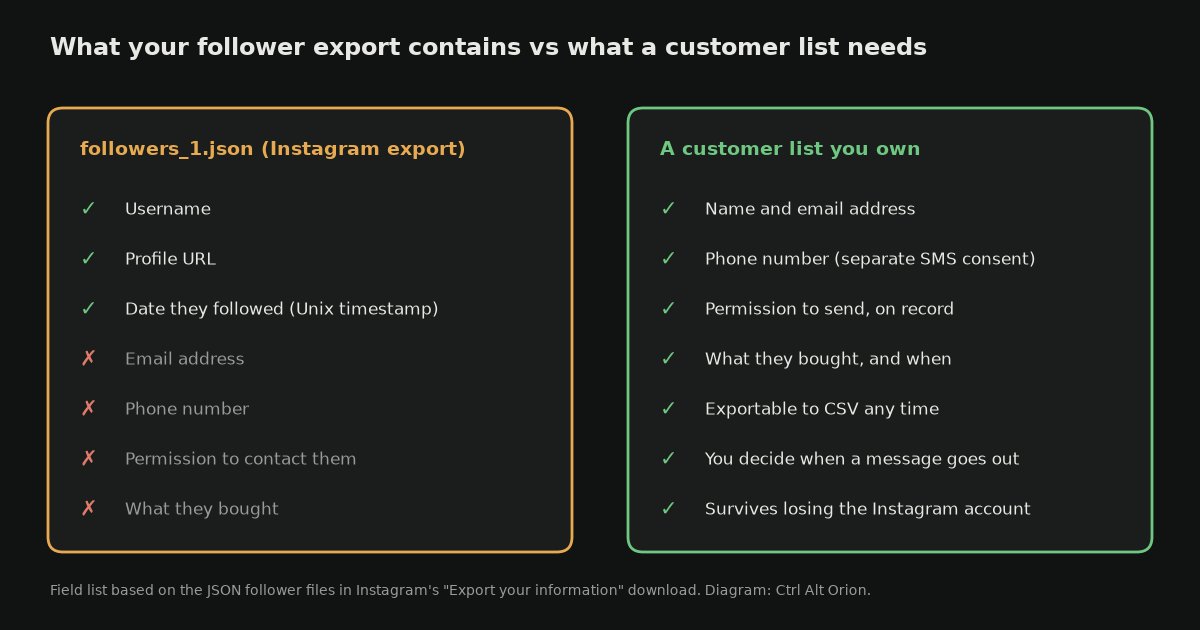
What the follower export gives you, next to what a customer list needs. Diagram: Ctrl Alt Orion.
No email addresses. No phone numbers. A username isn’t a channel. It’s a pointer to a profile inside a system you don’t control. And here’s the part almost nobody checks before betting a business on it: you can’t use that username to start a conversation.
Meta’s developer documentation for Instagram messaging, updated September 28, 2026, is explicit. “Conversations only begin when an Instagram user sends a message” to your professional account. “Only after an Instagram user has sent your app user’s Instagram professional account a message can your app send a message.” After that, you have a standard messaging window to reply. For most actions it’s 24 hours. If someone sends their first message after tapping a Click-to-Direct ad, that window can last up to 7 days. If a human is answering and needs more time, there’s a separate 7-day Human Agent window.
Read that in business terms:
- You may reply to people who contact you.
- You may not contact people just because they followed you.
- Your ability to reach 8,000 followers depends entirely on whether the feed decides to show them your post.
So yes, export your followers. You’ll end up with a spreadsheet of 8,000 usernames you aren’t allowed to message. Compare that with 200 email addresses collected with permission, where you decide when the message goes out and it arrives without asking anyone for a favor.
That’s not a difference of degree. It’s a different kind of thing.
How to export Instagram followers to Excel or CSV
You should still do the export. It’s a free backup, it tells you when people followed, and it gives you something to compare against the customers you actually know. Here’s the whole path. It takes about ten minutes of your time, plus however long Instagram takes to build the file.
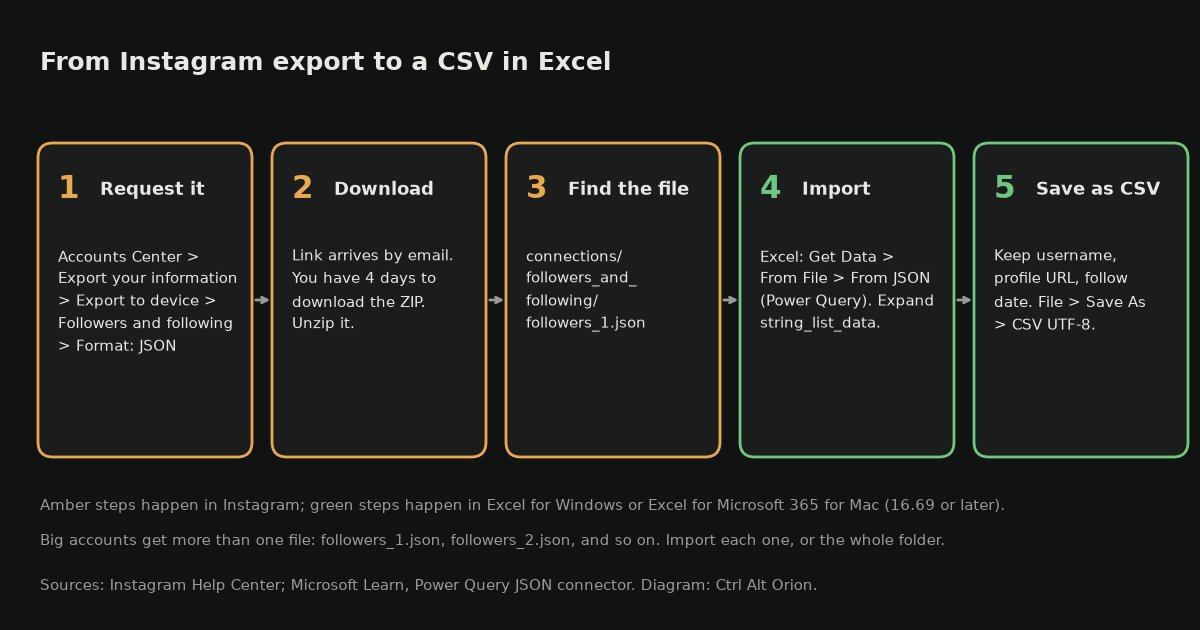
Instagram export to CSV in five steps. Diagram: Ctrl Alt Orion.
Step 1: Request the export as JSON
Instagram’s Help Center lays out the steps. In Instagram, open Settings, then Accounts Center (some accounts now see it as Meta Account). Go to Your information and permissions, then Export your information, then Create export. Pick your profile, choose Export to device, and before you start, change three settings:
- Customize information: pick just Followers and following. The file will be smaller and faster to build than a full export with every photo.
- Date range: All time.
- Format: JSON. This is the one that matters. HTML is easier to read in a browser but much harder to get into a spreadsheet.
Then tap Start export.
Instagram’s Help Center warns that it “may take up to 30 days” to email the export link. Do it before you need it, not after. When it’s ready, you have 4 days to download it from Available downloads before it expires. Export your information is password-protected, so only you can download it.
Step 2: Unzip and find the follower files
The download is a ZIP file. Unzip it and look in connections/followers_and_following/. You’ll see followers_1.json, maybe more numbered files, and following.json for the accounts you follow.
Step 3: Open it in Excel with Power Query
Excel can read JSON directly through Power Query, also called Get & Transform. Microsoft’s JSON connector “uses automatic table detection to seamlessly flatten the JSON data into a table.” It works in Excel for Windows and in Excel for Microsoft 365 for Mac. Microsoft lists JSON as a supported source on Mac, and the Power Query Editor there needs version 16.69 or later.
- In Excel, go to Data > Get Data > From File > From JSON.
- Select
followers_1.jsonand click Import. The Power Query Editor opens. - If you see a column of
RecordorListvalues, click the expand icon (the two arrows) at the top of the column. Expandstring_list_data, then expand it again to gethref,value, andtimestamp. - Remove the columns you don’t need, like
titleandmedia_list_data. - Click Close & Load. Your followers land in a new sheet as a table.
If you have more than one followers file, repeat this for each, or use Get Data > From File > From Folder on the followers_and_following folder. Microsoft points to the Folder connector for importing several JSON files at once.
The timestamp is a Unix timestamp, which is the number of seconds since January 1, 1970, in UTC. To turn it into a date, add a column with this formula, then format the column as a date:
=[@timestamp]/86400+DATE(1970,1,1)
If you’re comfortable pasting a query
If the clicking gets fiddly, paste this into Home > Advanced Editor in Power Query instead. Change the file path to wherever you unzipped the export. It handles follower files whether the list sits at the top level or inside a named key, and it falls back to the title field when the username isn’t in value.
let
    Source = Json.Document(File.Contents("C:\Users\you\Downloads\instagram\connections\followers_and_following\followers_1.json")),
    Items = if Value.Is(Source, type list) then Source else Record.FieldValues(Source){0},
    Rows = List.Combine(List.Transform(Items, (i) =>
        List.Transform(Record.FieldOrDefault(i, "string_list_data", {}), (s) => [
            username = Record.FieldOrDefault(s, "value", Record.FieldOrDefault(i, "title", null)),
            profile_url = Record.FieldOrDefault(s, "href", null),
            followed_on_utc = #datetime(1970, 1, 1, 0, 0, 0) + #duration(0, 0, 0, Record.FieldOrDefault(s, "timestamp", 0))
        ]))),
    Result = Table.FromRecords(Rows, type table [username = text, profile_url = text, followed_on_utc = datetime])
in
    Result
Step 4: Save your Instagram followers as a CSV
Once the table looks right, choose File > Save As and pick CSV UTF-8. The UTF-8 version keeps usernames with accents or other non-English characters intact. Now you have a CSV of your followers.
No Excel? Use this small script
If you don’t have Excel, this Python script does the same job. Put it in the followers_and_following folder and run python3 ig_to_csv.py. It reads every followers_*.json file and writes instagram_followers.csv, which opens in Google Sheets, Numbers, or anything else. We tested it on sample files in both layouts.
import csv, glob, json, datetime

rows = []
for path in sorted(glob.glob("followers_*.json")):
    data = json.load(open(path, encoding="utf-8"))
    if isinstance(data, dict):            # some exports wrap the list in one key
        data = next(iter(data.values()))
    for item in data:
        for s in item.get("string_list_data", []):
            ts = s.get("timestamp")
            rows.append({
                "username": s.get("value") or item.get("title", ""),
                "profile_url": s.get("href", ""),
                "followed_on_utc": datetime.datetime.fromtimestamp(ts, datetime.timezone.utc).strftime("%Y-%m-%d %H:%M") if ts else "",
            })

with open("instagram_followers.csv", "w", newline="", encoding="utf-8-sig") as f:
    w = csv.DictWriter(f, fieldnames=["username", "profile_url", "followed_on_utc"])
    w.writeheader()
    w.writerows(rows)
print(len(rows), "followers written to instagram_followers.csv")
What if you already downloaded HTML?
Open the HTML file in a browser to read it. But for a spreadsheet, the easiest fix is to request the export again with the format set to JSON. It’s free and costs you only the wait. Meta says export links expire after a few days anyway, so a fresh export is the normal routine.
What the CSV is good for (and what it isn’t)
Good uses:
- A dated backup of who followed you, in case the account disappears.
- Growth by month. Make a pivot table on the follow date and see which months, posts, or events actually brought people in.
- Matching against customers you already know. If your booking form asks for an Instagram handle, you can see which followers have actually bought from you.
Bad uses: hunting down emails for those usernames, buying “enrichment” data, or bulk-messaging people who never wrote to you. None of that is permission. It’s how a business turns into the spam factory this article warns about, and messaging people who haven’t contacted you first isn’t something Meta’s messaging tools allow anyway.
”They’d never disable my account” — Meta’s own Oversight Board is less confident
The risk of losing the account usually gets waved off as paranoia. It isn’t, and since June there’s a well-documented account of how the process works.
On June 4, 2026, Meta’s Oversight Board published its first case about permanently disabling an account. In that specific case, an Instagram account with more than 70,000 followers that posted violent threats against a journalist, the Board agreed with Meta’s decision. Nobody’s defending that account. What matters for you is what the Board said about the system on the way there, drawing on more than 750 public comments:
- “The restrictions Meta applies to Instagram accounts prior to disabling are not public.”
- There’s no middle ground between the strikes system and permanent removal. The Board said that where there are mitigating factors, “a significant but time-bound suspension may be more proportionate.”
- Many commenters said they couldn’t appeal, never got an explanation for why their account was disabled, or couldn’t download their content. Many said the decisions “appeared to have been made automatically, with no human oversight,” even on appeals for long-standing accounts with big followings.
- Some commenters said their accounts were disabled after they were hacked and used by strangers.
- The Board set out principles: clear rules, detailed reasons for disabling an account, fair appeals with human review in edge cases, and transparency reports. This was a pilot, and the Board says it “does not yet have a mandate to accept cases on accounts.” Its guidance can’t force Meta to change.
Board member Michael McConnell put it bluntly in a post the next day: “For small business owners, loss of an account can take away their livelihood.” In fairness, he also noted that Meta launched a 24/7 AI support assistant this year to help people with account problems and appeals. That’s a step. It’s not a guarantee.
You don’t need to believe Meta is careless to act on this. You just need to accept that a largely automated system, with an appeals process its own oversight board calls hard to follow, sits between you and every customer relationship you’ve built there.
This is the same structural argument as not relying on Facebook for every customer. The closer an asset sits to something you control, the less a third party’s policy update can wreck your month.
What “owning the list” actually means
A real customer list is boring on purpose:
- Email addresses, collected with permission
- Phone numbers, with separate permission, if you do SMS
- One line of context per person: what they bought, when, and what they asked about
Three things make it an asset rather than just a database:
- You can send without asking a middleman. No algorithm, no reach throttle, no messaging window.
- You can leave. If your email provider doubles its price or gets worse, you export the list and move it. The relationships come with you.
- The rules are published and stable. This is the underrated one.
On that last point: commercial email in the US runs under CAN-SPAM, and you can read the whole thing. Use accurate headers and sender information. No deceptive subject lines. Identify the message as an ad. Include a valid physical postal address. Provide a working unsubscribe, honor it within 10 business days, and keep it working for at least 30 days after you send. Penalties run up to $53,088 per violating email. The FTC confirmed in September that 2025 penalty levels stay in place for 2026. And hiring an email vendor doesn’t move your legal responsibility to them.
That list of obligations is longer than “post and hope.” It’s also knowable. It doesn’t change without a formal rulemaking process, and it’s the same for you and your largest competitor. Platform reach rules are none of those things.
Why businesses avoid building the list anyway
Four honest reasons. The last one is the real one.
- Social feels like marketing. The list feels like homework. A post gets likes within minutes. A list grows slowly and privately.
- “I don’t want to be salesy.” So nobody ever asks, and the follower who’d gladly have signed up for early access to appointments never gets the chance.
- “Lists are for big brands.” For almost any service business, a list of 200 real local customers beats 8,000 cold followers, because those 200 already paid you once.
- The follower count is a scoreboard and the list isn’t. Nobody congratulates you on 340 subscribers. This is a vanity problem dressed up as strategy.
The list isn’t a newsletter hobby. It’s the direct line you use for openings, restocks, seasonal work, and “we’re booking for next month.”
How to build the list without turning into a spammer
You don’t need a twelve-email sequence. You need three things running all the time: capture, deliver, and respect.
1. Give a real reason to sign up
“Join our newsletter” is not a reason. These are:
- A booking discount or a free consult
- A checklist for your trade, like what to do before a first roof inspection or what to have ready before an electrician arrives
- Early access to appointment slots or product drops
- Text alerts for cancellations. For a booked-out business, this is the most valuable thing you can offer.
2. Ask where people are already paying attention
Bio link. Story highlight. Pinned comment. The top of your website. Checkout. The follow-up after a finished job, when goodwill is at its peak and nobody has ever minded being asked.
Every social post can end with one clear way to get off the platform and onto your list. In this model, that’s what social is for.
3. Make sure the signup actually works
This is where most of the losses happen, and you don’t see them. A form that sends signups nowhere looks exactly like “we’re not getting many signups.” Before you spend a month sending people to it, test the whole path from start to finish. Here’s how contact forms quietly lose leads, and signup forms fail the same ways.
Also make sure what you send actually arrives. A list you can’t deliver to isn’t a list. If your mail goes out from a free address or a domain without email authentication set up, fix that first: business email that doesn’t land in spam.
4. Deliver right away
If they signed up for the checklist, the checklist arrives within the hour. Every broken promise teaches people to ignore your name in their inbox, and that’s very hard to undo.
5. Write like a person
Short. Useful. One link, one ask. Send as often as the business needs: weekly for a cafe, monthly for a contractor. “When there’s something worth saying” is a perfectly good schedule, as long as you stick to it.
6. Keep the data somewhere you control
The test is one question: can you download a complete CSV of your subscribers tomorrow, without contacting support? If not, you’ve just rebuilt the same dependency with a different landlord. Notice the contrast with the section above. Your email tool should hand you a CSV in one click. Instagram makes you convert JSON just to get usernames.
The hybrid that actually works
Stop framing this as Instagram versus email. They do different jobs:
| Social | Owned list | |
|---|---|---|
| Best at | Discovery, proof, personality | Reach, revenue, retention |
| Who controls delivery | The platform | You |
| Can you contact them first? | No, they must message you first | Yes |
| Export format | JSON or HTML, usernames only | CSV with contact details |
| Survives an account ban? | No | Yes |
| What you’re building | Access to an audience, which can be taken away | An asset you can take with you |
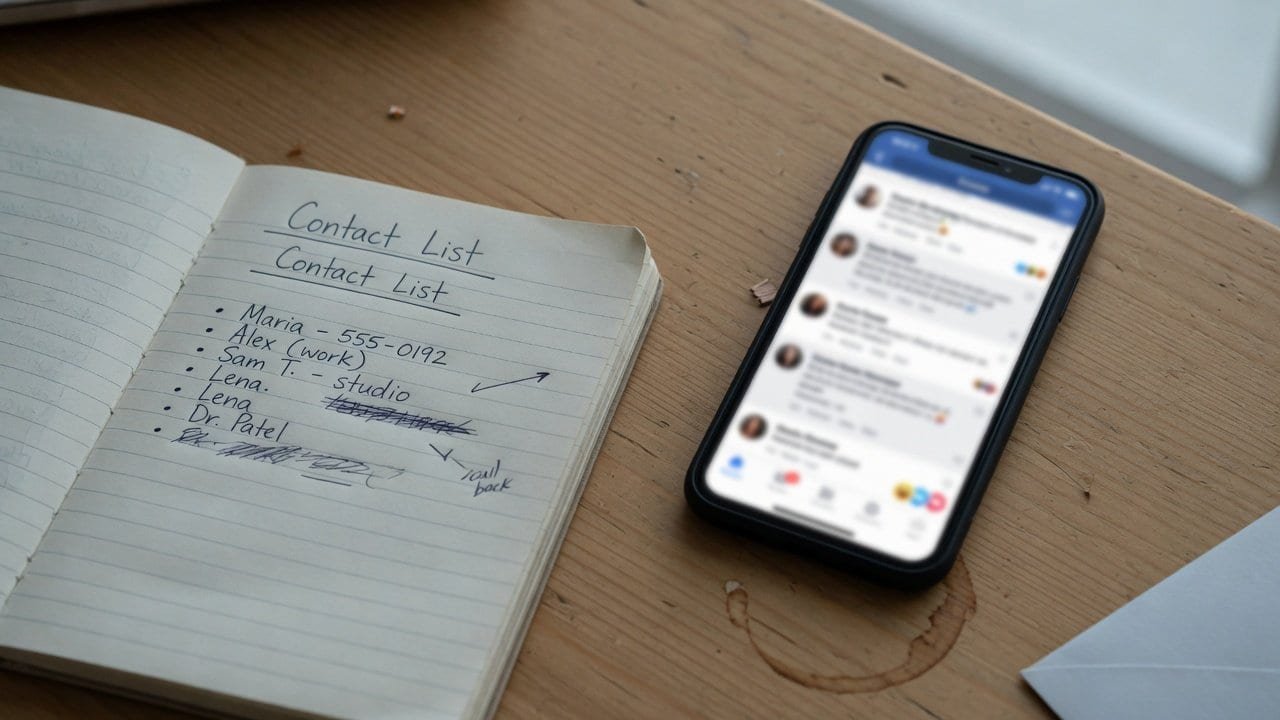
A list you keep, next to a feed you don’t control. Image: Ctrl Alt Orion.
Here’s how it fits together. Social gets you discovered. Discovery turns into contacts you own. The list brings bookings and repeat business. And the work from that business gives you something to post. Every step feeds the next one, and only one of them can be switched off by someone else.
If your whole strategy is “post and hope,” you’re not marketing. You’re auditioning for the algorithm every morning, on a stage the landlord can close.
The math of rented reach
Here’s where this stops being a philosophy argument and becomes a budget one. Use your own numbers. The shape holds whatever you plug in.
Say you need 10 bookings a month from marketing, and one in twenty people who actually see your offer books.
On social, you need about 200 people to actually see the offer. If each post reaches only part of your following, a 3,000-follower account might put a given post in front of a few hundred people. Some months more, some months fewer, and never on a schedule you set. So it works until the month it doesn’t, and then your only option is to buy the reach back as ads. That’s the trap: the channel is free until it isn’t, and the paid version is priced by the same company that throttled the free one.
On an owned list, if a third to half of your subscribers open a given email, 200 people seeing the offer takes roughly 400 to 600 subscribers. The cost is a monthly email tool, and our Mailchimp vs Klaviyo comparison walks through what that costs. Not free, but steady, predictable, and yours. And unlike reach, the list keeps growing as long as you keep adding contacts.
Two things follow from that:
- The list builds up; reach starts over. Every subscriber you added two years ago can still be reached today. A post from two years ago reaches nobody now. One is an asset with a balance. The other is a treadmill.
- You need fewer contacts than you’d think. For most local service businesses, a few hundred engaged contacts fill the calendar. That’s a few months of asking, not a growth-hacking campaign.
The day it actually happens: a 30-minute plan
If the account goes down, whether it’s hacked, caught in an enforcement sweep, or stuck in an appeals queue, the first 24 hours decide whether it’s an inconvenience or a hit to revenue. Set this up now, while nothing is wrong:
- Know where customers will look instead. When the profile is gone, people search your business name. Your Google Business Profile is what they’ll find, so claim it and keep it correct before you need it.
- Have a website that works on its own. Not a link-in-bio page hosted by another platform you don’t control. Hours, services, contact, and a way to book.
- Keep an offline copy of your content and your followers. Request your Instagram export twice a year, run the follower file through the Excel steps above, and keep both somewhere safe. Photos and captions are most of what you’d otherwise have to recreate. The Oversight Board’s case notes include people who couldn’t download their content after being disabled. The only export you can count on is the one you already have.
- Write the “we’ve moved” message before you need it. One paragraph, ready to send to your list, telling customers where to find you. If you have a list, losing the account is a bad afternoon. If you don’t, it’s the end of that channel.
- Turn on two-factor authentication and keep the recovery codes somewhere that isn’t your phone. Some commenters in the Board’s case said their accounts were disabled after strangers took them over. That’s the preventable version of this whole problem.
Thirty minutes, once. The businesses that survive losing a platform aren’t luckier. They just did this before it mattered.
When Instagram really is the right main channel
Here’s the honest part, because the answer isn’t always “build a list”:
- Impulse-buy retail. A vintage shop or bakery where people decide in eight seconds of scrolling. Social is the shop window, and the list is a second channel for regulars.
- Very visual trades. Tattoo artists, bakers, landscapers, restorers. The portfolio is the pitch, and the platform is the cheapest gallery ever built.
- You don’t have a product yet. If you don’t know what you sell or to whom, building a list is premature. Get attention first, then convert it.
- Your business is tiny and personal. Texting twelve clients yourself is a perfectly good CRM. Don’t build a marketing system for a client list you can keep in your head.
The point isn’t “social bad, email good.” It’s that you can rent discovery, but you shouldn’t rent the relationship. In every case above, the sensible move is still to turn your best customers into contacts you own. Just don’t pretend the list will replace the feed.
What to do this week
Five steps, each an hour or less:
- Request your Instagram export as JSON and turn it into a CSV using the steps above. Treat it as a backup, not a mailing list.
- Add one signup path to your website and your social bio, with one specific reason to join that isn’t the word “updates.”
- Test that path from start to finish. Submit the form yourself, from a phone on cellular data, and confirm the message arrives and the promised thing gets delivered.
- Ask your last 30 customers to join, directly and with permission. Don’t scrape, and don’t import data you bought. Ask.
- Track one number every week: new contacts. Not followers, not impressions. Contacts.
Do that for three months and you’ll have something you didn’t have before: a way to fill next month’s calendar that doesn’t depend on the algorithm.
If you want the capture and follow-up set up properly, with the form, the list, the delivery, and automation that actually sends, that’s the kind of system work we do. Keep posting. Keep the Reels. Just stop calling the follower count an asset when the export is a list of usernames and the platform’s own documentation says you can’t message them first.
Frequently asked questions
Can I export my Instagram followers to Excel?
Yes, but not directly. Instagram exports JSON or HTML. Request JSON, then use Excel’s Data > Get Data > From File > From JSON to load followers_1.json and save the result as a CSV.
Does the Instagram follower export include emails or phone numbers?
No. The follower files contain a username, a profile link, and when each person followed you. There’s no contact information.
Can I message my followers from the export?
Not through Meta’s messaging tools. Meta’s developer docs say conversations begin only when the Instagram user messages you first, and you can reply only within the messaging window that opens.
How long does an Instagram export take?
Instagram’s Help Center says it can take up to 30 days to email the link. Once it’s ready, you have 4 days to download it.
Is HTML or JSON better?
JSON, if you want a spreadsheet. HTML is easier to read in a browser. Meta describes JSON as the machine-readable format.
Can I download my Instagram followers list as a CSV?
Not straight from Instagram. Its own download comes only as JSON or HTML. Request JSON, convert followers_1.json with Excel’s Power Query (or the Python script above), and save the result as CSV UTF-8 so usernames with accents survive.
Where are the followers in the Instagram export?
Unzip the download and open connections/followers_and_following/. Your followers are in followers_1.json, with more numbered files for big accounts. The accounts you follow are in following.json.
How do I turn the follow date into a real date in Excel?
The timestamp is a Unix timestamp, the number of seconds since January 1, 1970, in UTC. Add a column with =[@timestamp]/86400+DATE(1970,1,1) and format it as a date.
Does this work in Excel for Mac?
Yes. Microsoft lists JSON as a supported Power Query source in Excel for Microsoft 365 for Mac. The Power Query Editor there needs version 16.69 or later.
Why is an email list better than Instagram followers?
You can send to it without asking a middleman, you can export it and move it if your provider gets worse, and the rules are published. In the US that’s CAN-SPAM. Followers can only be reached when the feed decides to show them your post, and you can’t message them until they message you.
Sources
5 refsAll pages checked October 9, 2026.
- Send Messages — Meta for Developers (updated September 28, 2026): conversations start only when the user messages first; standard 24-hour window, up to 7 days after a Click-to-Direct ad; separate 7-day Human Agent window.developers.facebook.com
- Review and export a copy of your Instagram information — Instagram Help Center and Export a copy of your Facebook information — Facebook Help Center: Accounts Center export steps, format choice, up to 30 days for the link, 4 days to download, password protection, and Meta’s description of HTML vs JSON.help.instagram.com · facebook.com
- Power Query JSON connector — Microsoft Learn and Import and shape data in Excel for Mac (Power Query) — Microsoft Support: Get Data from JSON, automatic table detection, Folder connector for multiple files, JSON support on Mac and the 16.69 version requirement.learn.microsoft.com · support.microsoft.com
- Board Upholds Ban in First Accounts Case — Oversight Board (June 4, 2026), the full decision, and Michael McConnell’s post (June 5, 2026): 750+ public comments, non-public pre-disable restrictions, no time-bound suspension option, automation and appeal complaints, compromised accounts, pilot status, the small-business quote.oversightboard.com
- CAN-SPAM Act: A Compliance Guide for Business — FTC and Civil Penalty Inflation Adjustments — Federal Register (September 15, 2026): CAN-SPAM requirements, $53,088 per-email maximum, 2025 levels kept for 2026.ftc.gov · federalregister.gov
comments
loading comments…
No comments yet. Start the thread.